
Sherlock Tarcker
Tool for case tracker
As of May 2026, Sherlock Tarcker has 14 users in the Workflow & Planning category.
Usersdown 12.5 percent−12.5%
14
14
Ratingno change0%
—
— reviews
Reviewsno change0%
—
Version
1.8.9
Manifest V3
History
3 snapshotsTracking since Apr 1, 2026.
View as table
| Date | Users | Rating | Reviews | Version |
|---|---|---|---|---|
| Apr 1, 2026 | 16 | — | — | 1.8.9 |
| Apr 30, 2026 | 15 | — | — | 1.8.9 |
| May 28, 2026 | 16 | — | — | 1.8.9 |
| Now | 14 | — | — | 1.8.9 |
Permissions & access
- Permissions
- clipboardReadstoragedebuggerclipboardWrite
- Host access
- None declared
Screenshots
About
The tool has been created to help you to track the cases you are working with, and to avoid the use of external tools that can take you even more time.

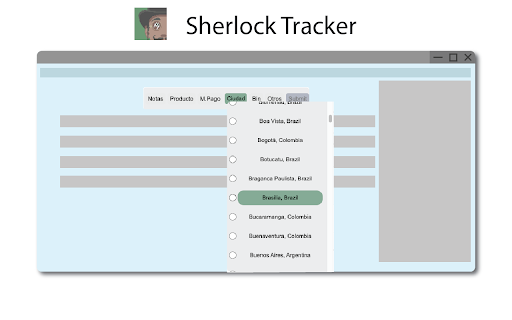
When the extension has been installed, you will see a new bar menu at the top of the site, where you will have all the options you need to have track of your case.

When the selection of the options has been done and as soon as you click submit, all the selections will be stored in your clipboard. This will let you paste it later on, into your tracker**.

Once you click submit button, the tool will reset and let you select your next set of options for your following case.

The data copied to your clipboard will be the same data you chose, with a character that will work as a separator ("{", ":", "|"). The idea is to later on we will be able to split the info with those separators. That's why if you type any of these 3 separators characters, you will see a floating message that alerts you that you have typed one of these. Don't worry, you can go back to the text input options and delete them, or replace them.

**NOTE: If you don't paste the data on your tracker right next you hit the submit button, the information might get lost because any of that information isn't stored internally or externally (Like a database).
Technical
- Version
- 1.8.9
- Manifest
- V3
- Size
- 45.02KiB
- Min Chrome
- 88
- Languages
- 1
- Featured
- No
Metadata
- ID
- mbndbnikfajojlmfpfnpdlagccigpggi
- Developer ID
- ua3750858c7f26f2c5a91e1dda0f1526e
- Developer Email
- [email protected]
- Created
- Sep 3, 2022
- Last Updated (Store)
- Sep 3, 2022
- Last Scraped
- May 28, 2026
- Website
- —
- Support URL
- —
- Privacy Policy
- —
Similar extensions
Alternatives to Sherlock Tarcker, ranked by description similarity.

Leads tracker
It tracks your leads so you can access them later. You copy the URL of the desired page, simply paste it in the extension's input…
—

Paster
Add multiple texts to your clipboard and use a different keyboard shortcut to paste each of them.
19

AutoSave & Recovery
Save input text values for easy retrieval, eliminating rewriting. Quickly access and reuse saved values.
192
★ 3.0

Web Tracker
Web Tracker helps you track anything on the web.
454

Web tracker
This extension will track the time you spend on each website
21
★ 4.0

Url tracker
Url tracker is an extension that will allow you to save any url from any website.
You just have to open the extension on the page…
75
★ 4.0

Crim Search
Crim Search Helper
—

.lazyPaste: Copy/Paste made easy
Easy COPY/PASTE for social network and personalized fields to store your favorite texts. Alt + C opens the extension pop-up.
22
★ 5.0
Data sourced from the Chrome Web Store · last verified May 28, 2026.