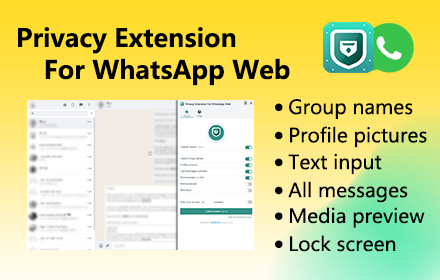
Privacy Extension For WhatsApp Web - wabulk.net
Protect your privacy on WhatsApp Web, lock your screen, and hide messages, images, profile, and more with blur effects.
As of June 2026, Privacy Extension For WhatsApp Web - wabulk.net has 200,000 users and a 4.66/5 rating from 11,888 reviews in the Workflow & Planning category.
Usersup 100.0 percent+100.0%
200.0K
200,000
Ratingdown 0.2 percent−0.2%
4.66
11.9K reviews
Reviewsup 24.2 percent+24.2%
11.9K
Version
3.3.16
Manifest V3
90-day change · In the last 90 days this extension gained 100.0K users.
History
14 snapshotsTracking since Apr 1, 2026.
View as table
| Date | Users | Rating | Reviews | Version |
|---|---|---|---|---|
| Apr 1, 2026 | 100.0K | 4.67 | 9.6K | 3.3.16 |
| Apr 5, 2026 | 200.0K | 4.67 | 9.6K | 3.3.16 |
| Apr 16, 2026 | 200.0K | 4.66 | 9.6K | 3.3.16 |
| Apr 26, 2026 | 200.0K | 4.67 | 9.8K | 3.3.16 |
| May 6, 2026 | 200.0K | 4.67 | 9.9K | 3.3.16 |
| May 13, 2026 | 200.0K | 4.67 | 10.1K | 3.3.16 |
| May 22, 2026 | 200.0K | 4.67 | 10.2K | 3.3.16 |
| Jun 1, 2026 | 200.0K | 4.67 | 10.4K | 3.3.16 |
| Jun 4, 2026 | 200.0K | 4.67 | 10.8K | 3.3.16 |
| Jun 6, 2026 | 200.0K | 4.67 | 10.9K | 3.3.16 |
| Jun 9, 2026 | 200.0K | 4.67 | 11.1K | 3.3.16 |
| Jun 12, 2026 | 200.0K | 4.66 | 11.2K | 3.3.16 |
| Jun 16, 2026 | 200.0K | 4.66 | 11.3K | 3.3.16 |
| Jun 25, 2026 | 200.0K | 4.66 | 11.5K | 3.3.16 |
| Now | 200.0K | 4.66 | 11.9K | 3.3.16 |
Permissions & access
- Permissions
- storagetabsunlimitedStoragecommands
- Host access
- None declared
Screenshots

About
Privacy Extension for WhatsApp Web offers privacy protection features that allow you to lock your screen and selectively hide messages, images, profile, and more. With this extension, you can safeguard your conversations on WA Web and prevent unauthorized access or prying eyes.


# Feature
✅ Screen lock: The Lock Screen feature requires a password to access WhatsApp Web, ensuring that your messages and conversations remain private even when you're away from your computer. You can also set a time limit for automatic lock screen activation.
✅ Message hiding: The Hidden Chat Messages feature allows you to blur out certain content, which can only be revealed by hovering over it with your mouse. This feature includes six independent toggles: Users/Group Names, Profile Pictures, Last Message Preview, All Messages in Chat, Media Preview, and Text Input.
✅ Convenience: Use keyboard shortcuts to quickly turn on/off screen lock and message hiding features, making it easy to use.

The Lock Screen shortcut key is Alt+X, and the overall toggle for Hidden Chat Messages is Alt+Z. You can customize these shortcuts in chrome://extensions/shortcuts.


# Home Page
https://privacy-wa-web.wabulk.net/

We're here to help! For any questions or feedback, contact us at [email protected].
Technical
- Version
- 3.3.16
- Manifest
- V3
- Size
- 1.46MiB
- Min Chrome
- 88
- Languages
- 54
- Featured
- Yes
Metadata
- ID
- mbcghjiodcjankhkllfohcgnckhdbkmi
- Developer ID
- u5eb87ead05908450807a6769eebf4439
- Developer Email
- [email protected]
- Created
- Jun 2, 2023
- Last Updated (Store)
- May 23, 2026
- Last Scraped
- Jun 25, 2026
- Website
- wabulk.net
- Support URL
- https://privacy-wa-web.wabulk.net
- Privacy Policy
- https://check-wa-number.wabulk.net/privacy-policy
Similar extensions
Alternatives to Privacy Extension For WhatsApp Web - wabulk.net, ranked by description similarity.

Privacy Guard for WhatsApp Web
Secure your WhatsApp Web with smart lock, panic button, and blur mode. Your privacy, your control.
26
blurrit
A web extension to make your WhatsApp safe and to make you feel safer.
354
★ 5.0

Complete Privacy Extension For WhatsApp Web
Hide name, phone number, message, profile and more with blur effect on WhatsApp web.
26
★ 5.0
Password Lock for WhatsApp™ Web
Automatically lock WhatsApp Web after a period of time or by pressing the action button
10.0K
★ 4.6

WhatsApp Web Lock Free
Protects the WhatsApp Web version with a password when the user navigates to web.whatsapp.com
18
★ 5.0

Whatsapp Blur Chats & Conversation by Productivity Extensions
Blur Chats & Conversation on Whatsapp
16

WA Plus Bulk Sender
WA Quick Sender and Automation Extension by So Lets Talk Digital (also known as “SLTD”):
• Personalised messaging features
•…
71

WA WorkFlow
Enhance your WhatsApp experience by incorporating additional tools for WhatsApp Web that prioritize security and reliability.
10.0K
★ 4.6
Data sourced from the Chrome Web Store · last verified Jun 25, 2026.