
TextLinks
Navigate faster by typing "go", spacebar (or TAB), and a text string. Ex: "go" + spacebar + "journal" sends you to a Google Doc!
As of May 2026, TextLinks has 60 users and a 4.80/5 rating from 5 reviews in the Productivity category.
Usersup 57.9 percent+57.9%
60
60
Ratingno change0%
4.80
5 reviews
Reviewsno change0%
5
Version
1.1
Manifest V3
History
3 snapshotsTracking since Apr 1, 2026.
View as table
| Date | Users | Rating | Reviews | Version |
|---|---|---|---|---|
| Apr 1, 2026 | 38 | 4.80 | 5 | 1.1 |
| Apr 30, 2026 | 36 | 4.80 | 5 | 1.1 |
| May 28, 2026 | 40 | 4.80 | 5 | 1.1 |
| Now | 60 | 4.80 | 5 | 1.1 |
Permissions & access
- Permissions
- storagetabs
- Host access
- None declared
Screenshots

About
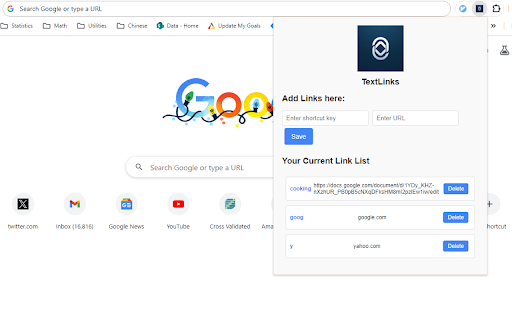
Tired of clickable bookmarks that clutter up your display, take your hands off the keyboard, and are impossible to find when you need them? With TextLinks, a short text string sends you to your most important URLs without taking your fingers off the keyboard!

To use this extension, click the 'TextLinks' icon in your extensions menu, enter keyword and url combinations. In the URL bar, type "go" + spacebar (or TAB), your keyword of choice, and press enter!

Other extensions charge you for similar functionality, but TextLinks will always be free for as many links as you want to store.

Detailed Setup:

1. Install the TextLinks extension
2. Click the extension icon at the top right of Chrome (i.e., the "puzzle piece"), and pin TextLinks to your extensions pane
3. Click the TextLinks logo, and add your URL pairs (e.g., "goog" and "google.com")

Detailed Usage:

1. Go to the URL bar (Ctrl + L to keep hands on the keyboard)
2. Type "go" followed by either spacebar or TAB to enter the TextLinks omnibox
3. Type the short string you've set up and press enter!

(Optional) Say goodbye to your bookmarks bar:

If you prefer this text linking approach, you can clear up some visual space in your browser by hiding your bookmarks bar. Click on the elipses on the top right > settings > Appearance > Show bookmarks bar.
Technical
- Version
- 1.1
- Manifest
- V3
- Size
- 29.89KiB
- Min Chrome
- 88
- Languages
- 1
- Featured
- Yes
Metadata
- ID
- mbbjmaadkoakhkcapmkomgjnjjlmkekm
- Developer ID
- u22963cdcf04a27e17400d85fa689b796
- Developer Email
- [email protected]
- Created
- Dec 28, 2023
- Last Updated (Store)
- Jan 4, 2024
- Last Scraped
- May 28, 2026
- Website
- —
- Support URL
- https://github.com/baogorek/TextLinks/issues
- Privacy Policy
- —
Similar extensions
Alternatives to TextLinks, ranked by description similarity.

Text2Link: Augment any text with a link
Sometimes you just wish a text on the page is a link to somewhere?Text2Link allows you to augment any text with any link you define!
34
★ 5.0

StashIt
Save text and links in Chrome local storage to easily access it with a shortcut
—

LinkLite
Navigate the web faster with custom URL shortcuts
6
★ 5.0

Quick Links
Save and quickly access your favorite links.
9
★ 5.0

Clickable Links
Turns unclickable URLs and email addresses into clickable ones.
213
★ 5.0

My Quick Links
Create and manage custom short links for quick access to your favorite sites. Example: 'my gmail' -> https://mail.google.com
11

GO- URL Shortcuts
Create custom URL shortcuts using the omnibox keyword 'go'.
14
★ 1.0

Select Search
Easily query selected text on any URLs.
31
★ 4.5
Data sourced from the Chrome Web Store · last verified May 28, 2026.