
My Quick Links
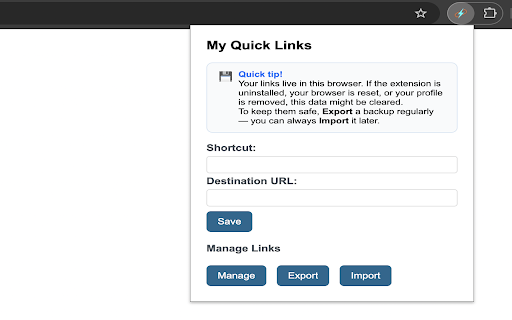
Create and manage custom short links for quick access to your favorite sites. Example: 'my gmail' -> https://mail.google.com
As of June 2026, My Quick Links has 11 users in the Productivity category.
Usersup 266.7 percent+266.7%
11
11
Ratingno change0%
—
— reviews
Reviewsno change0%
—
Version
1.2.4
Manifest V3
History
4 snapshotsTracking since Apr 18, 2026.
View as table
| Date | Users | Rating | Reviews | Version |
|---|---|---|---|---|
| Apr 18, 2026 | 3 | — | — | 1.2.4 |
| Apr 28, 2026 | 3 | — | — | 1.2.4 |
| May 9, 2026 | 3 | — | — | 1.2.4 |
| Jun 4, 2026 | 4 | — | — | 1.2.4 |
| Now | 11 | — | — | 1.2.4 |
Permissions & access
- Permissions
- storage
- Host access
- None declared
Screenshots


About
My Quick Links – Instantly Access Your Sites with Custom Shortcuts. Just type "my <shortcut>" in the browser bar and hit enter.

Tired of remembering or typing long URLs or searching through bookmarks? My Quick Links lets you create your own easy-to-remember shortcuts for the sites you use most. Just type `my <shortcut>` in your browser’s address bar and jump straight to your favorite pages!

Key Features:
* Custom Shortcuts: Create, edit, and delete your own keywords for any website.
* Lightning Fast Access: Type my plus your shortcut in the address bar to go directly to your chosen site.
* Simple Management: Clean, intuitive page to view and organize all your shortcuts.
* Backup & Restore: Export and import your shortcuts as a JSON file for easy backup or transfer.
* Smart Suggestions: See matching shortcuts as you type for quick selection.
* Works Everywhere: Compatible with Chrome and Edge on Mac and Windows.

How It Works:
1. Click the extension icon to open the management page OR just type my <shortcut>. If it doesn't exist, it will take you to management page where you can create new one.
2. Add a shortcut and its destination URL.
3. In the address bar, type my <shortcut> (e.g., my gmail) and press Enter—you're there!

Why Use My Quick Links?
* Save time and effort by skipping repetitive typing.
* Keep your most-used links at your fingertips using intuitive keywords.
* Personalize your browsing with shortcuts that make sense to you.
* Boost your productivity and streamline your browsing—install My Quick Links today!
Technical
- Version
- 1.2.4
- Manifest
- V3
- Size
- 39.06KiB
- Min Chrome
- 88
- Languages
- 1
- Featured
- No
Metadata
- ID
- kgajmbdjhlaeodphelbbjfakodfdejln
- Developer ID
- ud3a7d802fa98bae1efbeba85e83f0989
- Developer Email
- [email protected]
- Created
- Oct 9, 2025
- Last Updated (Store)
- Oct 23, 2025
- Last Scraped
- Jun 4, 2026
- Website
- —
Similar extensions
Alternatives to My Quick Links, ranked by description similarity.

Quick URL Shortcuts V2
Create custom shortcuts and dynamic searches in the address bar to quickly navigate the web.
—

Quick Links
Add and manage quick links with a clickable button.
224
★ 5.0

LinkLite
Navigate the web faster with custom URL shortcuts
6
★ 5.0

Quick Links
Save and search your links instantly using the omnibox.
—

QuickGo
Quickly open saved search engine URLs with custom keywords.
41
★ 5.0

Quick Links
Save and quickly access your favorite links.
9
★ 5.0

JustGo
The Ultimate Shortcut for Your Browsing!
6
★ 5.0

Shortcut2URL
Press Ctrl+Shift+S or click the extension icon to search and open websites with custom shortcuts. E.g. 'gh' to open GitHub!
9
★ 5.0
Data sourced from the Chrome Web Store · last verified Jun 4, 2026.