
ChronoMarker™
A stopwatch that can split time and mark notable events during your activities
As of June 2026, ChronoMarker™ has 20 users in the Workflow & Planning category.
Usersdown 13.0 percent−13.0%
20
20
Ratingno change0%
—
— reviews
Reviewsno change0%
—
Version
1.0.2
Manifest V3
History
5 snapshotsTracking since Apr 18, 2026.
View as table
| Date | Users | Rating | Reviews | Version |
|---|---|---|---|---|
| Apr 18, 2026 | 23 | — | — | 1.0.2 |
| Apr 28, 2026 | 24 | — | — | 1.0.2 |
| May 7, 2026 | 22 | — | — | 1.0.2 |
| May 15, 2026 | 20 | — | — | 1.0.2 |
| May 24, 2026 | 19 | — | — | 1.0.2 |
| Now | 20 | — | — | 1.0.2 |
Permissions & access
- Permissions
- storagenotifications
- Host access
- None declared
Screenshots


About
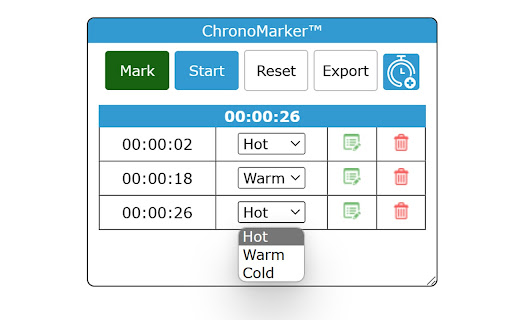
ChronoMarker™ is the world's first advanced split timer for streams, where you can mark notable takes and export to reference later saving you hours of post-production review:

=== Features ===

- Start, Stop, and Reset/Clear your timer and event log
- Track/log notable events by marking their time.
- Add 'temperature' to that marker (hot, warm, cold)
- Add notes for each event log
- Move and resize the panel using the title bar to a convenient spot.
- Export all event markers to CSV*

=== Price ===
+ First (3) markers are free.
+ Subscribe for Unlimited markers - Click on Logo in extension to sign-up or manage your existing subscription.

Never again have to spend HOURS trying to revisit an entire recording to find your takeaways or notable moments again!

=== Update ===

New UX and added shortcuts!
- alt-C - Clear
- alt-E - Export
- alt-M - Mark
- alt-S - Start and Stop Timer

=== Notes ===

* An active timer does not sync between tabs, but markers will. You must stop a timer, before starting another if you wish for the timer to carry over to another tab.

* Not showing up?  Try visiting a non-blank page or refresh your current one after installing.

*Contact us directly if you run into any issues on particular pages
(so far, we are aware of yahoo.com)
Technical
- Version
- 1.0.2
- Manifest
- V3
- Size
- 71.08KiB
- Min Chrome
- 88
- Languages
- 1
- Featured
- Yes
Metadata
- ID
- lnmpinckbacibgbpddpnehmjemoaimlh
- Developer ID
- uc906fa0a7be9399fb7c1cfbd71bc5314
- Developer Email
- [email protected]
- Created
- Jan 20, 2023
- Last Updated (Store)
- Nov 28, 2025
- Last Scraped
- Jun 3, 2026
- Website
- —
- Support URL
- http://chronomarker.com#contact
- Privacy Policy
- —
Similar extensions
Alternatives to ChronoMarker™, ranked by description similarity.

Mark‑Up‑Timer — Markdown Timestamp Stopwatch
Floating stopwatch: click to capture MM:SS stamps & copy as Markdown checklist.
—

ChronoTrec
Track your work time elegantly and stay focused on what matters
3

ChronoLog
Управляйте временем для задач и проектов: трекер, экспорт в Excel, звуковые напоминания, 9 языков.
15
★ 5.0

DsCrono
Floating Timers & Stopwatches for productivity with SOLID architecture
8

EnkiFlow: time tracking for solo professionals
Time tracker for freelancers and solo pros. Track time, capture tasks, sync with EnkiFlow for projects, delivery, finance.
2
★ 5.0

Work Timer
⏱ Time Tracker · 🍅 Pomodoro · 📊 Analytics · 💰 Earnings · 📄 Invoice Export · 📁 Projects · 🎯 Daily Goals · 🏢 Teams · ☁️ Sync
11
★ 5.0

Clockify Time Tracker
Track time from anywhere on the web and improve productivity.
300.0K
★ 3.5

MINTRA - Focus Timer
A minimalist, floating Pomodoro focus timer that stays visible across all tabs.
8
★ 5.0
Data sourced from the Chrome Web Store · last verified Jun 3, 2026.