
Clockify Time Tracker
Track time from anywhere on the web and improve productivity.
As of June 2026, Clockify Time Tracker has 300,000 users and a 3.55/5 rating from 223 reviews in the Workflow & Planning category.
Usersno change0%
300.0K
300,000
Ratingno change0%
3.55
223 reviews
Reviewsup 1.8 percent+1.8%
223
Version
2.12.1
Manifest V3
90-day change · In the last 90 days this extension 8 version updates.
History
10 snapshotsTracking since Apr 5, 2026.
View as table
| Date | Users | Rating | Reviews | Version |
|---|---|---|---|---|
| Apr 5, 2026 | 300.0K | 3.55 | 219 | 2.11.50 |
| Apr 16, 2026 | 300.0K | 3.55 | 220 | 2.11.50 |
| Apr 26, 2026 | 300.0K | 3.55 | 220 | 2.11.51 |
| May 15, 2026 | 300.0K | 3.54 | 221 | 2.11.52 |
| May 23, 2026 | 300.0K | 3.55 | 220 | 2.11.53 |
| May 28, 2026 | 300.0K | 3.56 | 221 | 2.11.54 |
| Jun 3, 2026 | 300.0K | 3.56 | 221 | 2.11.55 |
| Jun 6, 2026 | 300.0K | 3.56 | 221 | 2.11.56 |
| Jun 15, 2026 | 300.0K | 3.56 | 221 | 2.12.0 |
| Jun 22, 2026 | 300.0K | 3.56 | 221 | 2.12.1 |
| Now | 300.0K | 3.55 | 223 | 2.12.1 |
Permissions & access
- Permissions
- backgroundcontextMenusstoragetabsactiveTabidentityidlenotificationsscriptingalarms
- Host access
- *://*/, *://*.clockify.me/*
Screenshots

About
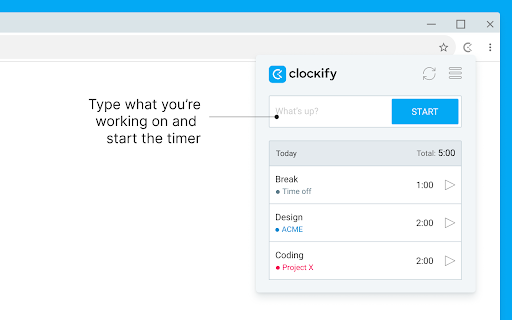
Track time from anywhere on the web with one click. Later, analyze and export time at https://clockify.me/reports/summary

FEATURES

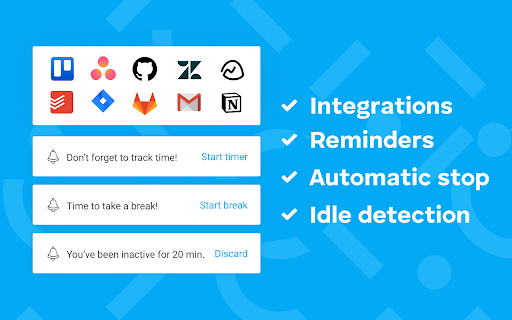
• Integrates with 50+ web apps
• Idle detection
• Reminders
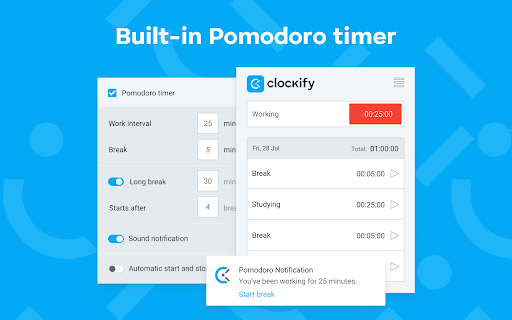
• Pomodoro timer
• Automatically start/stop timer
• Start a timer from selected text
• Start/stop timer shortcut (Ctrl+Shift+U)
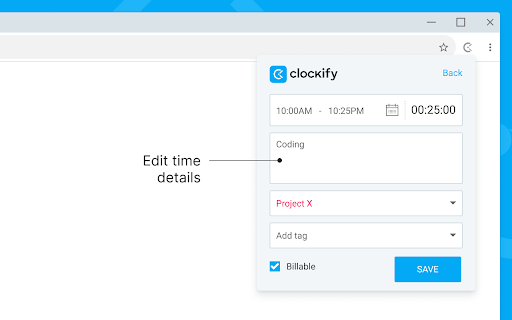
• Default project for new time entries

Q: Why does the extension need access to "read and change all your data on the websites you visit"?
A: We use the "Read and change all your data on the websites you visit" permission only for putting a timer button on other websites and taking the task's names as a description for the timer. If you don't wish to see the button on other websites, you can disable it in extension's Settings>Integrations.

The code for this extension is open source. Feel free to examine it and contribute on Github: https://github.com/clockify/browser-extension

For more information on how Clockify works, check out our help article https://clockify.me/help/apps/chrome-extension

If you have any issues or feedback, send us an email at [email protected]

ABOUT CLOCKIFY

Clockify is a time tracker that allows you to track the time you spend on projects and analyze your productivity. You can use Clockify on the web, desktop, and mobile – all your tracked data is synced in real time so you can seamlessly switch between devices.

- Free and simple online timer
- Analyze time in reports and export data
- Invite team and track time together
- Manage projects and monitor progress
Technical
- Version
- 2.12.1
- Manifest
- V3
- Size
- 1.44MiB
- Min Chrome
- 88
- Languages
- 4
- Featured
- Yes
Metadata
- ID
- pmjeegjhjdlccodhacdgbgfagbpmccpe
- Developer ID
- u4756da718a6128bf37070927472d3525
- Developer Email
- [email protected]
- Created
- Jul 5, 2018
- Last Updated (Store)
- Jun 11, 2026
- Last Scraped
- Jun 22, 2026
- Website
- https://clockify.me/
- Privacy Policy
- https://cake.com/privacy
Similar extensions
Alternatives to Clockify Time Tracker, ranked by description similarity.

ChronoTrec
Track your work time elegantly and stay focused on what matters
3

Work Timer
⏱ Time Tracker · 🍅 Pomodoro · 📊 Analytics · 💰 Earnings · 📄 Invoice Export · 📁 Projects · 🎯 Daily Goals · 🏢 Teams · ☁️ Sync
11
★ 5.0

Clocked
A time tracking ⏱ extension. Clock your time and export to Google Calendar 📅.
4

Site Time Tracker
Track time spent on different websites with monthly report generation for clients
11

Toggl Extension
Drop busy. Plan, track, focus.
495
★ 3.0

Timer, Alarm ,Countdown and Stopwatch for Google Chrome™
A simple Timer, Alarm ,Countdown and Stopwatch for Google Chrome
21

Simple Time Track
Easy and free time tracking of tasks in the browser running in the background.
2.0K
★ 3.9

Sandtime.io
Track time with ease
30
★ 5.0
Data sourced from the Chrome Web Store · last verified Jun 22, 2026.