
Twitter Customiser
Customise what metrics and content appears in the Media tabs, List tabs and more when browsing Twitter!
As of June 2026, Twitter Customiser has 295 users and a 4.20/5 rating from 5 reviews in the Productivity category.
Usersup 19.9 percent+19.9%
295
295
Ratingdown 16.0 percent−16.0%
4.20
5 reviews
Reviewsno change0%
5
Version
1.9
Manifest V3
History
7 snapshotsTracking since Apr 1, 2026.
View as table
| Date | Users | Rating | Reviews | Version |
|---|---|---|---|---|
| Apr 1, 2026 | 246 | 5.00 | 5 | 1.9 |
| Apr 18, 2026 | 238 | 5.00 | 5 | 1.9 |
| Apr 28, 2026 | 263 | 5.00 | 5 | 1.9 |
| May 8, 2026 | 257 | 5.00 | 5 | 1.9 |
| May 15, 2026 | 247 | 5.00 | 4 | 1.9 |
| May 24, 2026 | 272 | 5.00 | 4 | 1.9 |
| Jun 3, 2026 | 264 | 5.00 | 4 | 1.9 |
| Now | 295 | 4.20 | 5 | 1.9 |
Permissions & access
- Permissions
- storage
- Host access
- None declared
Screenshots
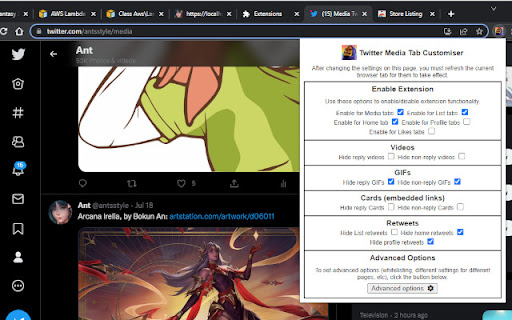
About
An extension made for customising the Twitter tabs and content panes to your liking. It can also hide metrics from all tweets.

This extension allows you to hide certain types of tweets from most tabs:
   - Reply tweets
   - Retweets
   - GIFs
   - Videos
   - Cards (embedded links)

Works for the home timeline, Media tabs, Likes tabs, Profile tabs and lists. You can also whitelist users or lists you don't want the extension to hide anything for.

In addition, you can use the Misc configuration options to hide the "Trending Topics" and "Who to Follow" panes that appear on the right of the Twitter webpage, and to hide the Explore link on the left navigation menu.

Note that the extension will only hide these tweets for you, not for other people viewing your Twitter profile (unless they have installed the extension as well). If you want e.g. something that hides all GIFs from your media tab for all Twitter users, the extension is not able to do that; it can only hide tweets for you in your browser.

Version 1.9 changelog:

- Added the option to hide the "Edit image" buttons on top of tweet images. It only hides them for you, not other users.

Version 1.8 changelog:

- Modified the main scripts to run on both twitter.com and x.com, as twitter.com links are being forcibly redirected to x.com recently, breaking script functionality.

Version 1.7 changelog:

- Added option to hide the Grok tab in the Advanced Options -> Misc area.
- Fixed a bug where the saved settings for removing sensitive timeline overlays was not properly reflected in the options checkbox.

Version 1.6 changelog:

- Added an option to remove all sensitive content overlays, in the Advanced Options -> Misc area.

Version 1.5 changelog:

- Metrics can now be hidden from all tweets. The options for this can be found under Advanced Options -> Metrics.

Version 1.4 changelog:

- Added options to hide the "Who to Follow" pane from the right of the Twitter page, and the Explore link in the left navigation menu. These options can be found under Advanced Options -> Misc.

Version 1.3 changelog:

- Added the option to hide the "What's happening" / "Trending topics" pane from the top right of the Twitter page. This option can be found under Advanced Options -> Misc. Additional options will come in future updates.
Technical
- Version
- 1.9
- Manifest
- V3
- Size
- 270KiB
- Min Chrome
- 88
- Languages
- 1
- Featured
- Yes
Metadata
- ID
- lnlejnkgobhbdidibbjnmaamnonlfnge
- Developer ID
- u0798da535d1cab871d5948800a5b2c1e
- Developer Email
- [email protected]
- Created
- Jun 27, 2022
- Last Updated (Store)
- Dec 27, 2025
- Last Scraped
- Jun 3, 2026
- Website
- —
- Support URL
- —
- Privacy Policy
- —
Similar extensions
Alternatives to Twitter Customiser, ranked by description similarity.

Clean Twitter
Clean up some annoying elements on Twitter and make your Twitter experience cleaner
1.0K
★ 5.0

Twitter/X Ads Hider
Hide Twitter/X ads from your timeline
1

degrok - No more slop
Filters out @grok tweets and replies on Twitter
9
★ 5.0

Block & Hide Feeds for X/Twitter, Instagram, YouTube - Distraktless
A plugin to block and hide feeds on Twitter / X, YouTube, and Instagram.
808
★ 4.8

Twitter Blue Hider
Hide X (formerly Twitter) verified accounts from your screen. You can also add them to your whitelist to never hide them again.
59
★ 5.0

Un-Grok
Remove tweets mentioning @GROK from your Twitter/X feed
1.0K
★ 5.0

X (Twitter) Cleaner
X Feed Cleaner – Distraction Free & Focus Mode for X.com
189
★ 5.0

Scootch Twitter
makes twitter less bloated
2
★ 5.0
Data sourced from the Chrome Web Store · last verified Jun 3, 2026.