Link Grabber
Use Link Grabber to extract all links from a webpage
As of June 2026, Link Grabber has 2,000 users and a 5.00/5 rating from 16 reviews in the Productivity category.
Usersdown 33.3 percent−33.3%
2.0K
2,000
Ratingno change0%
5.00
16 reviews
Reviewsup 6.7 percent+6.7%
16
Version
1.0.0
Manifest V3
90-day change · In the last 90 days this extension lost 1.0K users.
History
3 snapshotsTracking since Apr 16, 2026.
View as table
| Date | Users | Rating | Reviews | Version |
|---|---|---|---|---|
| Apr 16, 2026 | 3.0K | 5.00 | 15 | 1.0.0 |
| Apr 26, 2026 | 2.0K | 5.00 | 15 | 1.0.0 |
| May 7, 2026 | 2.0K | 5.00 | 15 | 1.0.0 |
| Now | 2.0K | 5.00 | 16 | 1.0.0 |
Permissions & access
- Permissions
- activeTabscriptingcontextMenusclipboardWritedownloadsstorage
- Host access
- https://*/*, http://*/*
Screenshots

About
🚀 Welcome to Link Grabber: Your Ultimate Tool for Effortless Link Extraction! 🚀

Are you tired of manually sifting through web pages to find the urls you need? Say goodbye to tedious tasks and hello to Link Grabber, the ultimate extension grabber designed to make your life easier. You can effortlessly extract all links from a webpage and streamline your online research or data collection process.

🌟 Why Choose it? 🌟
It is not just another url extractor chrome tool; it's a comprehensive solution for anyone looking to download all urls from a website quickly and efficiently. Whether you're a digital marketer, researcher, or just someone who needs to extract urls from page after page, Link Grabber is your go-to extension.

🔹 Key Features 🔹
1️⃣ Extract All Links from a Webpage: With just a click, extract all links from a webpage and save valuable time.
2️⃣ Download All Links from Webpage: Need to download all links from a website? It makes it a breeze.
3️⃣ Video Link Grabber Extension: Easily extract videos from webpage content without hassle.
4️⃣ Image Grabber: Find and download images effortlessly.
5️⃣ User-Friendly Interface: Intuitive design ensures that even beginners can use the link grabber extension with ease.

💡 How Does itWork? 💡
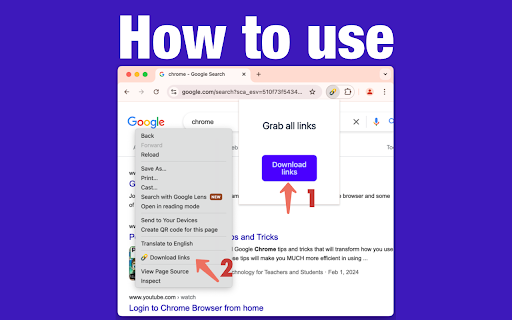
Using it is as simple as 1-2-3:
1. Install the Extension: Add the url extractor extension to your Chrome browser.
2. Navigate to Your Desired Page: Open the webpage from which you want to extract links.
3. Click and Extract: Hit the Grabber icon, and watch as it extracts all urls from a website in seconds.

📈 Benefits of Using 📈
✔️ Efficiency: Save time by automating the process to extract urls from website pages.
✔️ Accuracy: Ensure you get all the information from a website without missing any crucial URLs.
✔️ Versatility: Whether you need to extract urls, find all links on a site, or grab download lnks from page, it has you covered.

🌐 Who Can Benefit from the extractor? 🌐
It is perfect for:
🔸 Digital Marketers: Quickly extract urls for backlink analysis or competitor research.
🔸 Researchers: Gather data by extracting urls from page sources for academic or professional projects.
🔸 Content Creators: Use the image urls extractor to find visual assets for your content.
🔸 Web Developers: Test and verify data on your site with ease using the linkextractor.

🎯 Advanced Features for Power Users 🎯
For those who need more than just basic extraction, it offers advanced features:
➤ Filter Options: Customize your extraction process by filtering specific types of data.
➤ Batch Processing: Extract all links from a webpage across multiple tabs simultaneously.
➤ Export Functionality: Easily export extracted uris to CSV or other formats for further analysis.

💎 Why URL Extractor Stands Out 💎
Unlike other tools, it is a dedicated link extractor chrome extension that focuses solely on providing the best url extraction experience. Its robust functionality and ease of use make it the preferred choice for professionals and casual users alike.

🔥 Get Started with it Today! 🔥
Don't let manual url extraction slow you down. Download Grabber now and experience the power of efficient url extraction. Whether you need to extract video links from webpage content or find all urls for a domain, it is the tool you need.

📌 Join Thousands of Satisfied Users 📌
Join the growing community of users who have transformed their workflow with this powerful web url extractor. Discover why it's the top choice for anyone needing a reliable url graber.

✨ Conclusion: Your Go-To Extraction Tool ✨
In a digital world where time is money, it is the ultimate solution for anyone looking to get all the URI from a website quickly and efficiently. With its user-friendly interface and powerful features, it's the URI extractor you've been waiting for.
Download Grabber today and take the first step towards a more efficient and productive online experience. Whether you're looking to extract URI from website pages or need a reliable grabber URI tool, Grabber is here to help.
Technical
- Version
- 1.0.0
- Manifest
- V3
- Size
- 525KiB
- Min Chrome
- 88
- Languages
- 52
- Featured
- No
Metadata
- ID
- lnajkglgcopallcelkglibliacibpehf
- Developer ID
- ub7d86a98942b5d9ab21c6a6c74820d07
- Developer Email
- [email protected]
- Created
- Nov 10, 2024
- Last Updated (Store)
- Feb 19, 2026
- Last Scraped
- Jun 10, 2026
- Website
- —
- Support URL
- —
Similar extensions
Alternatives to Link Grabber, ranked by description similarity.

URL Extractor
Use URL Extractor - The ultimate url scanner and link grabber for detecting and exporting links effortlessly from any webpage.
10.0K
★ 4.8

Link Extractor V2
Extracts all links from a page and copies them to the clipboard.
889
★ 4.0

Scrape Similar - Smart Link Extractor
Smart links scraping with visual selector and custom CSS/XPath support. Extract similar links in 2 clicks.
107

Grab Links from Webpage
Grab all links on the current page, filter, copy, and group them.
103

URL Scraper for Google Search
Easily scrape and copy URLs from Google search results pages.
89

Data Extractor
Scrape data from a website
2.0K
★ 5.0

Sitemap URLs Extractor
Extract URLs from sitemap web pages with a single click 🔥
170
★ 1.0

Link Scraper
Displays all links on the current page in a side panel
1.0K
★ 5.0
Data sourced from the Chrome Web Store · last verified Jun 10, 2026.