
MentiPlus
Mentimeter formatting extension. Change a graph column's colour or the format of the axis text using a contextual menu
As of June 2026, MentiPlus has 2,000 users in the Communication category.
Usersdown 60.0 percent−60.0%
2.0K
2,000
Ratingno change0%
—
— reviews
Reviewsno change0%
—
Version
4.12.4
Manifest V3
90-day change · In the last 90 days this extension lost 3.0K users, 1 version update.
History
10 snapshotsTracking since Apr 1, 2026.
View as table
| Date | Users | Rating | Reviews | Version |
|---|---|---|---|---|
| Apr 1, 2026 | 5.0K | — | — | 4.12.0 |
| Apr 10, 2026 | — | — | — | 4.12.0 |
| Apr 19, 2026 | 4.0K | — | — | 4.12.4 |
| Apr 24, 2026 | 5.0K | — | — | 4.12.4 |
| Apr 29, 2026 | 5.0K | — | — | 4.12.4 |
| May 6, 2026 | — | — | — | 4.12.4 |
| May 10, 2026 | 5.0K | — | — | 4.12.4 |
| May 16, 2026 | — | — | — | 4.12.4 |
| May 25, 2026 | 5.0K | — | — | 4.12.4 |
| Jun 7, 2026 | — | — | — | 4.12.4 |
| Now | 2.0K | — | — | 4.12.4 |
Changelog
- Apr 10, 2026description
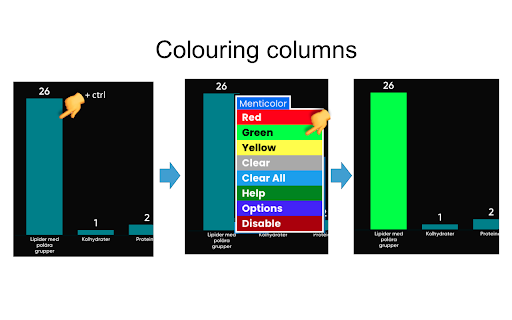
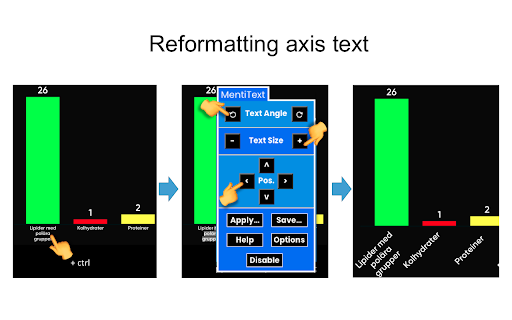
Allows you to customise result displays in the online voting platform Mentimeter. Right-click (or ctrl-click) on a graph column or some axis text to bring forward a contextual menu with formatting options. The contextual menu also offers a link to an extensive on-screen help document (also available as pdf at https://drive.google.com/drive/folders/1mtQjLuPcNKdS0DCRbR87ye9yex_DXZEP?usp=sharing).

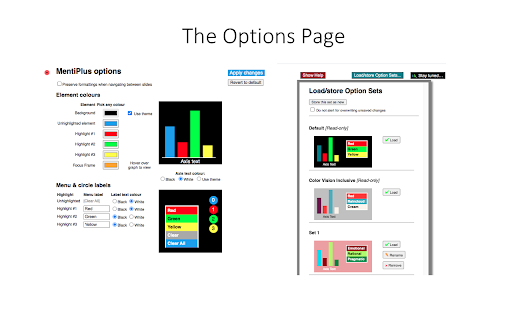
As of v 4.0, MentiPlus also features an Options Page, where you can select your own highlight colours, graph background colour, and contextual menu labels.

As of v 4.4, MentiPlus can be instantly disabled and re-enabled by choices from the contextual menus.

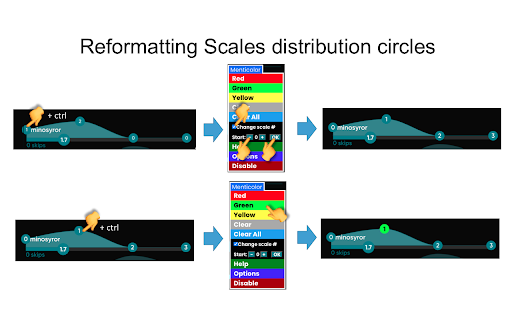
As of v 4.6, all the four layout types in the Mentimeter results view (Bars, Pie, Donut, and Dots) can be highlighted by MentiPlus. Highlight colours will be preserved when changing layout. NOTE: changes to the Mentimeter platform as of early 2026 have made it impossible to support formatting of Dots. Formatting of Scales are also no longer supported.

Version 4.11 restores MentiPlus functionality following a major restructuring of the Mentimeter page code in late 2024 which temporarily disabled MentiPlus.

This extension was developed in an educational setting to be able to highlight correct and incorrect answers by colouring the respective columns. The text formatting functionality was developed to handle the sometimes very tiny axis text generated by Mentimeter.

Please visit the MentiPlus Facebook page, https://www.facebook.com/MentiPlus-108267884332773 for news and tips, check out the MentiPlus  YouTube channel https://www.youtube.com/channel/UCZHfqC5yf8NxOU6g66hNUwQ for short instructive demos, and join the Google group https://groups.google.com/d/forum/mentiplus for support, questions etc.
Allows you to customise result displays in the online voting platform Mentimeter. Right-click (or ctrl-click) on a graph column or some axis text to bring forward a contextual menu with formatting options. The contextual menu also offers a link to an extensive on-screen help document (also available as pdf at https://drive.google.com/drive/folders/1mtQjLuPcNKdS0DCRbR87ye9yex_DXZEP?usp=sharing).

Version 4.12.4 restores highlighting of Dots layouts (via custom creation of <svg> elements; this feature can be disabled on the Options page) and of Scales distribution circles

Version 4.11 restores MentiPlus functionality following a major restructuring of the Mentimeter page code in late 2024 which temporarily disabled MentiPlus.

As of v 4.6, all the four layout types in the Mentimeter results view (Bars, Pie, Donut, and Dots) can be highlighted by MentiPlus. Highlight colours will be preserved when changing layout.

As of v 4.4, MentiPlus can be instantly disabled and re-enabled by choices from the contextual menus.

As of v 4.0, MentiPlus also features an Options Page, where you can select your own highlight colours, graph background colour, and contextual menu labels.

This extension was developed in an educational setting to be able to highlight correct and incorrect answers by colouring the respective columns. The text formatting functionality was developed to handle the sometimes very tiny axis text generated by Mentimeter.

Please visit the MentiPlus Facebook page, https://www.facebook.com/MentiPlus-108267884332773 for news and tips, check out the MentiPlus  YouTube channel https://www.youtube.com/channel/UCZHfqC5yf8NxOU6g66hNUwQ for short instructive demos, and join the Google group https://groups.google.com/d/forum/mentiplus for support, questions etc.
Permissions & access
- Permissions
- storage
- Host access
- https://bxtrom.eu/stats/mentiplus-stats/*
Screenshots

About
Allows you to customise result displays in the online voting platform Mentimeter. Right-click (or ctrl-click) on a graph column or some axis text to bring forward a contextual menu with formatting options. The contextual menu also offers a link to an extensive on-screen help document (also available as pdf at https://drive.google.com/drive/folders/1mtQjLuPcNKdS0DCRbR87ye9yex_DXZEP?usp=sharing).

Version 4.12.4 restores highlighting of Dots layouts (via custom creation of <svg> elements; this feature can be disabled on the Options page) and of Scales distribution circles

Version 4.11 restores MentiPlus functionality following a major restructuring of the Mentimeter page code in late 2024 which temporarily disabled MentiPlus.

As of v 4.6, all the four layout types in the Mentimeter results view (Bars, Pie, Donut, and Dots) can be highlighted by MentiPlus. Highlight colours will be preserved when changing layout.

As of v 4.4, MentiPlus can be instantly disabled and re-enabled by choices from the contextual menus.

As of v 4.0, MentiPlus also features an Options Page, where you can select your own highlight colours, graph background colour, and contextual menu labels.

This extension was developed in an educational setting to be able to highlight correct and incorrect answers by colouring the respective columns. The text formatting functionality was developed to handle the sometimes very tiny axis text generated by Mentimeter.

Please visit the MentiPlus Facebook page, https://www.facebook.com/MentiPlus-108267884332773 for news and tips, check out the MentiPlus  YouTube channel https://www.youtube.com/channel/UCZHfqC5yf8NxOU6g66hNUwQ for short instructive demos, and join the Google group https://groups.google.com/d/forum/mentiplus for support, questions etc.
Technical
- Version
- 4.12.4
- Manifest
- V3
- Size
- 1.93MiB
- Min Chrome
- 88
- Languages
- 1
- Featured
- No
Metadata
- ID
- lmmkabdibcnmjolemacgimkiakgopiga
- Developer ID
- ua861c69f2539091a3affa2582c53fbe3
- Developer Email
- [email protected]
- Created
- Nov 22, 2019
- Last Updated (Store)
- Apr 7, 2026
- Last Scraped
- Jun 11, 2026
- Website
- https://oldpike.bxtrom.eu/
- Support URL
- https://oldpike.bxtrom.eu/
- Privacy Policy
- https://oldpike.bxtrom.eu/privacy_policy.html
Similar extensions
Alternatives to MentiPlus, ranked by description similarity.

Notion Presenter
Transform any Notion page into a clean, distraction-free presentation.
5

Frame Luminater
Supercharge your web tutorials and demos by highlighting elements with a customizable gradient border.
—

Meet Layer
This extension allows you to add text directly to the video you are broadcasting on Google Meet.
37

Mouse Highlight & Annotation Tool
Highlight your cursor and draw temporary annotations on any webpage. Perfect for presentations, demos, and screen sharing.
134

SuperFeedback
Add visual feedback and comments to any website. Perfect for client reviews and team collaboration.
6

Code Medium
Extends the Medium and Substack writer interfaces to quickly create and edit Github Gists, without having to leave the editor.
1.0K
★ 4.6

vpromptr: Video Call e-Notes
Overlays teleprompter-style notes over video calls.
12

PlusThat
Read and write public comments and private chat on any webpage.
3
★ 5.0
Data sourced from the Chrome Web Store · last verified Jun 11, 2026.