
PlusThat
Read and write public comments and private chat on any webpage.
As of May 2026, PlusThat has 3 users and a 5.00/5 rating from 1 reviews in the Communication category.
Usersdown 40.0 percent−40.0%
3
3
Ratingno change0%
5.00
1 reviews
Reviewsno change0%
1
Version
0.20
Manifest V3
History
2 snapshotsTracking since Apr 25, 2026.
View as table
| Date | Users | Rating | Reviews | Version |
|---|---|---|---|---|
| Apr 25, 2026 | 5 | 5.00 | 1 | 0.20 |
| May 21, 2026 | 4 | 5.00 | 1 | 0.20 |
| Now | 3 | 5.00 | 1 | 0.20 |
Permissions & access
- Permissions
- sidePanelcontextMenustabsoffscreen
- Host access
- None declared
Screenshots

About
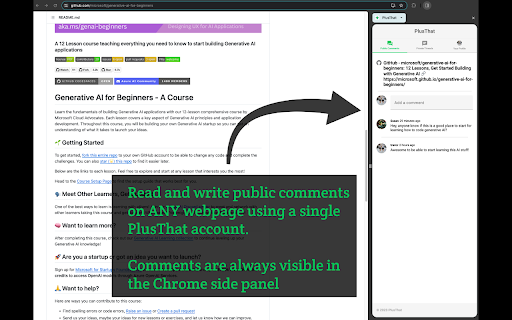
The PlusThat side panel extension allows you to read and write public comments and private messages on ANY web page through a single PlusThat account.
TO USE: install and then open the Chrome side panel.

PRIVACY:
The extension requires permission to view your browser history in order to be able to read the URL of each page that you browse.
This extension only looks at the URLs and titles of the pages as you browse them. It cannot look at or change any of the page content. It has no access to any sensitive data that might be on the page. It does not actually look at any of your browser history.
The extension does not track you. No URL is saved to PlusThat unless you interact with it by adding a comment or being included in a private message thread.

USAGE:
a) Right-click on any web page and use the PlusThat context menu entry to open the side panel.
-- or --
b) Open the Chrome Side Panel by clicking the puzzle piece button to the left of your avatar in the Chrome address bar. Then find "PlusThat" in the list and pin it. Then just tap the PlusThat logo whenever you want to open the side panel
-- or --
c) Or use the short cut Alt+Shift+P (MacOS: Option+Shift+P).

Once the side panel is open, the relevant comments and content will be updated whenever you change the webpage that you are browsing. Go ahead and write a comment!
Technical
- Version
- 0.20
- Manifest
- V3
- Size
- 644KiB
- Min Chrome
- 88
- Languages
- 1
- Featured
- Yes
Metadata
- ID
- fdolcalgjiodophceognejkdeokllmfh
- Developer ID
- u9471da4f0cea89879fb66be0c239a700
- Developer Email
- [email protected]
- Created
- Nov 17, 2023
- Last Updated (Store)
- Mar 6, 2025
- Last Scraped
- May 21, 2026
- Website
- plusthat.com
- Support URL
- https://plusthat.com/contact
- Privacy Policy
- https://plusthat.com/privacy
Similar extensions
Alternatives to PlusThat, ranked by description similarity.

Textxt Sidebar
Open Textxt in Chrome Side Panel.
9

Sidenote
An extension to discuss a site, on the site.
253
★ 5.0

mintyPoint
Leave comments on web pages and meet new people as you surf the web.
4

Annotier Extension
Bring discussions into your browsing — view and edit comments directly in your sidebar.
5

CommentAll
A Chrome extension for adding comments to any webpage
3

Clamor - Comment Anywhere
Comment Anywhere with Clamor: Anonymous Web Layer. Comment websites, comment webpages, comment everywhere, your voice on every page
112
★ 4.8

Grapevine
Offers a comment section for every url on the web
32
★ 5.0

Zinger
Add comments to any webpage and join discussions happening across the web.
11
★ 5.0
Data sourced from the Chrome Web Store · last verified May 21, 2026.