
Article Summary with ChatGPT and Take Notes
Summarize any webpage or article using ChatGPT. Summary generator for article.
As of May 2026, Article Summary with ChatGPT and Take Notes has 6,000 users and a 3.36/5 rating from 39 reviews in the Productivity category.
Usersno change0%
6.0K
6,000
Ratingdown 1.2 percent−1.2%
3.36
39 reviews
Reviewsdown 2.5 percent−2.5%
39
Version
1.0.6
Manifest V3
History
1 snapshotsTracking since Apr 30, 2026.
View as table
| Date | Users | Rating | Reviews | Version |
|---|---|---|---|---|
| Apr 30, 2026 | 6.0K | 3.40 | 40 | 1.0.6 |
| Now | 6.0K | 3.36 | 39 | 1.0.6 |
Permissions & access
- Permissions
- activeTabscriptingstorage
- Host access
- None declared
Screenshots

About
Summarize any webpage or article using ChatGPT. Summary generator for article.

🚀Features:
ChatGPT with the Article Summary Generator is a free Chrome Extension that harnesses the power of OpenAI technology. With this extension, you can quickly access concise summaries of articles and webpages, saving you time and enhancing your learning experience. Give it a try today to streamline your reading and knowledge acquisition! Experience the following features:


● One-Click Summarization: Quickly generate article summaries by clicking the logo.
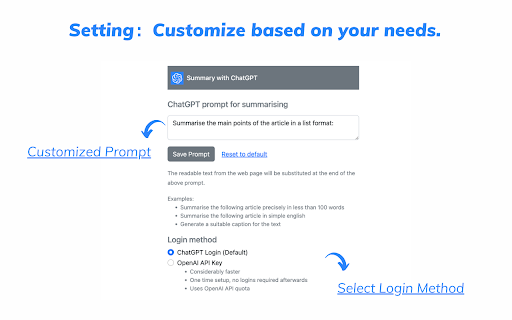
● Customizable Settings: Personalize ChatGPT prompts, login preferences, and more as needed.
● Unrestricted Summaries: Summarize any webpage or article, significantly saving you time.


🚀How to Use :
● Log in to https://chat.openai.com.
● Pin the extension and click on the logo.
● Obtain the Article Summary or Website Summary.
● If you encounter an error, try reopening openai.com. The service may be experiencing high demand.

💡 Q&A
Q1: What is ChatGPT?
A1: ChatGPT is an OpenAI-developed artificial intelligence chatbot based on OpenAI’s Generative Pre-trained Transformer (GPT) series of large language models (LLMs). ChatGPT can engage in conversations, respond to user requests, write stories, debug programming code, creative writing, and much more.

Q2: What is an Article summary?
A2: With the official support of OpenAI, an article summary is created to assist users in summarizing content while reading any article or webpage. This significantly saves time and enhances learning efficiency.

Q4: Do I need to create a ChatGPT/OpenAI account to use this extension?
A4: Yes, you must have a ChatGPT account to generate article summaries. You can create a free account at chat.openai.com, where you can also locate or generate your OpenAI API key.
Technical
- Version
- 1.0.6
- Manifest
- V3
- Size
- 179KiB
- Min Chrome
- 88
- Languages
- 49
- Featured
- Yes
Metadata
- ID
- llkgpihjneoghmffllamjfhabmmcddfh
- Developer ID
- u7fb0a4c82fb870a9755f9939daa1d0eb
- Developer Email
- [email protected]
- Created
- Oct 15, 2023
- Last Updated (Store)
- Jan 28, 2025
- Last Scraped
- May 29, 2026
- Website
- —
- Support URL
- —
- Privacy Policy
- https://denote.net/privacy
Similar extensions
Alternatives to Article Summary with ChatGPT and Take Notes, ranked by description similarity.

Summary Webpage - Summarize Youtube videos | AI - Assistant
Summarize any webpage or Youtube video using AI and save time. Get the summary.
80.0K
★ 3.9

ChatGPT Summarize
ChatGPT summarize or chat with Websites / Youtube using ChatGPT + DeepSeek. Summary * AI Summarize * OpenAI * PDF Summary * Claude
100.0K
★ 4.5

ChatGPT Webpage Summarizer
Summarize web pages using OpenAI's GPT-4 model
2.0K
★ 4.4

Coursera Summary with ChatGPT and Take Notes
Coursera videos transcript and summary with Chat GPT. Summary generator for Coursera videos.
2.0K
★ 2.9
NoteGPT: ChatGPT Summary for Vimeo
Vimeo Summary with ChatGPT for your better learn. Summarize vimeo courses for key points.
6.0K
★ 3.0

NoteGPT: Udemy Summary with ChatGPT & Claude
Use ChatGPT and Claude to summarize Udemy course videos and save time for better learning.
10.0K
★ 4.1

ChatGPT Webpage Summarizer
Summarizes the current tab's content using ChatGPT.
3

Tab Summarizer
Summarize webpages with AI chat services like ChatGPT & Claude. Uses your existing chat tabs with a convenient floating button.
5
Data sourced from the Chrome Web Store · last verified May 29, 2026.