
Coursera Summary with ChatGPT and Take Notes
Coursera videos transcript and summary with Chat GPT. Summary generator for Coursera videos.
As of June 2026, Coursera Summary with ChatGPT and Take Notes has 2,000 users and a 2.86/5 rating from 7 reviews in the Productivity category.
Usersno change0%
2.0K
2,000
Ratingno change0%
2.86
7 reviews
Reviewsno change0%
7
Version
1.0.6
Manifest V3
History
2 snapshotsTracking since Apr 19, 2026.
View as table
| Date | Users | Rating | Reviews | Version |
|---|---|---|---|---|
| Apr 19, 2026 | 2.0K | 2.86 | 7 | 1.0.6 |
| Apr 29, 2026 | 2.0K | 2.86 | 7 | 1.0.6 |
| Now | 2.0K | 2.86 | 7 | 1.0.6 |
Permissions & access
- Permissions
- storagewebRequest
- Host access
- https://*.coursera.org/*, https://*.openai.com/*, https://notegpt.io/*
Screenshots


About
Coursera Summary with ChatGPT and Take Notes - Your Summary generator for Coursera courses Chrome Extension

🚀Features:
ChatGPT with Coursera courses summary generator is the ultimate companion for learning through Coursera courses. It allows you to swiftly summarize courses content and generate summaries by utilizing transcribed text with timestamps, enhancing your learning efficiency. Experience the following features:


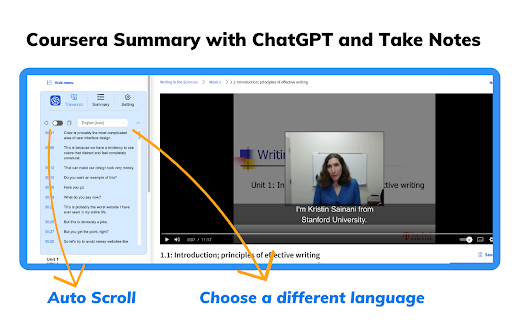
● Instant Timestamps: Click timestamp icons to easily locate the transcript of the current moment in courses videos.
● Auto-Scroll Transcripts: Enable auto-scroll to have transcripts follow along as you watch courses.
● One-Click Copy: Seamlessly copy entire automatically generated transcripts, summaries and Coursera notebooks.
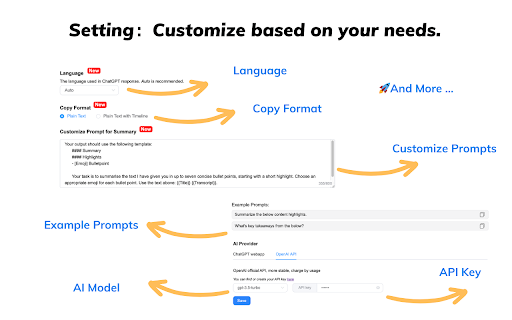
● Customizable Settings: Personalize output language, ChatGPT prompts, text formats and more based on your needs.


🚀How to Use :
● Go to the Coursera website
● Select a course video that you are interested in
● Click the "Transcript & summary" button. If subtitles exist for the video, they will be shown to you.
● If you are logged into chat.openai.com, click the View Summary with ChatGPT button to get a courses summary
● Click the "Copy" icon, then you can easily get a summary for the Coursera course video

💡 Q&A
Q1: What is ChatGPT?
A1: ChatGPT is an OpenAI-developed artificial intelligence chatbot based on OpenAI’s Generative Pre-trained Transformer (GPT) series of large language models (LLMs). ChatGPT can engage in conversations, respond to user requests, write stories, debug programming code, creative writing, and much more.

Q2: What is a Coursera summary?
A2: A Coursera summary is an AI-written overview of the relevant content contained in any courses video on the Coursera platform. The summary provides the user with the video's overall topic and important information without the user having to watch the entire video.

Q4: Do I need to create a ChatGPT/OpenAI account to use this extension?
A4: Yes, you must have a ChatGPT account to generate video summaries. You can create a free account at chat.openai.com, where you can also locate or generate your OpenAI API key.

📢Note:
Coursera is a trademark of Coursera, Inc., registered in the U.S. and other countries. Coursera Summary with ChatGPT and Take Notes is an independent project and has no relationship to Coursera or Coursera, Inc.
Technical
- Version
- 1.0.6
- Manifest
- V3
- Size
- 2.2MiB
- Min Chrome
- 88
- Languages
- 54
- Featured
- No
Metadata
- ID
- afmnhehfpjmkajjglfakmgmjcclhjane
- Developer ID
- u7fb0a4c82fb870a9755f9939daa1d0eb
- Developer Email
- [email protected]
- Created
- Sep 11, 2023
- Last Updated (Store)
- Nov 25, 2025
- Last Scraped
- Jun 6, 2026
- Website
- —
- Support URL
- —
- Privacy Policy
- https://denote.net/privacy
Similar extensions
Alternatives to Coursera Summary with ChatGPT and Take Notes, ranked by description similarity.

NoteGPT: Udemy Summary with ChatGPT & Claude
Use ChatGPT and Claude to summarize Udemy course videos and save time for better learning.
10.0K
★ 4.1

Article Summary with ChatGPT and Take Notes
Summarize any webpage or article using ChatGPT. Summary generator for article.
6.0K
★ 3.4

ChatGPT Summarize
ChatGPT summarize or chat with Websites / Youtube using ChatGPT + DeepSeek. Summary * AI Summarize * OpenAI * PDF Summary * Claude
100.0K
★ 4.5

Summary Webpage - Summarize Youtube videos | AI - Assistant
Summarize any webpage or Youtube video using AI and save time. Get the summary.
80.0K
★ 3.9
NoteGPT: ChatGPT Summary for Vimeo
Vimeo Summary with ChatGPT for your better learn. Summarize vimeo courses for key points.
6.0K
★ 3.0

ChatGPT Webpage Summarizer
Summarize web pages using OpenAI's GPT-4 model
2.0K
★ 4.4
YouTube Summary with ChatGPT & Claude
Summarize YouTube videos, web articles, and PDFs to save time, powered by ChatGPT, Claude, Mistral AI, and Gemini.
2.0M
★ 4.3

Awesum: AI YouTube video summaries
Save time on long videos and extract key ideas instantly. AI YouTube video summaries made in seconds.
38
★ 3.0
Data sourced from the Chrome Web Store · last verified Jun 6, 2026.