
Website Accessibility Checker
Comprehensive accessibility checker for WCAG 2.1/2.2, Section 508, EN 301 549, ADA, AODA, and 9 EU standards including EAA 2025
As of May 2026, Website Accessibility Checker has 119 users and a 5.00/5 rating from 1 reviews in the Productivity category.
Usersup 22.7 percent+22.7%
119
119
Ratingno change0%
5.00
1 reviews
Reviewsno change0%
1
Version
2.0
History
5 snapshotsTracking since Apr 1, 2026.
View as table
| Date | Users | Rating | Reviews | Version |
|---|---|---|---|---|
| Apr 1, 2026 | 97 | 5.00 | 1 | 2.0 |
| Apr 21, 2026 | 102 | 5.00 | 1 | 2.0 |
| May 6, 2026 | 117 | 5.00 | 1 | 2.0 |
| May 17, 2026 | 121 | 5.00 | 1 | 2.0 |
| May 31, 2026 | 115 | 5.00 | 1 | 2.0 |
| Now | 119 | 5.00 | 1 | 2.0 |
Permissions & access
- Permissions
- None declared
- Host access
- None declared
Screenshots



About
Website Accessibility Checker tests your website against 13 international accessibility standards including WCAG 2.1, Section 508, ADA, and the European Accessibility Act (EAA 2025).

What It Does

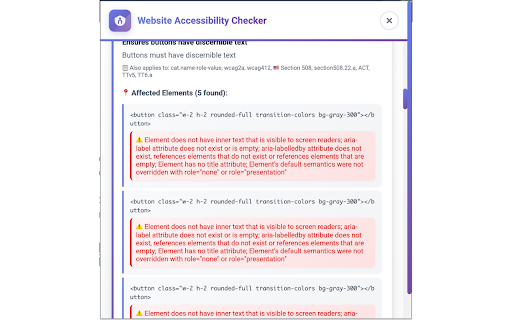
This extension analyzes the current webpage for accessibility issues and provides:
- An overall accessibility score (A-F grade)
- Detailed list of violations with severity levels
- Specific HTML elements that need fixing
- Instructions on how to resolve each issue
- Export options for compliance documentation

Supported Standards

International: WCAG 2.1 AA, WCAG 2.2 Ready

United States: Section 508, ADA Title III

European Union: EN 301 549, EAA 2025 (mandatory June 28, 2025)

Regional Standards:
- RGAA (France)
- BITV 2.0 (Germany)
- Stanca Act (Italy)
- Netherlands ACM
- Belgium BIPT
- UNE 139803 (Spain)
- AODA (Ontario, Canada)

Key Features

One-Click Testing
Run comprehensive accessibility tests without any configuration. The extension automatically detects which standards apply to your website based on domain and content.

Detailed Reporting
Each issue includes:
- The affected HTML element
- Why it fails accessibility standards
- How to fix it
- Which standards it violates

Performance
- Results cached for 1 hour to speed up re-testing
- All processing happens locally in your browser
- No external API calls or data transmission

Export Options
- Download compliance certificates
- Export results as CSV
- Copy report to clipboard

How to Use

1. Click the extension icon on any webpage
2. Select which standards to test against (or use auto-detect)
3. Click "Run Accessibility Check"
4. Review your score and violations
5. Export results if needed

Technical Details

Built on the axe-core accessibility engine (used by Microsoft, Google, and IBM) with additional custom tests for regional standards. Tests include:

- Color contrast ratios
- Keyboard navigation
- Screen reader compatibility
- ARIA implementation
- Touch target sizes
- Text spacing
- Focus management
- Heading structure
- Form labels
- Alt text presence

Important Notes

- Cannot test Chrome system pages (chrome://, extension://)
- Automated testing identifies approximately 40% of accessibility issues
- Manual testing is still recommended for complete compliance
- All data processing happens locally - nothing is sent to external servers

Who Should Use This

- Web developers testing during development
- QA teams checking accessibility compliance
- Digital agencies auditing client sites
- Businesses preparing for EAA 2025 (June 28 deadline)
- Organizations ensuring Section 508 or ADA compliance

Privacy

This extension only analyzes webpage content locally in your browser. No user data is collected, stored on external servers, or transmitted anywhere. Temporary cache is stored locally for performance and can be cleared by removing the extension.

Support

Website: https://testwebsiteaccessibility.com
Email: [email protected]
Privacy Policy: https://testwebsiteaccessibility.com/privacy

This extension is not affiliated with W3C, government agencies, or standards organizations.
Technical
- Version
- 2.0
- Manifest
- —
- Size
- 357KiB
- Min Chrome
- 88
- Languages
- 1
- Featured
- No
Metadata
- ID
- llilkedkgipnbganckfhneieigljcedh
- Developer ID
- u4c0215754d35fd0007df240adddbd989
- Developer Email
- [email protected]
- Created
- Sep 8, 2025
- Last Updated (Store)
- Sep 8, 2025
- Last Scraped
- May 31, 2026
- Website
- testwebsiteaccessibility.com
- Support URL
- —
- Privacy Policy
- https://testwebsiteaccessibility.com/privacy
Similar extensions
Alternatives to Website Accessibility Checker, ranked by description similarity.

Color Contrast Checker by Accessibility Tracker
The best color contrast analyzer in the game.
83
★ 5.0

A11yied
Chrome extension for accessibility testing - highlight issues and record browser interactions
—

Color Accessibility Checker
Use a color accessibility checker to check color contrast ratio, fulfill wcag color standards, and improve website accessibility.
393
★ 5.0

AccessWise
Find and fix accessibility issues during development. Fast, accurate, offline testing by AIO.com.ai
—

SEO & Accessibility Helper
Instant on-page SEO analysis, accessibility checks, and Core Web Vitals performance tracking directly in your side panel.
8

Contrast Check – WCAG Color Tester
Check color contrast ratio on any website. WCAG accessibility compliant contrast checker.
—

ClarityUX™ — AI Website Review: SEO, UX, HTML/CSS, Accessibility & Heatmaps
AI-powered website review tool: Predictive eye-tracking, heatmaps, SEO, UX, code & WCAG accessibility checks. Fix issues faster.
294

Presenc AI Audit
The Eye into AI Readiness. We help you see how AI perceives your digital presence. 100% local analysis.
3
Data sourced from the Chrome Web Store · last verified May 31, 2026.