
Color Accessibility Checker
Use a color accessibility checker to check color contrast ratio, fulfill wcag color standards, and improve website accessibility.
As of June 2026, Color Accessibility Checker has 393 users and a 5.00/5 rating from 3 reviews in the Productivity category.
Usersup 17.7 percent+17.7%
393
393
Ratingno change0%
5.00
3 reviews
Reviewsno change0%
3
Version
1.1.0
Manifest V3
History
4 snapshotsTracking since Apr 21, 2026.
View as table
| Date | Users | Rating | Reviews | Version |
|---|---|---|---|---|
| Apr 21, 2026 | 334 | 5.00 | 3 | 1.1.0 |
| May 6, 2026 | 383 | 5.00 | 3 | 1.1.0 |
| May 18, 2026 | 377 | 5.00 | 3 | 1.1.0 |
| Jun 1, 2026 | 385 | 5.00 | 3 | 1.1.0 |
| Now | 393 | 5.00 | 3 | 1.1.0 |
Permissions & access
- Permissions
- storage
- Host access
- None declared
Screenshots

About
Creating an inclusive, user-friendly digital experience starts with color. Our Color accessibility checker Chrome extension is designed for designers, developers, and content creators who care about accessibility, readability, and compliance. It empowers you to check color accessibility and improve user experience in seconds.

Whether you're building a new website or optimizing an existing one, our accessibility color contrast checker simplifies the process. With real-time analysis and instant feedback, it's never been easier to meet WCAG guidelines and provide a welcoming space for everyone.

Why Color Accessibility Matters
 1️⃣ Good color contrast improves readability
 2️⃣ Accessible designs reach more users
 3️⃣ Compliance with WCAG avoids legal risks
 4️⃣ Boosts SEO and usability metrics
 5️⃣ Enhances UX for blind users

Key Features of the Extension
 ➤ Instant contrast ratio analysis
 ➤ Hover-based scanning for any element
 ➤ Live page testing
 ➤ Color palette accessibility checker for UI design
 ➤ Compatible with Figma and design systems

Designed for real-world workflows, the extension fits seamlessly into your development cycle. From quick checks to in-depth audits, it has you covered.

Built for Every Professional
• UX/UI Designers
• Front-End Developers
• Accessibility Experts
• QA Testers
• Digital Agencies

If you care about website accessibility checker standards or need to check color contrast as part of your daily workflow, this tool is essential.

Boost Inclusivity with Smart Tools
The extension includes a powerful color blindness accessibility checker to simulate various types of color vision deficiency. This means you can preview your designs as they appear to people with:
1.  Protanopia
2. Deuteranopia
3. Tritanopia

Improve your site using the color blind accessibility checker and create digital experiences that serve everyone equally.

One Click to Check
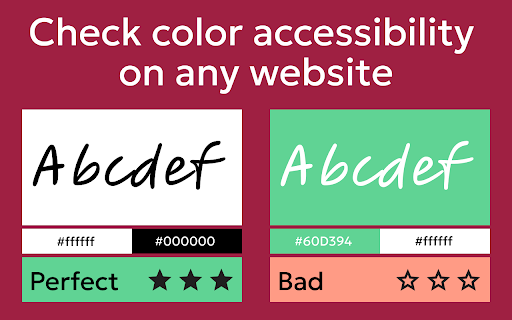
With one click, check color contrast for any element on the page. The checker scans live DOM content and shows contrast results right in your browser.

You’ll get:
 ▸ Pass/Fail status
 ▸ Suggested color adjustments
 ▸ Hex values
 ▸ Accessible alternatives

Evaluate Full Color Schemes
Working on a full design system or theme? Use the palette tester to evaluate all your UI shades. The palette checker helps you maintain visual harmony.

Simply upload or select your colors and get an instant accessibility report. It’s ideal for brand design, dashboards, and multi-component interfaces.

Integrated Online Accessibility Testing
We understand that modern teams need flexibility. That's why the extension supports online accessibility testing for dynamic content and SPAs. Whether it's React, Vue, or plain HTML — you're covered.

Need to check website accessibility on the fly? Just open the extension and run the checker — no page reloads needed.

Empower Your Workflow
Here’s what makes this accessibility color checker tool indispensable:
• Saves hours of manual testing
• Works directly in Chrome
• Highlights problem areas visually
• Shares results with your team
Built for speed and simplicity, it's perfect for fast-moving teams.

Follow the Standards
The color checker follows international standards for contrast ratio, including WCAG. No need to guess how to check color contrast for accessibility — we guide you step by step.

Even non-technical users can confidently check color accessibility and improve their designs.

Make the Web Better for Everyone
Use the website accessibility checker to ensure your content is readable, understandable, and inclusive. Every site can benefit from better contrast ratio and optimized visual accessibility.

Small changes in color contrast can lead to big improvements in engagement and retention.

Test and Improve in Real-Time
1. Open the extension
2. Choose background and text colors
3. Get instant contrast ratio checker results
It’s that simple. Say goodbye to trial and error.

A Must-Have for Every Site
From blogs to enterprise SaaS apps, our web accessibility color checker ensures your users can read, navigate, and interact comfortably.
Some use cases include:
💡 Blog design
💡 E-commerce product pages
💡 Button and link contrast testing
💡 Forms and inputs
💡 Custom dashboards

Frequently Asked Questions
Q: Is it hard to use?
A: Not at all! The interface is intuitive and beginner-friendly.
Q: Can I use it for client work?
A: Absolutely. It’s great for agencies and freelance designers.
Q: What standards does it follow?
A: The checker supports WCAG 2.0, 2.1 and 3 guidelines.

Try It Now — Make Your Web Content Accessible Today
Don’t leave accessibility to chance. Use the trusted color accessibility checker to audit, improve, and optimize every pixel of your site.

Install the tool now and join thousands of creators who are building better, fairer websites.
✅ Better contrast
✅ Satisfied users
✅ WCAG compliance
Technical
- Version
- 1.1.0
- Manifest
- V3
- Size
- 1.13MiB
- Min Chrome
- 88
- Languages
- 52
- Featured
- Yes
Metadata
- ID
- hhgnmpnklakblkddmmnbbbdgcgjciode
- Developer ID
- u4cc7aaa81c9d4174312621bd95cb6135
- Developer Email
- [email protected]
- Created
- Jul 2, 2025
- Last Updated (Store)
- Jul 10, 2025
- Last Scraped
- Jun 1, 2026
- Website
- —
- Support URL
- —
Similar extensions
Alternatives to Color Accessibility Checker, ranked by description similarity.

color contrast checker
Ensure accessibility with Color Contrast Checker. Easily check color contrast with contrast checker for compliance!
2.0K
★ 5.0

Contrast Check – WCAG Color Tester
Check color contrast ratio on any website. WCAG accessibility compliant contrast checker.
—

Check Color Contrast
To assess the color contrast between the text's foreground and background.
8

Color Contrast Checker by Accessibility Tracker
The best color contrast analyzer in the game.
83
★ 5.0

Webpage Color Customizer
Customize webpage colors with presets and custom themes.
126

ColorScout
Pick colours from any page and copy them to your clipboard. HEX & RGB with history and contrast hints.
24

ColorPicker
Easily pick colors from your browser screen.
94
★ 4.8

Eyedropper Tool - Color Chooser
Grab any pixel colour from any webpage and copy its HEX code instantly.
176
Data sourced from the Chrome Web Store · last verified Jun 1, 2026.