
Dro.pics Screenshot
Screenshot, Annotate & Upload
As of June 2026, Dro.pics Screenshot has 9 users in the Productivity category.
Usersdown 10.0 percent−10.0%
9
9
Ratingno change0%
—
— reviews
Reviewsno change0%
—
Version
1.2.3
Manifest V3
History
4 snapshotsTracking since Apr 1, 2026.
View as table
| Date | Users | Rating | Reviews | Version |
|---|---|---|---|---|
| Apr 1, 2026 | 10 | — | — | 1.2.3 |
| Apr 20, 2026 | 8 | — | — | 1.2.3 |
| Apr 29, 2026 | 9 | — | — | 1.2.3 |
| May 17, 2026 | 8 | — | — | 1.2.3 |
| Now | 9 | — | — | 1.2.3 |
Permissions & access
- Permissions
- activeTab
- Host access
- None declared
Screenshots
About
Easy to use:
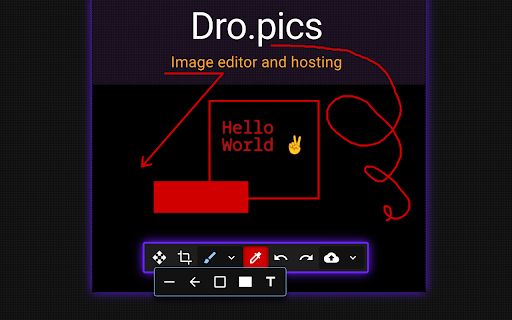
1) Click on extension icon to make a screenshot
2) Edit the image
3) Upload or Download

👆 Touch support
✨ Modern look
⌨️ Keyboard shortcuts
Technical
- Version
- 1.2.3
- Manifest
- V3
- Size
- 838KiB
- Min Chrome
- 88
- Languages
- 1
- Featured
- No
Metadata
- ID
- llfgplnnffneodbpdabioechhhdhjfjb
- Developer ID
- u96e6db2207c3d1e675994a6534332d8f
- Developer Email
- [email protected]
- Created
- Apr 10, 2024
- Last Updated (Store)
- Jan 12, 2026
- Last Scraped
- Jun 4, 2026
- Website
- dro.pics
- Support URL
- —
- Privacy Policy
- https://dro.pics/privacy-policy.txt
Similar extensions
Alternatives to Dro.pics Screenshot, ranked by description similarity.
StaticShot - Screenshot to Notes & Images
Capture, annotate, and save screenshots as markdown notes or images on Static.md
2.0K
★ 4.7

Backdropify Screenshot Extension
Capture screenshots effortlessly and instantly turn them into snapshots you’ll want to share!
How to use:
✨ Just open the…
7

EditMyScreenshot (screenshot tool)
Edit Screenshots Online with Ease
46
★ 5.0

Capture It - Screenshot Capture & Design
Capture & edit screenshots in beautiful designs.
24
★ 5.0

Screenshot Extension
Take a screenshot and save it to a location of your choice.
89

Screenshot Editor
Create beautiful screenshots with gradients, shadows, and rounded corners
96
★ 5.0

ScreenCapture Light - Screenshot Tool with Annotation & Scroll Capture
Capture full page, visible area, or regions with editing, annotations, cropping, and watermarks. Simple and powerful.
35

OneClick Screenshot
Click to capture screenshots instantly.
18
★ 5.0
Data sourced from the Chrome Web Store · last verified Jun 4, 2026.