
MarkUp For Chrome
Visual Feedback for Websites
As of June 2026, MarkUp For Chrome has 20,000 users and a 4.41/5 rating from 32 reviews in the Workflow & Planning category.
Usersno change0%
20.0K
20,000
Ratingdown 2.4 percent−2.4%
4.41
32 reviews
Reviewsup 3.2 percent+3.2%
32
Version
2.1.31
Manifest V3
90-day change · In the last 90 days this extension 7 version updates.
History
10 snapshotsTracking since Apr 4, 2026.
View as table
| Date | Users | Rating | Reviews | Version |
|---|---|---|---|---|
| Apr 4, 2026 | 20.0K | 4.52 | 31 | 2.1.23 |
| Apr 14, 2026 | 20.0K | 4.52 | 31 | 2.1.24 |
| Apr 19, 2026 | 20.0K | 4.52 | 31 | 2.1.24 |
| Apr 25, 2026 | 20.0K | 4.52 | 31 | 2.1.25 |
| Apr 28, 2026 | 20.0K | 4.52 | 31 | 2.1.25 |
| May 19, 2026 | 20.0K | 4.52 | 31 | 2.1.26 |
| Jun 2, 2026 | 20.0K | 4.52 | 31 | 2.1.27 |
| Jun 5, 2026 | 20.0K | 4.41 | 32 | 2.1.27 |
| Jun 13, 2026 | 20.0K | 4.41 | 32 | 2.1.29 |
| Jun 19, 2026 | 20.0K | 4.41 | 32 | 2.1.30 |
| Now | 20.0K | 4.41 | 32 | 2.1.31 |
Permissions & access
- Permissions
- tabsscriptingwebNavigationwebRequestdeclarativeNetRequeststoragealarmsoffscreen
- Host access
- <all_urls>
Screenshots


About
Easily provide and collect feedback on any live website, PDF or image from your browser with the MarkUp chrome extension.

MarkUp is the leading visual commenting platform for images, PDFs and live websites. It’s the perfect companion in your creative process to make your life easier.

MarkUp ALLOWS YOU TO
1. Turn any website or image into a collaboration workspace
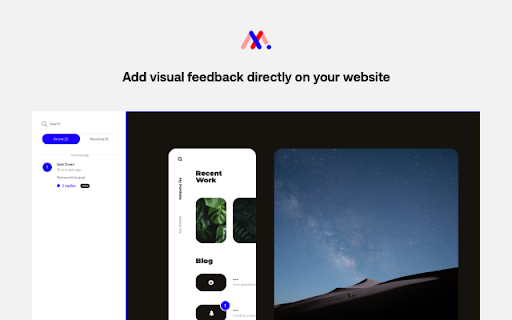
2. Add comments anywhere on your website
3. Share with your team to collect and manage their feedback, all in one place

COMMENT ANYWHERE
Your whole website becomes a digital canvas ready to collect feedback. Easily navigate your website within MarkUp and add comments to any page. All of your comments are organized by page in your sidebar. Click any comment on your sidebar and MarkUp will bring you right to the page and pin location.

INCLUDE SCREENSHOTS WITH COMMENTS
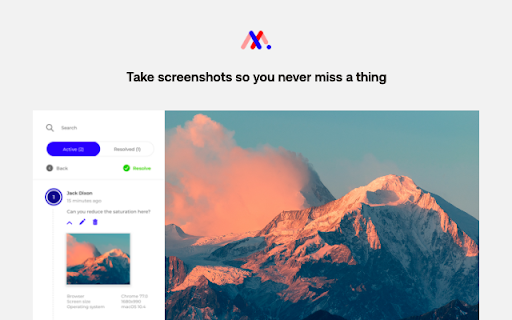
The MarkUp Chrome Extension allows you to include automated screenshots with every comment you make, providing an audit trail and allowing your team to see exactly what you were looking at when you made a comment and provided feedback.

SEAMLESS SHARING
When you’re ready, copy the project invite link and share with clients, colleagues, teammates, or even your friends. When they receive their link, they can seamlessly access the project as a guest (no signup required) or create their own account, quickly reply to and resolve your comments, or create their own.

MORE THAN AN EXTENSION
Want to try MarkUp, but don’t want to download an extension?
No problem, you can use MarkUp without an extension at markup.io.
Technical
- Version
- 2.1.31
- Manifest
- V3
- Size
- 11.06MiB
- Min Chrome
- 88
- Languages
- 1
- Featured
- No
Metadata
- ID
- llbkdcpbiogplgmefnkbgcdfiopfphbc
- Developer ID
- u39bf225ec2af2777afc8810fdaff4a20
- Developer Email
- [email protected]
- Created
- Aug 20, 2020
- Last Updated (Store)
- Jun 18, 2026
- Last Scraped
- Jun 19, 2026
- Website
- markup.io
- Support URL
- https://support.markup.io/
- Privacy Policy
- https://www.markup.io/privacy-policy/
Similar extensions
Alternatives to MarkUp For Chrome, ranked by description similarity.

Annotate Capture
Capture and upload page screenshots to Annotate.design
7

Page Marker Pro - Draw on Web Pages
Draw on web page, annotate, and mark up any webpage with a floating toolbar. Add text, shapes, highlights, and freehand drawings.
106

Page Marker for Google Chrome™
Draw and add text to any web page screenshot. Make notes easily
6.0K
★ 3.7
ZetaMarker - PDF & Web Highlighter
The privacy-friendly tool for highlighting web pages and PDF files.
20.0K
★ 4.3

Commented | Collaboration enabled!
Seamlessly comment and chat on your digital products
606
★ 5.0

GoComment
GoComment widget extension
13

Collaborate.to
A robust bug tracking and visual feedback tool for your website. Collect, organize and act on your feedback without any effort
14
★ 5.0

PageMark
A browser extension that allows you to take markdown and LaTeX notes on websites.
4
Data sourced from the Chrome Web Store · last verified Jun 19, 2026.