Element Outliner
Adds Outlines to Elements
As of May 2026, Element Outliner has 202 users in the Developer Tools category.
Usersdown 10.2 percent−10.2%
202
202
Ratingno change0%
—
— reviews
Reviewsno change0%
—
Version
1.0
Manifest V3
History
2 snapshotsTracking since Apr 24, 2026.
View as table
| Date | Users | Rating | Reviews | Version |
|---|---|---|---|---|
| Apr 24, 2026 | 225 | — | — | 1.0 |
| May 19, 2026 | 203 | — | — | 1.0 |
| Now | 202 | — | — | 1.0 |
Permissions & access
- Permissions
- activeTabscriptingstorage
- Host access
- None declared
Screenshots


About
■ FUNCTIONALITY
    ◈ Toggle Outline
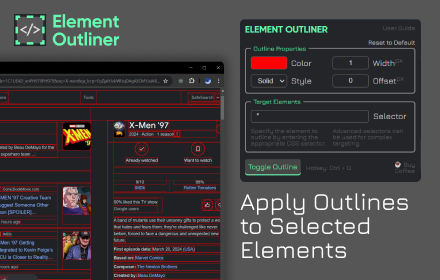
        - Apply an outline style to the current active tab by clicking the “toggle outline” button or by using the hotkey Ctrl + Q.
        - Target specific elements for outlining based on the entered CSS selector.
    ◈Control Outline Properties
        - Customize the outline’s color, style, width, and offset to suit their needs.

■ BACKGROUND and PURPOSE
    ◈ This extension is a personal practice project born out of a need to toggle element outlines during web development.
    ◈ It serves as a tool for web developers, designers, and accessibility testers, aiming to help them quickly visualize the structure of a webpage and identify potential layout or design issues.

■ HOW TO USE
    ◈ Install
        - Visit the Chrome Web Store, search for “Element Outliner”, and click on “Add to Chrome”.
    ◈ Uninstall
        - Open the Extensions menu in Chrome, find “Element Outliner”, and click “Remove”.
    ◈ General
        - Click the extension icon (upper right) to trigger the popup HTML.
        - Click the “toggle outline” button to add/remove the outline style to the current active tab.
            - Use Ctrl + Q as an alternative way to toggle the outline.
        - Set outline properties depending on your need/preference.
        - To target a specific group of elements or a specific element, enter the appropriate CSS selector.
        - To reset to default, click the reset button in the upper right corner of the outline properties section.

■ TROUBLESHOOTING and SUPPORT
    ◈ If you’re experiencing issues with Element Outliner, try the following:
        - Ensure inputs are valid and not empty.
        - Retoggle the outline.
        - Visit your browser’s “chrome://extensions/” and toggle on/off.
        - Reload the webpage.
        - Restart the browser.
        - Reinstall the extension.
    ◈ If you’re still having trouble or found bugs, please comment your issue in the feedback section.

■ SECURITY and PRIVACY MEASURES
    ◈ The extension does not access, collect, or modify any information on any site you visit.
    ◈ It operates under manifest version 3, which only grants the following permissions:
        - activeTabs: to query the current active tab and add style into the correct webpage.
        - storage: to save the customized outline properties for each tab.
            - data are stored as session only, (holds data in memory for the duration of a browser session only).
        - scripting: to add CSS styles into webpages

■ LIMITATIONS
    ◈ The extension is unable to add an outline style to:
        - Internal pages of the Chrome browser (like chrome://settings/, chrome://extensions/, etc.) due to security restrictions.
        - The extensions gallery (like https://chromewebstore.google.com/) as it cannot be scripted.
    ◈ The extension was developed and tested using the latest version of the Chrome browser. Compatibility with older versions has not yet been verified.

■ SUPPORT
    ◈ While the extension is free to use, your support can help maintain and improve the extension. Here are a few ways you can support:
        - Share Your Ideas: I value your input! Share your ideas or features you'd like to see implemented in future updates.
        - Spread the Word: If you find the extension useful, share it with others who might benefit from it.
        - Leave a Review: Your feedback matters! Leave a review or star rating.
        - Buy me a Coffee: If you're feeling generous, consider buying me a coffee to keep my creative juices flowing! ☕
           - https://ko-fi.com/ceps#

Every bit of your support is deeply appreciated. It contributes to making Element Outliner better for everyone. A heartfelt thank you to all! 😊
Technical
- Version
- 1.0
- Manifest
- V3
- Size
- 185KiB
- Min Chrome
- 88
- Languages
- 1
- Featured
- No
Metadata
- ID
- lkojkahobobmlgidfckdkpeklpionhmc
- Developer ID
- u6af17c6ab403e313ce4261e86c899bad
- Developer Email
- [email protected]
- Created
- Apr 15, 2024
- Last Updated (Store)
- Apr 15, 2024
- Last Scraped
- May 19, 2026
- Website
- —
- Support URL
- —
- Privacy Policy
- —
Similar extensions
Alternatives to Element Outliner, ranked by description similarity.

Element Outliner
Visualize HTML structure with color-coded outlines and detailed element inspection. Perfect for CSS debugging and layout analysis.
43
★ 5.0

Outliner - HTML Element Inspector
Professional HTML element inspector with custom outlines. Perfect for web developers to visualize page structure.
55
★ 5.0

Outline All Elements
Add CSS Outline property to all elements on the page for debugging CSS Layout.
388
★ 5.0

Outline HTML Elements
Outline HTML elements with a colorful border without affecting the layout to inspect website structure.
1.0K
★ 5.0

Inspect Element
Use Inspect element – a CSS viewer with Chrome inspect element shortcut. Learn how to inspect element easily using this simple tool!
3.0K
★ 4.8

Debug CSS
When enabled adds outline to all elements on the page, Hold Ctrl and hover to get more detail
10.0K
★ 4.4

Developer DOM Inspector
Inspect DOM elements visually
68
★ 5.0

CSS Debugger
Instantly debug CSS layouts by adding colorful outlines to HTML elements. Easily identify and inspect elements with a simple click.
617
★ 5.0
Data sourced from the Chrome Web Store · last verified May 19, 2026.