
Applitools Centra Screenshot Capture
Take a screenshot and save it to your system clipboard
As of May 2026, Applitools Centra Screenshot Capture has 117 users and a 5.00/5 rating from 2 reviews in the Workflow & Planning category.
Usersdown 6.4 percent−6.4%
117
117
Ratingno change0%
5.00
2 reviews
Reviewsno change0%
2
Version
1.0.1
Manifest V3
History
2 snapshotsTracking since Apr 24, 2026.
View as table
| Date | Users | Rating | Reviews | Version |
|---|---|---|---|---|
| Apr 24, 2026 | 125 | 5.00 | 2 | 1.0.1 |
| May 19, 2026 | 123 | 5.00 | 2 | 1.0.1 |
| Now | 117 | 5.00 | 2 | 1.0.1 |
Permissions & access
- Permissions
- activeTabscriptingtabsstorageclipboardWritecontextMenusnotifications
- Host access
- <all_urls>
Screenshots


About
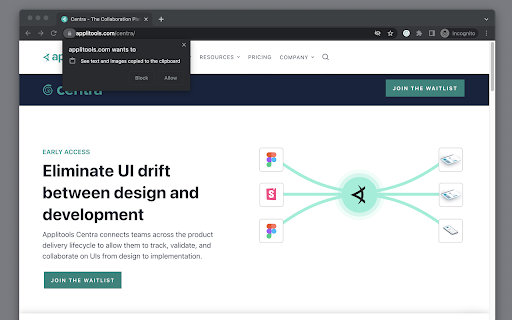
Applitools Centra enables you to capture full-page and viewport screenshots of your website or web application and upload it to Applitools Centra for easy comparison and validation against your designs or components.

Once uploaded to Centra, stakeholders can collaborate on differences that may arise between design and implementation. Enabling you to easily collaborate, validate, and track an app's development in your team.

Collaborate --  Easily communicate with different stakeholders across the product delivery lifecycle.

Validate -- Verify that your designs are implemented correctly and that your brand is kept intact.

Track --  View the history of your UI over time as changes are made.


Screenshot capture options:

Located in the context menu by right-clicking on the webpage. Available options include...

- [Default] Full-page screenshot (Captures the entire page).
- Viewport screenshot (Captures the viewable area on the page).
- [Default] Stitch with CSS (Captures screenshot using CSS transition and removes duplication of fixed position elements. i.e sticky headers/footers).
- Stitch with scroll (Captures screenshot using standard Javascript scrolling).

Known limitations:

Saving an image to the system clipboard only works on HTTPS or local HTTP sites.
Users need to allow the extension to copy images to clipboard per domain they use it on.
Technical
- Version
- 1.0.1
- Manifest
- V3
- Size
- 406KiB
- Min Chrome
- 88
- Languages
- 1
- Featured
- No
Metadata
- ID
- lkafnclgfnendcdgepjccbbadfcjlhdm
- Developer ID
- u12c041925b1cd02dbc97d86904f9017b
- Developer Email
- [email protected]
- Created
- Feb 9, 2023
- Last Updated (Store)
- Feb 9, 2023
- Last Scraped
- May 19, 2026
- Website
- —
- Support URL
- https://applitools.com/docs/centra/feedback
- Privacy Policy
- https://applitools.com/privacy-policy
Similar extensions
Alternatives to Applitools Centra Screenshot Capture, ranked by description similarity.
Easy Screenshot - a Web Clipper
all-in-on capturing tool for the visual part, the entire page, or a selective area with auto-scrolling and editing support
20.0K
★ 4.2

Free Snipping Tool
Professional snipping tool with full page, selection, and scrolling capture capabilities
40.0K
★ 3.9

Easy Screenshot
Capture full-page screenshots instantly. Manually select any part of the page to capture exactly what you need.
4

Full Page Screenshot
Capture full-page screenshots of any webpage
687
★ 1.0

Screenety - Screen Recorder & Annotation Tool
Screenshot tool
154
★ 5.0

Full Page Screenshot - Screen Capture
Screenshot tool for making a full page or partial screen capture with further edit, text adding and download.
3.0K
★ 4.3

Quick Snip
Browse web and capture tabs you like, easy and quick.
10.0K
★ 3.6

Captr
Take and edit beautiful screenshots on the fly
258
★ 5.0
Data sourced from the Chrome Web Store · last verified May 19, 2026.