
Monosnap
Capture pages or blocks with the awesome smart screen capture tool!
As of June 2026, Monosnap has 30,000 users and a 3.56/5 rating from 41 reviews in the Workflow & Planning category.
Usersno change0%
30.0K
30,000
Ratingdown 2.7 percent−2.7%
3.56
41 reviews
Reviewsup 7.9 percent+7.9%
41
Version
2.0.22
Manifest V3
History
5 snapshotsTracking since Apr 10, 2026.
View as table
| Date | Users | Rating | Reviews | Version |
|---|---|---|---|---|
| Apr 10, 2026 | 30.0K | 3.66 | 38 | 2.0.22 |
| Apr 17, 2026 | 30.0K | 3.62 | 37 | 2.0.22 |
| May 7, 2026 | 30.0K | 3.66 | 38 | 2.0.22 |
| May 11, 2026 | 30.0K | 3.59 | 39 | 2.0.22 |
| Jun 25, 2026 | 30.0K | 3.63 | 40 | 2.0.22 |
| Now | 30.0K | 3.56 | 41 | 2.0.22 |
Permissions & access
- Permissions
- clipboardWritedownloadsstoragenotificationswindowstabsdesktopCapturecontextMenussystem.memorysystem.displayalarmsscriptingoffscreen
- Host access
- <all_urls>
Screenshots



About
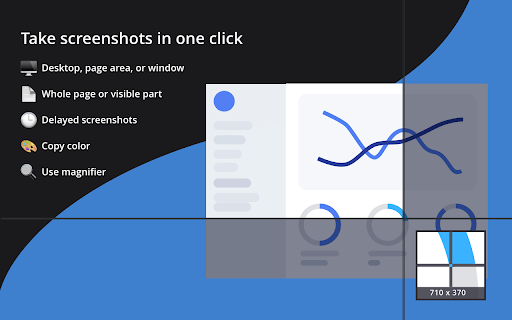
Take screeshots in 1️⃣ click!

Capture and edit screenshots, upload files, record video and .GIFs! Share a visual explanation with your clients and colleagues.

📸 Capture:
▸ Desktop screenshots: fullscreen and window.
▸ Page: screenshots: area, visible content, and whole page.
▸ Taking timed screenshots.
▸ Customize hotkeys.

✏️ Annotate and edit:
▸ Highlight important details with arrows, pen, shapes, and text.
▸ Hide too personal and private information with the blur tool.
▸ Resize and crop screenshots.

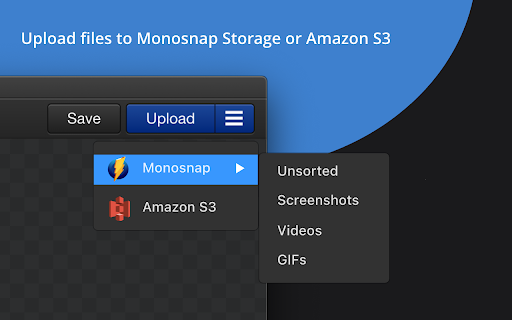
☁️ Upload and share:
▸ Log in to get 2 GB in Monosnap Cloud storage.
▸ Amazon S3 storage (Non-Commercial and Commercial plans)

🎥 Record:
▸ Desktop, window or browser
▸ WebM and GIF
▸ Add audio to your videos
▸ Customize FPS

📧 Contact US:
▸ Twitter: https://twitter.com/monosnap
▸ Facebook: https://www.facebook.com/Monosnap/
▸ Support:  [email protected]


ℹ️ Info:
▸ Pricing and Plans: https://monosnap.ai/pay
▸ Support Docs: https://medium.com/@monosnap
▸ Terms of Service: https://monosnap.ai/tos
▸ Privacy Policy: https://monosnap.ai/privacy

❓2.0.22 changelog:
▸ Settings fixes due to Chrome update
▸ Aws s3 UI buckets duplicate fix

❓2.0.21 changelog:
Manifest permission cleanup
▸ Removed: system.cpu, system.storage, audio, identity, identity.email
New feature: Recent Media page
▸ New MSRecentMedia class with default state tracking
▸ Captures registered on upload; blob deletion guarded against active consumers
▸ Popup button added conditionally (only shown when there are recent items)
▸ Dedicated page, EJS template, and styles
▸ Recovery hints surfaced on upload failure notifications
i18n strings added
▸ Empty state shown by default; EJS template registered inline
Blob / offscreen infrastructure
▸ Offscreen blob bridge added to background
▸ Editor and screencast player register as blob consumers
▸ Consumer-aware blob utils with lifecycle guard to prevent premature deletion
S3 settings fixes
▸ Debounced credential input handlers (400ms) to prevent rapid-fire saves _bucketsRefreshed flag + one-shot background bucket refresh after cached render
▸ Removed bucket-fetch from render() to break an infinite update loop
▸ buckets_loaded refresh trigger removed; logout resets state cleanly
▸ Robust bucket fetch with safe type coercion
Authentication / Okta
▸ OAuth client cached across calls; service worker handling hardened
▸ Logging: Okta data redacted in prod, mirrored only in dev
▸ BackgroundPopupChromeExtensionLoader added
Settings / accounts
▸ Account syncing deferred to the accounts handler (not settings init)
▸ account_updated event routing fixed: moved back to local.subscribe; settings.js bridge relays chrome-to-local
▸ [object Function] bug in Path field fixed
Misc
▸ Export UI: reuse cached folders; S3 labels clarified
▸ Sessions substantially reworked (204-line diff)
▸ hardware.js removed from chrome_api

Contact [email protected] to learn more about Enterprise plans.
Technical
- Version
- 2.0.22
- Manifest
- V3
- Size
- 11.42MiB
- Min Chrome
- 100
- Languages
- 2
- Featured
- Yes
Metadata
- ID
- lhgadannddhdpkfhfjjgcpdjhpmjhkfm
- Developer ID
- ub0ed76f1851c33d6f569e46c2c8201ab
- Developer Email
- [email protected]
- Created
- May 25, 2017
- Last Updated (Store)
- Mar 27, 2026
- Last Scraped
- Jun 25, 2026
- Website
- monosnap.ai
- Support URL
- https://monosnap.zendesk.com/
- Privacy Policy
- https://monosnap.ai/privacy
Similar extensions
Alternatives to Monosnap, ranked by description similarity.

AD Screenshot and Recorder
Capture your screen easily using the screen recorder and screen capture tool.
326

TinySnap (Production-ready Screenshot Tool)
Production-ready screenshots made simple for creators, developers and marketers.
4.0K
★ 4.8

Screenshotify
Lightweight Screenshot + Annotate Chrome Extension. Capture, annotate, blur, crop, and zoom screenshots - all offline and private.
11
★ 5.0

ScreenCloud Digital Signage Player
Easy to use cloud based Digital Signage content management. Designed to work with Google apps, Chrome, Chromebox, & Chromebit kiosk
—
★ 4.1

Awesome Screen Recorder & Screenshot
The best screen recorder and screen capture & screenshot tool to record screen.
3.0M
★ 4.7

Snapilot - Full Page Screenshot
Full-featured webpage screenshot tool, supporting full-page scrolling, area selection, and image editing.
1

Screenshot Collab
Take unlimited screenshots of any webpage. Annotate, edit, and save screenshots locally, or upload and share them via Google Drive.
167
★ 5.0

Bonjoro
Free HD screen recorder for Chrome
3.0K
★ 4.3
Data sourced from the Chrome Web Store · last verified Jun 25, 2026.