
Netflix Subtitle Translator
Translates Netflix subtitles in real-time.
As of May 2026, Netflix Subtitle Translator has 1,000 users and a 4.38/5 rating from 8 reviews in the Entertainment category.
Usersno change0%
1.0K
1,000
Ratingup 2.1 percent+2.1%
4.38
8 reviews
Reviewsup 14.3 percent+14.3%
8
Version
1.0
Manifest V3
History
1 snapshotsTracking since Apr 23, 2026.
View as table
| Date | Users | Rating | Reviews | Version |
|---|---|---|---|---|
| Apr 23, 2026 | 1.0K | 4.29 | 7 | 1.0 |
| Now | 1.0K | 4.38 | 8 | 1.0 |
Permissions & access
- Permissions
- activeTabscriptingstorage
- Host access
- https://www.netflix.com/watch/*
Screenshots

About
Netflix Subtitle Translator is a Chrome extension designed for language learners and anyone who wants to enjoy Netflix content with translated subtitles. By providing real-time subtitle translations, this extension enhances your viewing experience and helps you understand foreign languages better.

Why install it?

Language Learning: Ideal for language learners who want to watch shows in a foreign language with dual subtitles, allowing you to compare the original and translated text simultaneously.

Overcome Limitations: Bypass Netflix's limitations by getting translations in languages that are not offered by Netflix.

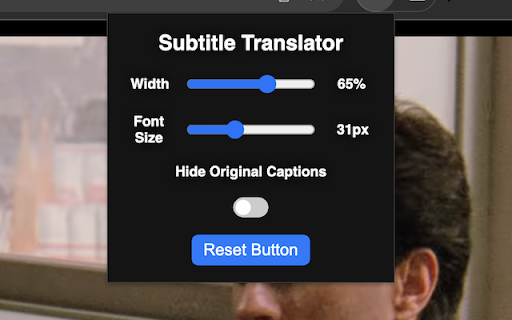
Customization: Adjust the font size, textbox width, and placement of the translated subtitles on your screen for a personalized viewing experience.

User-Friendly: Easily toggle the visibility of original captions and reset all settings with a single click.

Functionalities:
Drag the translated text box to any location on the screen.
Adjust font size and textbox width using sliders in the extension's popup.

Toggle the visibility of the original captions with the "Hide Original Captions" button.

Reset all settings to default with the "Reset" button.
Installation and Usage:

Install the extension from the Chrome Web Store.

Go to Netflix.com and start playing a video.

Right-click on the screen, select "Translate," and choose your target language.

The translated subtitles will appear in your chosen language.
By installing Netflix Subtitle Translator, you gain an effective tool for language learning and an enhanced viewing experience on Netflix.
Technical
- Version
- 1.0
- Manifest
- V3
- Size
- 19.39KiB
- Min Chrome
- 88
- Languages
- 1
- Featured
- No
Metadata
- ID
- lhdphaeipialmjelannmaeoejdmcgclk
- Developer ID
- u79ff2a89be12e00a1a2cce4950a05c43
- Developer Email
- [email protected]
- Created
- Jul 2, 2024
- Last Updated (Store)
- Jul 2, 2024
- Last Scraped
- May 18, 2026
- Website
- —
- Support URL
- —
- Privacy Policy
- —
Similar extensions
Alternatives to Netflix Subtitle Translator, ranked by description similarity.

Netflix Live Translator
Translate Netflix subtitles in real time. 106 languages. Free, private, runs entirely in your browser. Bring your own API key.
16

Subtitle Reader for Netflix
Subtitle Reader for Netflix 🎥🎧 Transform your viewing experience by turning subtitles into an immersive auditory adventure
365
★ 3.4

Netflix Dual Subtitles Master
Displays subtitles in your preferred language from 55 options, below the original Netflix subtitles.
469
★ 4.5

Youtube Subtitles
Get accurate and fast YouTube subtitles with our extension.
236
★ 4.0

Dubtitles
Translate Netflix subtitles into your preferred language. Learn A language with quizzes!
—

SubStream: Add Subtitles to Videos
Enhance Your Streaming Experience with Custom Subtitles!
1.0K
★ 4.9

Amazon Prime Subtitles & Dictionary
Dual subtitles and AI explanations for Amazon Prime. Save words, download transcripts, and master a new language while watching!
2.0K
★ 3.1

Dual Subtitles
Watch Netflix, Apple TV+, Disney+ and Prime Video with two subtitles at once. Pick language, position and style—no more switching.
36
★ 5.0
Data sourced from the Chrome Web Store · last verified May 18, 2026.