
Integrito — Analyze Text, Check Plagiarism&AI
This extension is a helpful all-in-one tool for education and working with texts.
As of June 2026, Integrito — Analyze Text, Check Plagiarism&AI has 5,000 users and a 4.81/5 rating from 27 reviews in the Productivity category.
Usersno change0%
5.0K
5,000
Ratingno change0%
4.81
27 reviews
Reviewsno change0%
27
Version
1.5.1
Manifest V3
90-day change · In the last 90 days this extension 6 version updates.
History
8 snapshotsTracking since Apr 5, 2026.
View as table
| Date | Users | Rating | Reviews | Version |
|---|---|---|---|---|
| Apr 5, 2026 | 5.0K | 4.81 | 27 | 1.4.5 |
| Apr 16, 2026 | 5.0K | 4.81 | 27 | 1.4.6 |
| Apr 22, 2026 | 6.0K | 4.81 | 27 | 1.4.6 |
| May 2, 2026 | 6.0K | 4.81 | 27 | 1.4.7 |
| May 11, 2026 | 6.0K | 4.81 | 27 | 1.4.8 |
| May 28, 2026 | 6.0K | 4.81 | 27 | 1.4.9 |
| Jun 6, 2026 | 5.0K | 4.81 | 27 | 1.4.9 |
| Jun 21, 2026 | 5.0K | 4.81 | 27 | 1.5.0 |
| Now | 5.0K | 4.81 | 27 | 1.5.1 |
Permissions & access
- Permissions
- storageactiveTabnotificationsscriptingwebRequestwebNavigation
- Host access
- <all_urls>
Screenshots

About
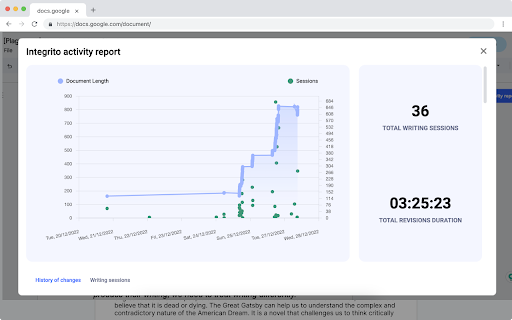
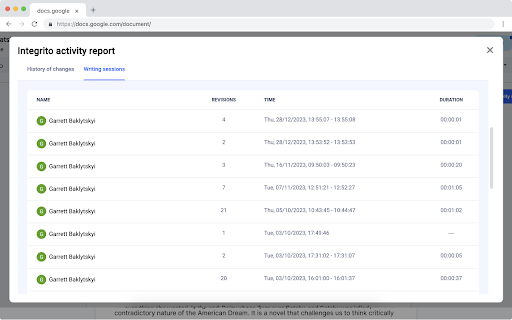
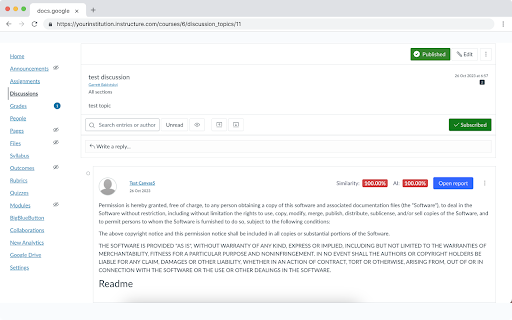
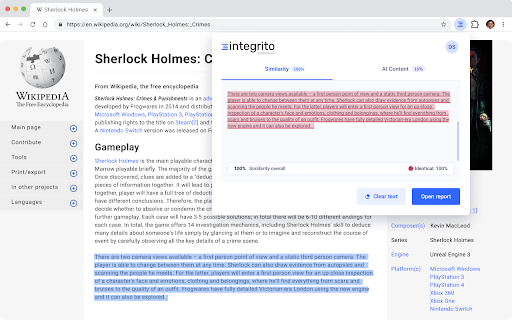
Integrito allows you to: ✅ Prove or disprove text authenticity by exploring the writing process and identifying suspicious events in Activity reports ✅ Check Quizzes & Discussions in Canvas for Plagiarism and AI ✅ Check any web content for Plagiarism and AI in 1 click Integrito Activity reports allow to track writing and contribution progress to see: - how the text was written - how much time was spent on writing it - if suspicious events like pasted text happened and compare them to the final version - if there were any other contributors to make sure contract-cheating didn't take place. With Integrito Activity reports, students can easily prove they didn’t use AI and wrote the assignment on their own by showing the writing process. This way they can get a fair grade no matter what AI detectors say. For teachers, Integrito gives confidence in assignment authenticity by tracking suspicious events like pasted text or outsourcing the writing to a third party. Activity reports provide an extensive overview of what AI detectors and plagiarism checkers are missing. Integrito by PlagiarismCheck.org helps teachers, students, and content creators check for plagiarism and AI-generated content Integrito Plagiarism checker Chrome extension makes the process smoother: scan any webpage and get a clear report within seconds. ✅ How it works: - Select the text you want to check. - Launch Integrito extension. - Click “Check”. - Get a similarity and AI percentage in no time! - Access a detailed report to analyze the similarity sources. - Download the PDF report to share it with others. 🔧 Integrito extension includes a comprehensive toolkit to enhance your workflow: - Check plagiarism swiftly and accurately with our sophisticated algorithms and constantly updated databases. - Trace potentially machine-written content with our precise AI detector. - Check Discussions from Canvas or Brightspace. - Analyze any assignment right in your LMS. - Stay mistakes and typo-free with the Writing Assistant. 🧑🏫 Why customers choose Integrito by PlagiarismCheck.org: - Plagiarism detector provides deep Internet search along with specific databases, some of which are not available on the web. - AI-detector with 97% accuracy distinguishes between human and machine writing and catches content from popular AI generators - including Google Bard and ChatGPT checker. - Responsive customer Support is available 24/7, fixing problems and answering questions. - The team offers free unlimited training for the faculty. - The tool is improving along with technologies, helping you to be one step ahead of AI and plagiarism-related challenges! ⚙️ How to set Integrito Plagiarism & AI Detector Chrome extension: - Click “Add to Chrome”. - Click on the extension's icon on the extension bar. - Click “pin” near the Plagiarism and AI Checker. - Register/log in with your email or Gmail. - Enjoy! Integrito is a powerful tool for text analysis in Google Doc history that leaves no doubts in the text's authenticity and originality. If you have ever wondered how to prove you didn’t plagiarize or use AI, Integrito was created to help you! Try it now and tell us what you think in Reviews! ⭐⭐⭐⭐⭐
Technical
- Version
- 1.5.1
- Manifest
- V3
- Size
- 2.66MiB
- Min Chrome
- 88
- Languages
- 1
- Featured
- Yes
Metadata
- ID
- lhbjcjhlgiblnlfigbfhnamoghgfppoh
- Developer ID
- ua96ed36dc37082deced562ce30154275
- Developer Email
- [email protected]
- Created
- Nov 3, 2023
- Last Updated (Store)
- Jun 12, 2026
- Last Scraped
- Jun 21, 2026
- Website
- https://plagiarismcheck.org/
- Support URL
- https://plagiarismcheck.org/contact-us/
- Privacy Policy
- https://plagiarismcheck.org/privacy-policy/
Similar extensions
Alternatives to Integrito — Analyze Text, Check Plagiarism&AI, ranked by description similarity.

AI Checker for Teachers
Leverage AI Checker for Teachers — featuring an AI detector for essays. Teachers ensure originality with our ai paper checker tool.
1.0K
★ 5.0

Trace GPT AI Detector by PlagiarismCheck.org
Check content, websites, and emails for AI presence with an accurate Trace GPT AI Detector by PlagiarismCheck.org
5.0K
★ 4.3

AI Content Detector - Copyleaks
Verify what content was written by a human or an AI chatbot with the AI Content Detector browser extension from Copyleaks.
200.0K
★ 4.1

It's AI: AI Detector
Detect AI-generated content within one click. Just highlight text and get instant results. ChatGpt plugin included.
It's AI is an…
215
★ 5.0

AI or Not?
Analyze text to determine if it's AI-generated.
17

Google Classroom plagiarism and AI checker
PlagiarismCheck.org integrates with Google Classroom to provide teachers and students an easy way to ensure academic integrity.
10.0K
★ 4.7

AI Check
Use AI Check, an AI detection tool to score originality and detect if ai text is machine-written across pages, emails—in seconds.
179
★ 3.7

Ghost Writer - Free
Make AI write and type for you. Effortlessly bypass revision history based AI detection.
238
★ 5.0
Data sourced from the Chrome Web Store · last verified Jun 21, 2026.