
Trace GPT AI Detector by PlagiarismCheck.org
Check content, websites, and emails for AI presence with an accurate Trace GPT AI Detector by PlagiarismCheck.org
As of June 2026, Trace GPT AI Detector by PlagiarismCheck.org has 5,000 users and a 4.32/5 rating from 28 reviews in the Productivity category.
Usersdown 16.7 percent−16.7%
5.0K
5,000
Ratingno change0%
4.32
28 reviews
Reviewsno change0%
28
Version
1.0.12
Manifest V3
90-day change · In the last 90 days this extension lost 1.0K users, 2 version updates.
History
3 snapshotsTracking since Apr 1, 2026.
View as table
| Date | Users | Rating | Reviews | Version |
|---|---|---|---|---|
| Apr 1, 2026 | 6.0K | 4.32 | 28 | 1.0.10 |
| Jun 6, 2026 | 6.0K | 4.32 | 28 | 1.0.11 |
| Jun 21, 2026 | 5.0K | 4.32 | 28 | 1.0.11 |
| Now | 5.0K | 4.32 | 28 | 1.0.12 |
Permissions & access
- Permissions
- storageactiveTabnotificationsscripting
- Host access
- <all_urls>
Screenshots


About
Find out whether the text is human-written or AI-generated with our ChatGPT Detector and be confident in the web content's authenticity.

Browse safely 🔒by using a secure AI Writing Detector and ensure the posts on blogs or social media, reviews on the websites, and web texts are human-written. An accurate and free AI Detector Chrome Extension becomes handy in your everyday browsing, teaching, or business routine.

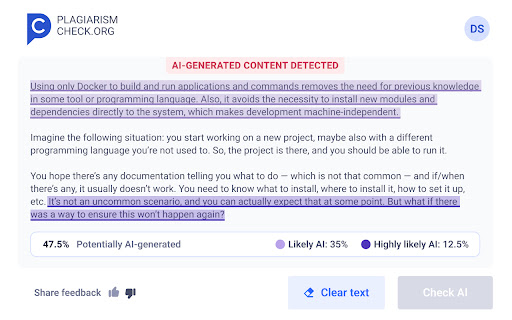
Just select the text you want to check on the webpage and launch our AI Detector Chrome Extension, or paste your text in the Extension window to get an accurate, reliable result in no time.

How you can benefit from Trace GPT AI Detector:

💡Rely on the real 97% accuracy with extremely low false-positives
💡Catch popular AI generators, including Google Bard and ChatGPT
💡Get convenient and clear reports in one place
💡Download a pdf report to share with others
💡Check your texts for FREE

How to use:
✅ Click “Add to Chrome”
⬇⬇⬇
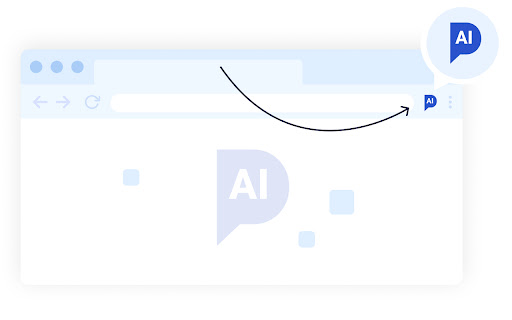
✅ Click on the extension's icon in the extension bar
⬇⬇⬇
✅Click “pin near TraceGPT AI Detector
⬇⬇⬇
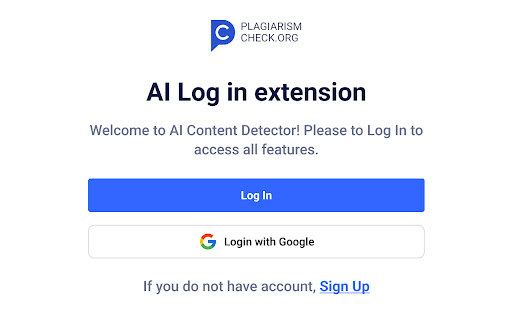
✅ Register/Login with your email or Gmail
⬇⬇⬇
Enjoy! 🏁

Select the text from a webpage and launch our extension to see the result, or copy-paste text or a file in AI Detector Chrome Extension by PlagiarismCheck.

🙌🏼 We would appreciate you leaving us a 5-star review 😉
Technical
- Version
- 1.0.12
- Manifest
- V3
- Size
- 168KiB
- Min Chrome
- 88
- Languages
- 1
- Featured
- No
Metadata
- ID
- jlkgehfplidjjhkhhnjakobmiajignpe
- Developer ID
- ua96ed36dc37082deced562ce30154275
- Developer Email
- [email protected]
- Created
- Jul 21, 2023
- Last Updated (Store)
- Jun 12, 2026
- Last Scraped
- Jun 21, 2026
- Website
- https://plagiarismcheck.org/
- Support URL
- https://plagiarismcheck.org/contact-us/
- Privacy Policy
- https://plagiarismcheck.org/privacy-policy/
Similar extensions
Alternatives to Trace GPT AI Detector by PlagiarismCheck.org, ranked by description similarity.

AI Content Detector - Copyleaks
Verify what content was written by a human or an AI chatbot with the AI Content Detector browser extension from Copyleaks.
200.0K
★ 4.1

It's AI: AI Detector
Detect AI-generated content within one click. Just highlight text and get instant results. ChatGpt plugin included.
It's AI is an…
215
★ 5.0

AI Text Detector
Use AI text Detector as chatgpt checker: AI detection tool analyzes content on web pages and documents with chat gpt detector.
564
★ 5.0

AI Text Detection
Quickly check if text is AI-generated with advanced detection algorithms
23
★ 5.0

AI Humanizer and Detector by Rephrasy
Best AI Humanizer and Detector. 100 % undetectable for AI Detectors.
1.0K
★ 5.0
AI Content Detector for ChatGPT - Sapling.ai
Quickly check if any content was AI generated, and make sure your writing isn't!
9.0K
★ 4.8

HumanText - AI Humanizer & Detector
Humanize AI text and detect AI content directly from any webpage. Works with ChatGPT, Claude, Gemini & more.
42

AI Content Detector
Detect AI-generated content in web pages and custom text
25
★ 5.0
Data sourced from the Chrome Web Store · last verified Jun 21, 2026.