
Amplitude Copy Helper
Copy raw JSON data from Amplitude Analytics event details with beautiful notifications
As of May 2026, Amplitude Copy Helper has 3 users in the Developer Tools category.
Usersdown 25.0 percent−25.0%
3
3
Ratingno change0%
—
— reviews
Reviewsno change0%
—
Version
1.0.2
Manifest V3
History
4 snapshotsTracking since Apr 20, 2026.
View as table
| Date | Users | Rating | Reviews | Version |
|---|---|---|---|---|
| Apr 20, 2026 | 4 | — | — | 1.0.2 |
| May 5, 2026 | 3 | — | — | 1.0.2 |
| May 16, 2026 | 3 | — | — | 1.0.2 |
| May 30, 2026 | 4 | — | — | 1.0.2 |
| Now | 3 | — | — | 1.0.2 |
Permissions & access
- Permissions
- None declared
- Host access
- None declared
Screenshots
About
# 🚀 Streamline Your Amplitude Analytics with One-Click JSON Copying

Amplitude Copy Helper is the essential Chrome extension for developers, data analysts, and teams who work with Amplitude Analytics daily. Stop wasting time manually selecting and copying event JSON data - get everything you need with a single click.

✨ Key Features:
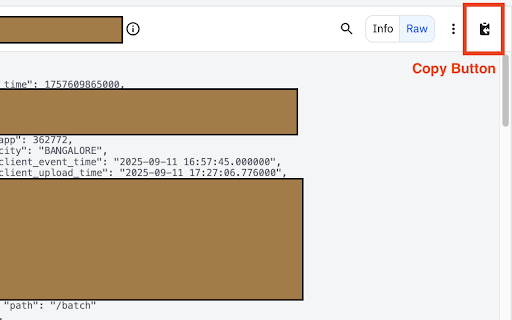
• Instant Copy Button - Adds a convenient copy button directly to Amplitude event detail pages
• Auto Raw View - Automatically switches to raw JSON view when needed
• Complete Data Copy - Copies full event JSON including all properties and metadata
• Smart Toast Notifications - Clean, native-style confirmations that match Amplitude's design
• Seamless Integration - Native-looking button that blends perfectly with Amplitude's interface

🎯 Perfect For:
• Developers debugging event tracking and analytics implementations
• Data analysts extracting event data for analysis and reporting
• QA teams documenting event structures and validation
• Product managers reviewing user behavior data
• Anyone who frequently works with Amplitude event data

⚡ How It Works:
1. Install the extension
2. Navigate to any Amplitude event details page
3. Click the new copy button that appears next to view toggles
4. Raw JSON data is instantly copied to your clipboard
5. Paste anywhere - complete event data ready to use!

🔒 Privacy & Security:
• No data collection or tracking
• Works entirely within your browser
• Only accesses Amplitude pages when needed
• Open source and transparent

🛠 Technical Details:
• Compatible with all Amplitude Analytics instances (*.amplitude.com)
• Lightweight and fast - no impact on page performance
• Handles automatic view switching for optimal data extraction
• Works with all modern Chrome and Edge versions

💡 Boost Your Analytics Workflow:
Save time every day by eliminating repetitive copying tasks when working with Amplitude event data. Whether you're debugging tracking implementations, creating reports, or analyzing user behavior, Amplitude Copy Helper makes extracting event information effortless.
Technical
- Version
- 1.0.2
- Manifest
- V3
- Size
- 14.25KiB
- Min Chrome
- 88
- Languages
- 1
- Featured
- No
Metadata
- ID
- lgmeodeikpnpecackehhedpchpihpjnl
- Developer ID
- u9e12905bc72d95783f3964640ea42243
- Developer Email
- [email protected]
- Created
- Sep 18, 2025
- Last Updated (Store)
- Sep 18, 2025
- Last Scraped
- May 30, 2026
- Website
- —
- Support URL
- —
- Privacy Policy
- —
Similar extensions
Alternatives to Amplitude Copy Helper, ranked by description similarity.

Console Copy
Capture & analyze console logs with on-device AI Assistant (Gemini Nano) and Lighthouse-style Page Analysis. Filters, search, export
56
★ 5.0

Copy Console
One-click console log copying with timestamps, performance markers, and gap analysis - optimized for AI debugging
19

Console Copy Tool
Automatically captures and copies formatted console messages from Chrome DevTools
875
★ 5.0

Click Copy {Code} – One-Click Copy
Software engineer's friend. Copy code from any website with a single click.
204
★ 5.0

CloudClip – Multicopy Clipboard History Manager with Dark Mode & CSV Export
CloudClip saves copied text, lets you search, reuse, delete, and export as CSV. Works offline with local storage and no tracking
545
★ 5.0

Copy Title & URL
Quickly copy the current page title and URL in plain text, Markdown, or HTML formats.
7

SVG Copy Extension
Copy SVG elements with a single click when hovering over them
15

Firestore JSON Copier
Copy Firestore documents as JSON with one click
50
★ 1.0
Data sourced from the Chrome Web Store · last verified May 30, 2026.