
Ottitor
Accessibility Testing extension within browser
As of May 2026, Ottitor has 45 users in the Accessibility category.
Usersdown 10.0 percent−10.0%
45
45
Ratingno change0%
—
— reviews
Reviewsno change0%
—
Version
1.6.2
Manifest V3
History
4 snapshotsTracking since Apr 20, 2026.
View as table
| Date | Users | Rating | Reviews | Version |
|---|---|---|---|---|
| Apr 20, 2026 | 50 | — | — | 1.6.2 |
| May 5, 2026 | 49 | — | — | 1.6.2 |
| May 16, 2026 | 48 | — | — | 1.6.2 |
| May 30, 2026 | 46 | — | — | 1.6.2 |
| Now | 45 | — | — | 1.6.2 |
Permissions & access
- Permissions
- storagetabsscriptingactiveTabdownloads
- Host access
- http://*/*, https://*/*
Screenshots
About
Introduction

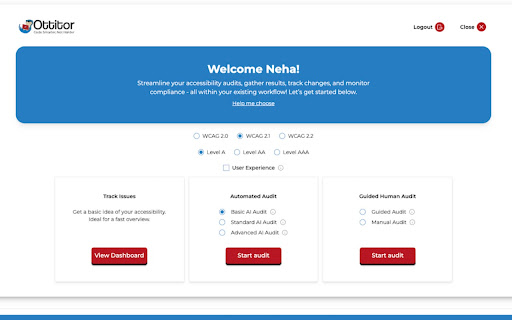
Ottitor is a website accessibility auditing and remediation tool. With an intuitive, streamlined, and point-of-use design, this user-friendly tool empowers individuals of all backgrounds and experience levels with the ability to test their website code for compliance with Web Content Accessibility Guidelines (WCAG), the global digital accessibility standard, and remediate any issues of noncompliance. Powered by advanced Artificial Intelligence, Ottitor dives deeper into accessibility compliance than any other tool on the market and delivers secure, precise website analysis. Users can even use Ottitor to edit the noncompliant code and verify that the proposed solution will indeed comply with the applicable standard.

What is it?

* Comprehensive Accessibility Auditing and Remediation Tool: Ottitor analyzes websites for compliance with digital accessibility standards and provides a mechanism to remediate any issues that are found.
* Browser Extension for Ease of Use: Available on web stores, Ottitor simplifies accessibility checks directly from within your browser.
* AI-Driven Insights: Powered by AI to analyze and enhance accessibility and user experiences so that you can comply with the law and meaningfully engage diverse audiences.
* User-Centric Evolution: Continuously evolving to match global digital accessibility requirements and accommodate user experience best practices. Cutting edge, and future-facing.
* Efficient Reporting: Generates detailed, actionable audit reports to help developers, designers, even small business web content managers, fix accessibility issues quickly, correctly.
* Global Language Support: Designed for inclusivity, Ottitor supports multiple languages to reach a broader audience.

Who should use it?

* Web Developers & Designers: To identify and fix accessibility issues during the website creation process.
* QA & Accessibility Testers: For conducting comprehensive audits and ensuring compliance with WCAG standards.
* Small Business Owners & Web Content Managers: To ensure their websites are accessible to a wider audience, improving user experience and avoiding legal risks.
* Educational Institutions: To audit e-learning platforms and make them inclusive for students with disabilities.
* Government Agencies: To meet accessibility regulations and ensure public websites are inclusive to all users.
* Assistive Technology Experts: To evaluate and improve web compatibility with assistive tools.

Why another accessibility testing tool?
More than 1 billion people, around the world, live with a disability. They control more than \$8 trillion in spending. Yet, only 3% of websites meet their accessibility needs, according to research.

Many WCAG rules, the global digital accessibility standard, necessitate a semantic understanding of content, which, traditionally, can only be verified through human intervention. This process is often time-consuming and prone to inconsistencies. Ottitor leverages the power of Artificial Intelligence (AI) and large language models (LLMs) to automate these checks, making accessibility audits more efficient and reliable.

Robust features do not have to be complicated, and simplicity should not mean basic. Ottitor is a game changer in the world of quality assurance (QA) and accessibility auditing. This website accessibility checker provides powerful features and meaningful content exactly where you need it, when you need it. The user interface has been deliberately designed to help you focus on, and accomplish, the task at hand by eliminating distractions and empowering capabilities relevant at every point of use.

Features

* Advanced AI Analysis
* Manual Testing
* Guided Analysis
* In-app issue tracking
* Export Functionality to Github issue tracker and CSV file download
* Remediation function to verify solutions

Why can Ottitor manage your downloads

Ottitor allows users to generate and export accessibility audit reports. This requires permission to manage downloads so that the extension can:
* Trigger and save audit reports to your computer;
* Download files securely and store them properly;

Why can Ottitor read and change all of your data on the websites you visit
This permission is required so Ottitor can:
* Analyze the content of the webpages you visit for accessibility issues;
* Highlight elements that need attention.
* Provide real-time feedback and recommendations.
Technical
- Version
- 1.6.2
- Manifest
- V3
- Size
- 15.32MiB
- Min Chrome
- 88
- Languages
- 3
- Featured
- No
Metadata
- ID
- lgdjiennpmfahlhcglbjajbnjelpphil
- Developer ID
- ub4c6266e9a401fffd81e83b245f0c57a
- Developer Email
- [email protected]
- Created
- Feb 4, 2025
- Last Updated (Store)
- Aug 29, 2025
- Last Scraped
- May 30, 2026
- Website
- ottitor.com
- Support URL
- —
- Privacy Policy
- https://www.ottitor.com/policy.html
Similar extensions
Alternatives to Ottitor, ranked by description similarity.

A11yInspect Accessibility Testing Tool
Your fastest path from accessibility issues to clean, shippable code. Test for WCAG, EN 301 549, and more.
1.0K
★ 5.0

Able - Accessibility & ADA Compliance Checker
One-click WCAG & ADA accessibility audits with plain-language results and actionable fix suggestions.
19

Web Accessibility Pro
Best tool to help users access the internet more easily
180
★ 5.0

Accessibility Checker by WebYes
Accessibility Checker for developers and testers to identify WCAG issues directly in Chrome for improved accessibility compliance.
849
★ 4.8

Accessibility Analyzer
Perform Accessibility audits on webpages based on WCAG 2.2 and download free excel sheet reports
895
★ 4.5

Accessibility Content Inspector
Displays accessibility content attribute- by Juny Kallukalam
81

Eye-Able Assist - Accessibility Assistant
Eye-Able Assist will let you see any website the way you need to.
2.0K
★ 4.4

Accessibility Ai
Scan and fix accessibility issues on any website.
—
Data sourced from the Chrome Web Store · last verified May 30, 2026.