
A11yInspect Accessibility Testing Tool
Your fastest path from accessibility issues to clean, shippable code. Test for WCAG, EN 301 549, and more.
As of June 2026, A11yInspect Accessibility Testing Tool has 1,000 users and a 5.00/5 rating from 16 reviews in the Accessibility category.
Usersno change0%
1.0K
1,000
Ratingno change0%
5.00
16 reviews
Reviewsno change0%
16
Version
1.5.6
Manifest V3
90-day change · In the last 90 days this extension 6 version updates, changed permissions.
History
6 snapshotsTracking since Apr 17, 2026.
View as table
| Date | Users | Rating | Reviews | Version |
|---|---|---|---|---|
| Apr 17, 2026 | 1.0K | 5.00 | 16 | 1.4.2 |
| May 2, 2026 | 1.0K | 5.00 | 16 | 1.4.3 |
| May 14, 2026 | 1.0K | 5.00 | 16 | 1.5.1 |
| May 23, 2026 | 1.0K | 5.00 | 16 | 1.5.2 |
| Jun 2, 2026 | 1.0K | 5.00 | 16 | 1.5.4 |
| Jun 22, 2026 | 1.0K | 5.00 | 16 | 1.5.5 |
| Now | 1.0K | 5.00 | 16 | 1.5.6 |
Changelog
- Jun 22, 2026permissions
scripting, tabs
scripting, tabs, activeTab
- Jun 2, 2026description
Accessibility Testing in less than a few minutes using A11yInspect Accessibility Testing Tool.

Save 40% of your time by using accessibility automated tests to detects issues faster, boosts accuracy and provides more coverage to meet accessibility standards.

Why choose A11yInspect as your automated accessibility tool?
- Exhaustive Rulesets - 530+ accessibility checks.  A11yInspect has a less than 1% false positive rate and maximizes coverage across 30 Success Criteria in WCAG.
- Global Accessibility Standards - Results grouped by Web Content Accessibility Guidelines (WCAG) Conformance Levels. Test for Section 508, EN 301 549, GIGW 3.0 and IS 17802.
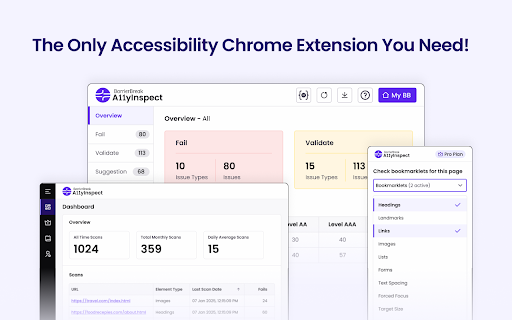
- Detailed Analysis - Test a web page or a specific element for accessibility. Issues categorized as Fails, Validates & Suggestions with Success Criteria and Severity mapping to prioritize accessibility fixes.
- Design Tools - A11yInspect includes a accessibility color contrast checker as per WCAG, CSS overview, unit converter and color combination guide to help you build accessible designs.

You don't even need to register to get access to A11yInspect Free and start testing your first page for Accessibility.

A11yInspect Free gives you:
- Highlight Code- One-click and A11yInspect highlights the accessibility issue along with the code. As simple as that!
- Wide Range of Bookmarklets - Need help with your manual accessibility checks as per WCAG?
We got you covered with one bookmarklet that allows you to test for Headings, Tab order, Grayscale, Target size, Text spacing, Forms and so much more..
- Key Code Attribute - Based on the issue, A11yInspect identifies the relevant part of the code to help you evaluate the accessibility of the element.

If you want to save time in accessibility testing:, invest in A11yInspect Pro for:
- Download Audit Reports - Share excel reports with your team of the accessibility audit to meet WCAG, Section 508, EN 301 549 & IS 17802.
- Download Screenshots - Save time & effort with Download a screenshot that captures the accessibility issue. We don't only give you the screenshot, we highlight the accessibility isuue too.
- View Your Scan Log. - Want to know which pages you conducted an accessibility test for, come check your scan logs.

Free Plan Includes:
- Test Unlimited Pages for Accessibility
- Wide Range of Accessibility Bookmarklets
- Key Code Attributes
- Test for Global Accessibility Standards - WCAG, EN 301 549, IS 17802
- In-built Accessibility Color Contrast Checker for WCAG
- Color Palette & Fonts Overview

Upgrade to Pro for:
- Dashboard to View your Accessibility Scan Logs
- Download Screenshots
- Pause Script Feature
- Download an Accessibility Audit Report in Excel

Improve Accessibility Coverage:
Only approx. 40-45% accessibility issues can be identified with automated accessibility testing. Remember, to conduct manual accessibility testing and include people with disabilities using assistive technology like screen readers, screen magnifiers, speech recognition tools.

If you want the power to create manual accessibility issues - Integrate A11yInspect with A11yNow (https://www.barrierbreak.com/a11ynow/). Log Manual accessibility Issues along with your automated test results.

Support
If you have any questions, check out the A11yInspect - Accessibility Testing tool knowledge base (https://a11yinspectdocs.barrierbreak.net/).

By installing the A11yInspect - Accessibility Testing Tool extension, you agree to and acknowledge:
https://www.barrierbreak.com/privacy-policy/
https://www.barrierbreak.com/terms-of-service/
Accessibility Testing in less than a few minutes using A11yInspect Accessibility Testing Tool.

Save 40% of your time by using automated accessibility tests to detects issues faster, boosts accuracy and provides more coverage to meet accessibility standards.

Why choose A11yInspect as your automated accessibility tool?
- Exhaustive Rulesets - 600+ accessibility checks.  A11yInspect has a less than 1% false positive rate and maximizes coverage across 30 Success Criteria in WCAG.
- Global Accessibility Standards - Results grouped by Web Content Accessibility Guidelines (WCAG) Conformance Levels. Test for Section 508, EN 301 549, GIGW 3.0 and IS 17802.
- Detailed Analysis - Test a web page or a specific element for accessibility. Issues categorised as Fails, Validates & Suggestions with Success Criteria and Severity mapping to prioritise accessibility fixes.
- Design Tools - A11yInspect includes a accessibility color contrast checker as per WCAG, CSS overview, unit converter and color combination guide to help you build accessible designs.

You don't even need to register to get access to A11yInspect Free and start testing your first page for Accessibility.

A11yInspect Free gives you:
- Highlight Code - One-click and A11yInspect highlights the accessibility issue along with the code. As simple as that!
- Wide Range of Bookmarklets - Need help with your manual accessibility checks as per WCAG?
We got you covered with a bookmarklet that allows you to test for Headings, Tab order, Grayscale, Target size, Text spacing, Forms and so much more..
- Key Code Attribute - Based on the issue, A11yInspect identifies the relevant part of the code to help you evaluate the accessibility of the element.

If you want to save time in accessibility testing:, invest in A11yInspect Pro for:
- Download Audit Reports - Share reports with your team of the accessibility audit to meet WCAG, Section 508, EN 301 549 & IS 17802.
- Download Screenshots - Save time & effort with Download a screenshot that captures the accessibility issue. We don't only give you the screenshot, we highlight the accessibility issue too.
- View Your Scan Log - Want to know which pages you conducted an accessibility test for, come check your scan logs.

Free Plan Includes:
- Test Unlimited Pages for Accessibility
- Wide Range of Accessibility Bookmarklets
- Key Code Attributes
- Test for Global Accessibility Standards - WCAG, EN 301 549, IS 17802
- In-built Accessibility Color Contrast Checker for WCAG
- Color Palette & Fonts Overview

Upgrade to Pro for:
- Dashboard to View your Accessibility Scan Logs
- Download Screenshots
- Pause Script Feature
- Download an Accessibility Audit Report in Excel

Improve Accessibility Coverage:
Only approx. 40-45% accessibility issues can be identified with automated accessibility testing. Remember, to conduct manual accessibility testing and include people with disabilities using assistive technology like screen readers, screen magnifiers, speech recognition tools.

If you want the power to create manual accessibility issues - Integrate A11yInspect with A11yNow (https://www.barrierbreak.com/a11ynow/). Log Manual accessibility Issues along with your automated test results.

Support
If you have any questions, check out the A11yInspect - Accessibility Testing tool knowledge base (https://a11yinspectdocs.barrierbreak.net/).

By installing the A11yInspect - Accessibility Testing Tool extension, you agree to and acknowledge:
https://www.barrierbreak.com/privacy-policy/
https://www.barrierbreak.com/terms-of-service/
- Jun 2, 2026short_description
A11yInspect, your fastest path from accessibility issues to clean & shippable code to test for WCAG, EN 301 549 & more.
Your fastest path from accessibility issues to clean, shippable code. Test for WCAG, EN 301 549, and more.
Permissions & access
- Permissions
- scriptingtabsactiveTab
- Host access
- *://*/*, <all_urls>
Screenshots



About
Accessibility Testing in less than a few minutes using A11yInspect Accessibility Testing Tool.

Save 40% of your time by using automated accessibility tests to detects issues faster, boosts accuracy and provides more coverage to meet accessibility standards.

Why choose A11yInspect as your automated accessibility tool?
- Exhaustive Rulesets - 600+ accessibility checks.  A11yInspect has a less than 1% false positive rate and maximizes coverage across 30 Success Criteria in WCAG.
- Global Accessibility Standards - Results grouped by Web Content Accessibility Guidelines (WCAG) Conformance Levels. Test for Section 508, EN 301 549, GIGW 3.0 and IS 17802.
- Detailed Analysis - Test a web page or a specific element for accessibility. Issues categorised as Fails, Validates & Suggestions with Success Criteria and Severity mapping to prioritise accessibility fixes.
- Design Tools - A11yInspect includes a accessibility color contrast checker as per WCAG, CSS overview, unit converter and color combination guide to help you build accessible designs.

You don't even need to register to get access to A11yInspect Free and start testing your first page for Accessibility.

A11yInspect Free gives you:
- Highlight Code - One-click and A11yInspect highlights the accessibility issue along with the code. As simple as that!
- Wide Range of Bookmarklets - Need help with your manual accessibility checks as per WCAG?
We got you covered with a bookmarklet that allows you to test for Headings, Tab order, Grayscale, Target size, Text spacing, Forms and so much more..
- Key Code Attribute - Based on the issue, A11yInspect identifies the relevant part of the code to help you evaluate the accessibility of the element.

If you want to save time in accessibility testing:, invest in A11yInspect Pro for:
- Download Audit Reports - Share reports with your team of the accessibility audit to meet WCAG, Section 508, EN 301 549 & IS 17802.
- Download Screenshots - Save time & effort with Download a screenshot that captures the accessibility issue. We don't only give you the screenshot, we highlight the accessibility issue too.
- View Your Scan Log - Want to know which pages you conducted an accessibility test for, come check your scan logs.

Free Plan Includes:
- Test Unlimited Pages for Accessibility
- Wide Range of Accessibility Bookmarklets
- Key Code Attributes
- Test for Global Accessibility Standards - WCAG, EN 301 549, IS 17802
- In-built Accessibility Color Contrast Checker for WCAG
- Color Palette & Fonts Overview

Upgrade to Pro for:
- Dashboard to View your Accessibility Scan Logs
- Download Screenshots
- Pause Script Feature
- Download an Accessibility Audit Report in Excel

Improve Accessibility Coverage:
Only approx. 40-45% accessibility issues can be identified with automated accessibility testing. Remember, to conduct manual accessibility testing and include people with disabilities using assistive technology like screen readers, screen magnifiers, speech recognition tools.

If you want the power to create manual accessibility issues - Integrate A11yInspect with A11yNow (https://www.barrierbreak.com/a11ynow/). Log Manual accessibility Issues along with your automated test results.

Support
If you have any questions, check out the A11yInspect - Accessibility Testing tool knowledge base (https://a11yinspectdocs.barrierbreak.net/).

By installing the A11yInspect - Accessibility Testing Tool extension, you agree to and acknowledge:
https://www.barrierbreak.com/privacy-policy/
https://www.barrierbreak.com/terms-of-service/
Technical
- Version
- 1.5.6
- Manifest
- V3
- Size
- 1.66MiB
- Min Chrome
- 88
- Languages
- 1
- Featured
- Yes
Metadata
- ID
- giaolcgipopikbjonacmaokkeiaolmfp
- Developer ID
- uc8ed48e1727adf07778d9278cd093204
- Developer Email
- [email protected]
- Created
- Feb 18, 2025
- Last Updated (Store)
- Jun 17, 2026
- Last Scraped
- Jun 22, 2026
- Website
- barrierbreak.com
- Support URL
- https://www.barrierbreak.com/contact-us/
- Privacy Policy
- https://www.barrierbreak.com/privacy-policy/
Similar extensions
Alternatives to A11yInspect Accessibility Testing Tool, ranked by description similarity.

WeAccess Scan
Web pages accessibility testing Chrome extension
61
★ 5.0

BrowserStack Accessibility Toolkit
Automate accessibility compliance. Detect issues 8X faster with Spectra™ & AI. Test JAWS, NVDA, VoiceOver & TalkBack on real devices
30.0K
★ 4.8

Accessibility Checker by WebYes
Accessibility Checker for developers and testers to identify WCAG issues directly in Chrome for improved accessibility compliance.
849
★ 4.8

A11y Spotlight
An extension to help you identify accessibility issues on your website.
36

Accessibility Analyzer
Perform Accessibility audits on webpages based on WCAG 2.2 and download free excel sheet reports
895
★ 4.5

A11yMate - WCAG Accessibility Checker
Scan any webpage for WCAG 2.2 accessibility violations and get fix suggestions instantly.
4

Siteimprove Accessibility Checker
Jumpstart your web accessibility efforts directly in Chrome.
60.0K
★ 3.2

DARTSuite Extension Tools
Accessibility Testing Tools from DARTSuite.com
148
★ 5.0
Data sourced from the Chrome Web Store · last verified Jun 22, 2026.