
Easy Mute for Google Meet
A simple extension for mute/unmute Google Meet calls from browser icon. Including options to by default turn microphone/camera off.
As of June 2026, Easy Mute for Google Meet has 10,000 users and a 3.31/5 rating from 36 reviews in the Workflow & Planning category.
Usersno change0%
10.0K
10,000
Ratingno change0%
3.31
36 reviews
Reviewsno change0%
36
Version
1.7.4
Manifest V3
Permissions & access
- Permissions
- storage
- Host access
- https://meet.google.com/**-**-**
Screenshots
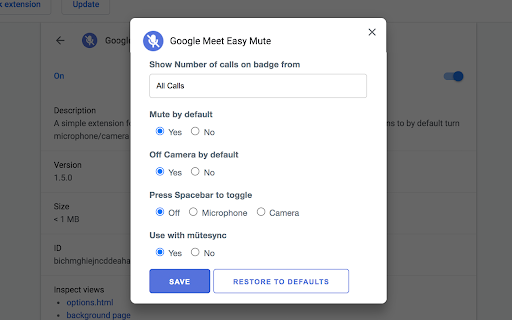


About
Easy Mute for Google Meet

One of the best extensions to work with Google Meet.

✨ FEATURES:
✅ Simply Mute/Unmute (🔇) Google Meet calls directly from the browser icon
✅ Shows how many calls are mute
✅ Shows how many calls are unmute
✅ Mute Microphone by default
✅ Off Camera by default
✅ Toggle mute/unmute Microphone using Spacebar
✅ Toggle on/off Camera using Spacebar

🛠️ TROUBLESHOOTING:
- In case the extension doesn't work, try again after refreshing the page

🦾 HOW DOES IT DECIDE WHICH CALL TO MUTE:

➡ If you have just 1 tab with Google Meet Call (either the join screen or you have already joined the call):
- Pressing the mute button from any tab will toggle mute

➡ If you have more than 1 tab with Google Meet Call and you haven’t joined any of them:
- Pressing the mute button from a tab with the call will only toggle mute for that tab
- Pressing the mute button from any other tab will toggle all of your calls (you haven’t joined any of them so doesn’t matter)

➡ If you have more than 1 tab with Google Meet Call and you have joined only 1 of them
- Pressing the mute button from a tab with the call (joined or not joined yet) will only toggle mute for that tab
- Pressing the mute button from any other tab will ONLY mute that one tab where you have joined the call

➡ If you have more than 1 tab with Google Meet Call and you have joined the call in more than 1 tab
- Pressing the mute button from a tab with the call (joined or not joined yet) will only toggle mute for that tab
- Pressing the mute button from any other tab will make my extension confused coz which active call it should toggle. So it will show you a Red Cross sign and ask you to mute the right one yourself.

🔴 WHAT IF I SEE A RED CROSS BADGE?
- It means you are having multiple calls going on and so the system is confused about which call to toggle mute.

WORKS ON:
✅ Google Meet (https://meet.google.com)

📝 PRIVACY POLICY:
This extension does not track any user data, and therefore does not require a detailed privacy policy. If this is insufficient please email [email protected]
If you click on a third party link, you will be directed to that third party's site. We strongly advise you to review the Privacy Policy of every site you visit. We have no control over and assume no responsibility for the content, privacy policies or practices of any third party sites or services.

Support this extension: https://coffee.010pixel.com
Technical
- Version
- 1.7.4
- Manifest
- V3
- Size
- 987KiB
- Min Chrome
- 88
- Languages
- 2
- Featured
- No
Metadata
- ID
- lgdalbjhcglejepghfomkmngebhaelga
- Developer ID
- ua4b6a368b17b17cf7b0b45889b49da9d
- Developer Email
- [email protected]
- Created
- May 18, 2020
- Last Updated (Store)
- Nov 12, 2023
- Last Scraped
- Jun 8, 2026
- Website
- http://www.010pixel.com/
- Support URL
- http://www.010pixel.com
- Privacy Policy
- https://privacy.010pixel.com/chrome/
Similar extensions
Alternatives to Easy Mute for Google Meet, ranked by description similarity.

Push To Talk for Google Meet™
Hold <space> in Google Meet to talk instead of fumbling around trying to mute and unmute
20.0K
★ 3.4

Google Meet Auto Mute
Create a Google Meet with a click of a button, automatically mute audio and video, and copy the Google Meet URL
130

Meeting Manager
Easily Manage all your google meet conferences from any window or tab. Supports muting/unmuting of microphone, camera and sound.
37

MuteMe Web Extension
Take control of your web-based video calls with MuteMe.
6.0K
★ 3.5

Mute All for Google Meet™
Mute all users on Google Meet™
10.0K
★ 3.5

MeetBouncer: Google Meet Auto-Exit
Automatically leaves Google Meet when participant count falls below your specified threshold, by timer or schedule.
95
★ 3.0

GOAT Meet Manager
Control Google Meet mute (audio+video) status from anywhere.
174
★ 5.0

Where is my Meeting?
A small helper to find your online meetings (e.g. Google Meet) in your endless list of tabs!
198
★ 5.0
Data sourced from the Chrome Web Store · last verified Jun 8, 2026.