
Where is my Meeting?
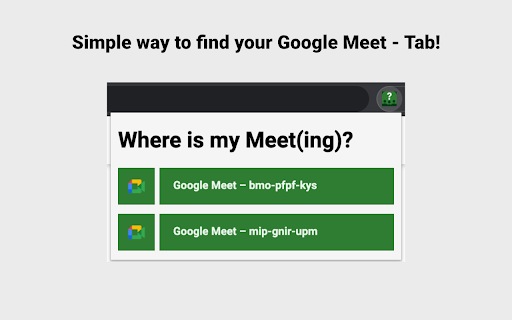
A small helper to find your online meetings (e.g. Google Meet) in your endless list of tabs!
As of May 2026, Where is my Meeting? has 198 users and a 5.00/5 rating from 4 reviews in the Workflow & Planning category.
Usersdown 9.2 percent−9.2%
198
198
Ratingno change0%
5.00
4 reviews
Reviewsno change0%
4
Version
0.7.0
Manifest V3
History
3 snapshotsTracking since Apr 1, 2026.
View as table
| Date | Users | Rating | Reviews | Version |
|---|---|---|---|---|
| Apr 1, 2026 | 218 | 5.00 | 4 | 0.7.0 |
| May 1, 2026 | 210 | 5.00 | 4 | 0.7.0 |
| May 29, 2026 | 214 | 5.00 | 4 | 0.7.0 |
| Now | 198 | 5.00 | 4 | 0.7.0 |
Permissions & access
- Permissions
- tabs
- Host access
- None declared
Screenshots
About
Introducing "Where is my Meeting?" - an easy-to-use Chrome extension designed to help you locate and navigate to your online meetings with just a few clicks. Whether it's Google Meet, Microsoft Teams, Zoom, or others, this lightweight extension is dedicated to making your life simpler and more efficient during these challenging times.

== Features ==

✓ Lists all open Google Meet, Zoom, Microsoft Teams, and Jitsi tabs
✓ One-click navigation to the desired meeting tab
✓ Privacy-conscious: No data tracking or sharing involved
✓ Dark Mode support: Adapts the popup style to your selected theme
✓ Capability to include additional online meeting platforms

== Upcoming Features ==

Your feedback is appreciated as we work on adding these enhancements:

✓ Support for more meeting providers
✓ Microphone and audio muting options via the plugin
✓ Grouping meetings by provider
✓ Customizable settings: Add URL patterns for proprietary meeting platforms
✓ Theme selection and meeting provider filtering
✓ Enhanced tab information with metadata parsing
✓ Localization for international users
✓ Meeting provider-themed button colors
✓ Share your ideas and suggestions by contacting me!

== Permission Explanation: "Read your browsing history" ==

To search through open tabs, the extension requires "tabs" permission in its configuration. Rest assured, your data is only used to identify matching URLs for supported meeting platforms. The extension's code will soon be open-sourced for complete transparency.

== Rate and Share! ==

If you find this extension helpful, please leave a rating and share it with others!

== Troubleshooting ==

For any issues or inquiries, feel free to reach out to me.
Technical
- Version
- 0.7.0
- Manifest
- V3
- Size
- 18.75KiB
- Min Chrome
- 88
- Languages
- 2
- Featured
- Yes
Metadata
- ID
- gogioagefecnpkiaoegkobapeklhchni
- Developer ID
- ue0ea0393363dff11d45b7ae4de6d6d94
- Developer Email
- [email protected]
- Created
- Oct 27, 2020
- Last Updated (Store)
- Mar 25, 2023
- Last Scraped
- May 29, 2026
- Website
- —
- Support URL
- —
- Privacy Policy
- —
Similar extensions
Alternatives to Where is my Meeting?, ranked by description similarity.

Meet Link
Meet Link is a simple way to create Google Meet links for your meetings without having to open a meeting in a new tab.
3
★ 5.0

Auto Google Meet: Open & Copy Links Instantly
One-click Google Meet link opener & copier. Instantly start a meeting and share the link!
4

Instant Teams Meeting Link
Quickly generate and insert a Microsoft Teams meeting link via the right-click menu or popup.
141
★ 5.0

Google Meet Enhancement Suite
40 new features for Google Meet such as mute all, remove all, auto admit, emojis, mirror videos, background color, and push to talk!
100.0K
★ 4.0

MeetApps: Google Calendar Video Call Links
Quickly start video calls without opening calendar (Zoom, Teams, Meet & 7 others supported)
1.0K
★ 5.0

AutoMeet
Never miss a meeting!
14

Easy Mute for Google Meet
A simple extension for mute/unmute Google Meet calls from browser icon. Including options to by default turn microphone/camera off.
10.0K
★ 3.3

Google Meet Manager
Extension to launch Google Meet and show Calendar events
8
Data sourced from the Chrome Web Store · last verified May 29, 2026.