
Hummingbird
A light and zippy bookmarks navigator
As of June 2026, Hummingbird has 5 users in the Workflow & Planning category.
Usersno change0%
5
5
Ratingno change0%
—
— reviews
Reviewsno change0%
—
Version
1.2
Manifest V3
History
2 snapshotsTracking since Apr 23, 2026.
View as table
| Date | Users | Rating | Reviews | Version |
|---|---|---|---|---|
| Apr 23, 2026 | — | — | — | 1.2 |
| Jun 8, 2026 | 4 | — | — | 1.2 |
| Now | 5 | — | — | 1.2 |
Permissions & access
- Permissions
- bookmarks
- Host access
- None declared
Screenshots

About
Hummingbird is a Chrome extension that helps you navigate your bookmarks, and find what you're looking for faster. If you want a particular bookmarked webpage, Hummingbird is the quickest way to get from opening a new tab, to looking at that page in your browser.

This extension is for people who heavily utilise bookmarks to organise and retrieve resources on the web as part of their daily workflow. Examples include frequently used web apps and websites, cheatsheets, instructions, and any other reference material. It is for people who need a fast way to find and access those resources with minimal interruption to their workflow.

Navigating through bookmark menus to find a particular resource can disrupt your workflow, even if you know exactly where your bookmark is located. Hummingbird allows you to find what you're looking for as quickly as possible, without taking your fingers off the keyboard. Quite often it takes longer to find a bookmark than it does to complete the task the bookmark is helping you with. Hummingbird aims to change this.

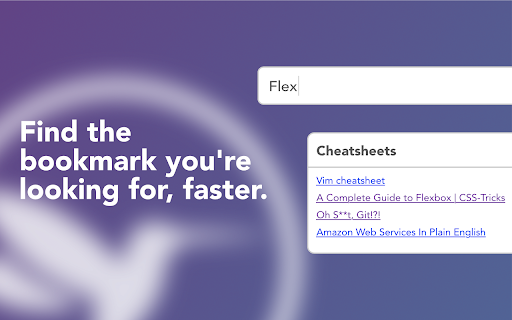
Hummingbird displays all your bookmarks every time you open a new tab, grouped by folder. You can easily search through all your bookmarks, and use hotkeys to navigate them. It is designed to be simple, light-weight, and fast. It works with your existing bookmark manager, which means you can still create and edit bookmarks in the usual way.

Features

* Opens when you create a new tab
* Search through all your bookmarks
* Hotkeys for quicker navigation
* Ignore feature - decide which bookmarks to exclude in Hummingbird

Notes

Hummingbird is designed to be as simple as possible and only supports a single level of folder hierarchy. It will display a flattened version of your bookmark folders, but won't touch the structure of your actual bookmarks.

Hummingbird doesn't create, delete, or manage your bookmarks, it simply allows you to navigate them quickly and easily. Managing your bookmarks can be done with Chrome's built in bookmark manager (or a third party bookmark manager).
Technical
- Version
- 1.2
- Manifest
- V3
- Size
- 6.5MiB
- Min Chrome
- 88
- Languages
- 1
- Featured
- No
Metadata
- ID
- lgcnodficcefimdomgblomepccpdbkel
- Developer ID
- uf13593ba7649de1774b864b2452ee05a
- Developer Email
- [email protected]
- Created
- Jul 25, 2024
- Last Updated (Store)
- Feb 11, 2025
- Last Scraped
- Jun 8, 2026
- Website
- —
- Support URL
- —
- Privacy Policy
- —
Similar extensions
Alternatives to Hummingbird, ranked by description similarity.

Pretty Bookmarks
A pretty Google Chrome bookmark manager created with productivity with mind.
40
★ 3.0

Easy Bookmark Manager
Quick and easy bookmarks manager with categories, search and dark mode in Chrome side panel.
10

proBookmarkly Smart Visual Preview Bookmark Manager for Power Users
This extension helps you organize, preview, search, and open bookmarks efficiently — whether you manage dozens or thousands of links
13
★ 5.0

Bookmark Manager + Quick Search
Search, organize, and manage your bookmarks the smart way. Instant results every time.
542
★ 3.7

Home Page: The fastest way to visit bookmarked sites
Replace your default new tab with a fast, dashboard that lets you visit and organize bookmarks instantly.
6

Bookmark Plus by Vidura
Bookmark Plus is a smart bookmarks manager to a knowledge base.
109
★ 3.9

Bookmark Pro
Save native bookmarks in Chrome faster.
680
★ 4.5

AI Bookmarks Search
Search and chat with your bookmarks using AI. Powered by Gemini, OpenAI, and Claude for intelligent bookmark discovery.
8
Data sourced from the Chrome Web Store · last verified Jun 8, 2026.