
Code Beautifier (JS, CSS, HTML)
A lite and free JavasScript, CSS and HTML beautifier for your browser.
As of June 2026, Code Beautifier (JS, CSS, HTML) has 5,000 users and a 5.00/5 rating from 2 reviews in the Developer Tools category.
Usersno change0%
5.0K
5,000
Ratingno change0%
5.00
2 reviews
Reviewsno change0%
2
Version
0.1.5
Manifest V3
History
2 snapshotsTracking since Apr 16, 2026.
View as table
| Date | Users | Rating | Reviews | Version |
|---|---|---|---|---|
| Apr 16, 2026 | 5.0K | 5.00 | 2 | 0.1.5 |
| Apr 26, 2026 | 5.0K | 5.00 | 2 | 0.1.5 |
| Now | 5.0K | 5.00 | 2 | 0.1.5 |
Permissions & access
- Permissions
- storagecontextMenus
- Host access
- None declared
Screenshots



About
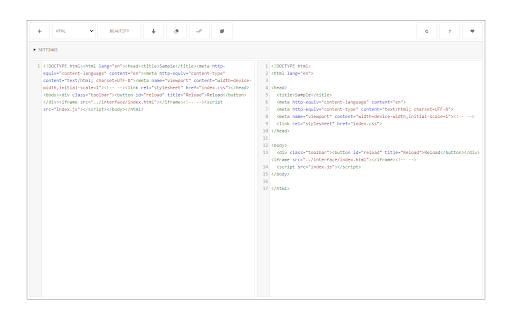
Code Beautifier, is an extension that lets you easily beautify codes in your browser. This addon supports JavaScript, CSS, and HTML as input languages. You can either browser files via the (+) button at the UI (top-left corner) or drag & drop a file in the left textarea. The former method is preferred as the coding language for the input file can be detected automatically and the interface will be updated accordingly (no need to adjust the input language manually).

Code Beautifier can work offline without the need for an internet connection. It uses an open-source library called "js-beautify" and available in this (https://github.com/beautify-web/js-beautify) GitHub repo. Moreover, it also uses the famous CodeMirror (https://github.com/codemirror/CodeMirror) library to format the input and output codes. Within the interface, there are several buttons at the top toolbar which are self-explanatory. There is also a settings list at the top which contains several options for the beautifier. Change any desired settings and see the live result in the output field. To download the beautified result, please click on the download button at the top toolbar.

If you have a feature request or found a bug to report, please fill the bug report form on the addon's homepage (https://mybrowseraddon.com/code-beautifier.html).
Technical
- Version
- 0.1.5
- Manifest
- V3
- Size
- 221KiB
- Min Chrome
- 88
- Languages
- 1
- Featured
- No
Metadata
- ID
- lflcmgiebpalnlcjbadhamjfkmkfpjmg
- Developer ID
- u9441e7c8f1e0d96ede112471bb22f779
- Developer Email
- [email protected]
- Created
- Jan 6, 2021
- Last Updated (Store)
- Feb 15, 2026
- Last Scraped
- Jun 5, 2026
- Website
- —
- Privacy Policy
- —
Similar extensions
Alternatives to Code Beautifier (JS, CSS, HTML), ranked by description similarity.

Code Beautifier Online
Free java script beautifier for your browser. A lightweight and free JavasScript, CSS, and HTML beautifier.
196
★ 5.0

Code Minifier (JS, CSS, HTML)
A lite and free JavasScript, CSS and HTML minifier for your browser.
535
★ 5.0

JavaScript Code Beautifier
Transform plain JavaScript files into beautifully formatted, syntax-highlighted code
81
★ 5.0

Code Formatter - JSON, CSS & JavaScript
Code Formatter – all-in-one extension offering sophisticated syntax highlighting for CSS, JSON, and JavaScript.
4.0K
★ 3.9

JSON Beautifier
Format, highlight, and inspect JSON with syntax coloring, collapsible tree view, minify toggle, copy, and light/dark theme.
16

HTML, CSS, JS Beautify & Minify
Beautify or minify your HTML, CSS, and JS code instantly with one click.
23
★ 4.8

Beautifer & Minify
HTML & CSS & JavaScript Beautifier/Minifier
1.0K
★ 4.2

HTML Formatter
Use HTML Formatter to format HTML, beautify code, and enhance readability with ease. Work with the HTML beautifier online or offline
250
★ 4.0
Data sourced from the Chrome Web Store · last verified Jun 5, 2026.