Button for Google Calendar
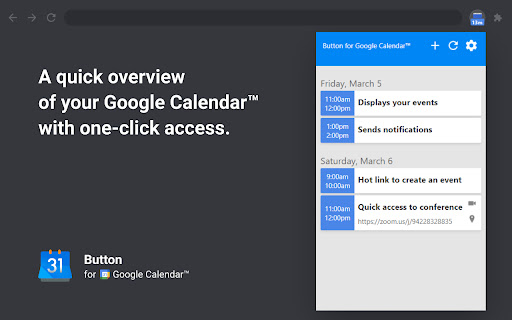
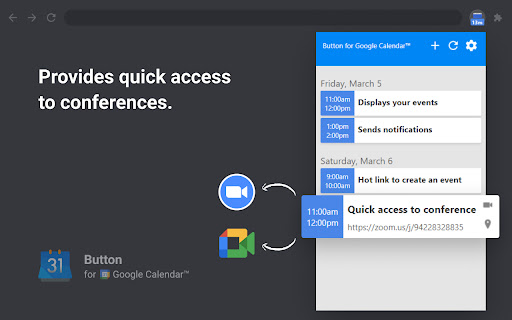
Check Google Calendar schedule and join meetings with one click. It fully integrates with Zoom, Google Meet, Microsoft Teams, etc.
As of June 2026, Button for Google Calendar has 100,000 users and a 4.14/5 rating from 209 reviews in the Workflow & Planning category.
Usersno change0%
100.0K
100,000
Ratingup 0.2 percent+0.2%
4.14
209 reviews
Reviewsup 0.5 percent+0.5%
209
Version
26.4.4
Manifest V3
90-day change · In the last 90 days this extension 1 version update.
History
3 snapshotsTracking since Apr 5, 2026.
View as table
| Date | Users | Rating | Reviews | Version |
|---|---|---|---|---|
| Apr 5, 2026 | 100.0K | 4.13 | 208 | 26.1.31 |
| Apr 14, 2026 | 100.0K | 4.13 | 208 | 26.4.4 |
| Jun 14, 2026 | 100.0K | 4.13 | 208 | 26.4.4 |
| Now | 100.0K | 4.14 | 209 | 26.4.4 |
Permissions & access
- Permissions
- alarmsidentitynotificationsstorage
- Host access
- None declared
Screenshots


About
Experience seamless integration with Google Calendar using the Button for Google Calendar™ extension. Trusted by over 100,000 users, our extension provides the ultimate convenience for managing your schedule:
• Instant Access: Open Google Calendar to view your schedule and join meetings directly from the toolbar.
• Quick Event Creation: Navigate effortlessly to Google Calendar to create new events.
• Real-Time Notifications: Get timely reminders for upcoming events and meetings.
• Customizable Interface: Adjust settings to personalize your calendar experience and boost productivity.

Join a growing community of users relying on Button for Google Calendar™ to simplify scheduling. Download now and enhance your calendar management!

KEY FEATURES
• Toolbar Button: Immediate access to Google Calendar from your browser.
• Meeting Integration: Join Google Meet and other video calls with ease.
• Event Creation: Quickly open Google Calendar to add new events.
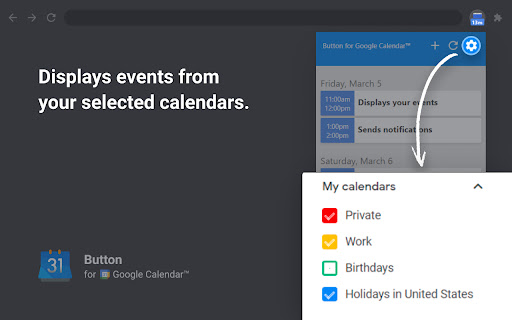
• Customization: Personalize notifications and calendar views to suit your needs.


HELP
• Authorization: Works correctly only in Google Chrome.
• Multiple Accounts: Supports only one Google Calendar account. To receive notifications from multiple calendars, select the primary account and grant it access to the secondary calendar.
• Time Format: Automatically synchronizes with your Calendar upon installation.
• Corporate Accounts: If using a corporate Google Workspace account and facing authorization issues, contact your domain administrator to add our "Button" to the list of trusted extensions.
• Support: For problems or bugs, contact us at [email protected].


ADS
You may encounter ads when using Button for Google Calendar. These ads allow us to offer this extension for free.


DISCLAIMER
Button for Google Calendar is not made by Google™ or affiliated with Alphabet Inc.


Supported with ❤️ by the BrowseCraft gang. Stand with Ukraine 💙💛.
Technical
- Version
- 26.4.4
- Manifest
- V3
- Size
- 300KiB
- Min Chrome
- 88
- Languages
- 55
- Featured
- Yes
Metadata
- ID
- lfjnmopldodmmdhddmeacgjnjeakjpki
- Developer ID
- ue4ab703c8aadbceedaa89b1faa20460e
- Developer Email
- [email protected]
- Created
- Jan 27, 2021
- Last Updated (Store)
- Apr 4, 2026
- Last Scraped
- Jun 14, 2026
- Website
- browsecraft.com
- Support URL
- https://browsecraft.com/contacts
- Privacy Policy
- https://browsecraft.com/privacy
Similar extensions
Alternatives to Button for Google Calendar, ranked by description similarity.

Add to Calendar
Add events to Google Calendar directly from selected text.
98
★ 2.5

Scheduling Calendar
This Scheduling Calendar: Manage events, calendar reminders & sync calendars. Join video meetings in a shared calendar app.
5.0K
★ 4.5

Toolset for Google Calendar™
This extension provides multiple small tools for the Google Calendar™.
2.0K
★ 4.0

Checker Plus for Google Calendar™
See your next events, get meeting notifications and snooze events without opening the Google Calendar page!
300.0K
★ 4.4

Google Calendar™ on new Tab
Displays your Calendar's weekly, or monthly schedules and agenda on new tabs
5.0K
★ 4.8

Itsybitsycal
A minimal calendar in your browser toolbar
—
Add More Colors to Calendar
Enhance your Google Calendar with a Chrome extension that adds custom colors to each event for a personalized, organized schedule.
5.0K
★ 3.4

Google Meet Manager
Extension to launch Google Meet and show Calendar events
8
Data sourced from the Chrome Web Store · last verified Jun 14, 2026.