
Google Calendar™ on new Tab
Displays your Calendar's weekly, or monthly schedules and agenda on new tabs
As of June 2026, Google Calendar™ on new Tab has 5,000 users and a 4.80/5 rating from 10 reviews in the Workflow & Planning category.
Usersup 25.0 percent+25.0%
5.0K
5,000
Ratingno change0%
4.80
10 reviews
Reviewsno change0%
10
Version
0.2.4
Manifest V3
90-day change · In the last 90 days this extension gained 1.0K users, 1 version update, changed permissions.
History
3 snapshotsTracking since Apr 24, 2026.
View as table
| Date | Users | Rating | Reviews | Version |
|---|---|---|---|---|
| Apr 24, 2026 | 4.0K | 4.80 | 10 | 0.2.3 |
| May 21, 2026 | 4.0K | 4.80 | 10 | 0.2.3 |
| Jun 15, 2026 | 4.0K | 4.80 | 10 | 0.2.4 |
| Now | 5.0K | 4.80 | 10 | 0.2.4 |
Changelog
- May 21, 2026permissions
storage, contextMenus
storage, contextMenus, search
Permissions & access
- Permissions
- storagecontextMenussearch
- Host access
- None declared
Screenshots
About
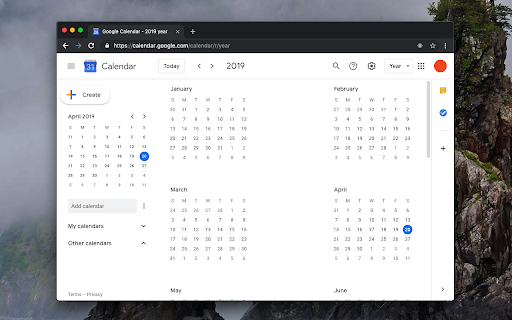
This extension replaces the default new tab page with a customized Google Calendar page. You can view various calendar views, such as day, week, month, year, or agenda. Moreover, you have the flexibility to set a custom URL for the new page, which can even point to a different calendar web application. The extension directs the new tab to the specified URL, and that's it.

Key Features:
1. Substitute the new tab with an external service of your choice.
2. Open the external service with a single click next to your current tab (using the action button).
3. Access common calendar views (day, week, month, year, or agenda) via a right-click context menu.
4. Access an account selector, allowing you to choose the logged-in account for displaying the calendar.
5. You can configure different pages for new tab and toolbar button click

Legal Disclaimer:
This extension is an open-source project that exclusively opens the official Google Calendar web application in a new tab. It is not affiliated with Google or the Google Calendar team in any way. Furthermore, this extension cannot access or modify your calendar or any other data.
Technical
- Version
- 0.2.4
- Manifest
- V3
- Size
- 53.97KiB
- Min Chrome
- 88
- Languages
- 11
- Featured
- Yes
Metadata
- ID
- keodkbefllpdgoodnnamaipiacnkpmog
- Developer ID
- u892a251722229e96a42d8c5d4004044c
- Developer Email
- [email protected]
- Created
- Apr 20, 2019
- Last Updated (Store)
- May 10, 2026
- Last Scraped
- Jun 15, 2026
- Website
- —
- Privacy Policy
- https://add0n.com/policies/balvin.perrie.txt
Similar extensions
Alternatives to Google Calendar™ on new Tab, ranked by description similarity.

Calendar View Tab
Google Calendar events on your new tab
10.0K
★ 5.0

New Tab Calendar
Customized the new tab experience to show a calendar
34
★ 5.0

Itsybitsycal
A minimal calendar in your browser toolbar
—

NewCal
Displays an interactive preview of your calendar on the New Tab page along with the current time and great wallpapers
11
★ 5.0

Scheduling Calendar
This Scheduling Calendar: Manage events, calendar reminders & sync calendars. Join video meetings in a shared calendar app.
5.0K
★ 4.5
Button for Google Calendar
Check Google Calendar schedule and join meetings with one click. It fully integrates with Zoom, Google Meet, Microsoft Teams, etc.
100.0K
★ 4.1

Toolset for Google Calendar™
This extension provides multiple small tools for the Google Calendar™.
2.0K
★ 4.0

My Google Calendar
keep a Google like calender in a new tab for easy access to it.
363
★ 5.0
Data sourced from the Chrome Web Store · last verified Jun 15, 2026.