
BULK URL Opener | bulkU
Opens a list of URLs in new tabs, removes duplicates, and maintains the order.
As of June 2026, BULK URL Opener | bulkU has 37 users and a 5.00/5 rating from 2 reviews in the Workflow & Planning category.
Usersup 19.4 percent+19.4%
37
37
Ratingno change0%
5.00
2 reviews
Reviewsno change0%
2
Version
1.1
Manifest V3
90-day change · In the last 90 days this extension 1 version update.
History
8 snapshotsTracking since Apr 18, 2026.
View as table
| Date | Users | Rating | Reviews | Version |
|---|---|---|---|---|
| Apr 18, 2026 | 31 | 5.00 | 2 | 1.0 |
| Apr 28, 2026 | 38 | 5.00 | 2 | 1.0 |
| May 7, 2026 | 40 | 5.00 | 2 | 1.0 |
| May 14, 2026 | 38 | 5.00 | 2 | 1.0 |
| May 20, 2026 | 36 | 5.00 | 2 | 1.1 |
| May 27, 2026 | 37 | 5.00 | 2 | 1.1 |
| Jun 3, 2026 | 34 | 5.00 | 2 | 1.1 |
| Jun 9, 2026 | 35 | 5.00 | 2 | 1.1 |
| Now | 37 | 5.00 | 2 | 1.1 |
Changelog
- May 20, 2026description
BULK URL Opener (bulkU) is a powerful browser extension designed to streamline your workflow when dealing with large lists of URLs. Whether you're an SEO professional analyzing website audits, a researcher managing sources, or a digital marketer tracking campaigns, bulkU saves you hours of repetitive clicking.

100% Free Forever

All core features are completely free with no time limits or tricks. The free version includes everything you need to efficiently manage and open URL lists. For users who want to support development and unlock additional convenience features, an optional Pro upgrade is available.

Key Features:

✅ Bulk URL Opening - Open hundreds of URLs at once with customizable delays and batch sizes to prevent browser overload

✅ Smart Organization - Create unlimited groups to organize URLs by project, client, or topic (5 groups in free version, unlimited in Pro)

✅ Powerful Filtering - Search URLs with text filters, regex patterns, or filter by custom tags

✅ Context Menu Integration - Right-click on any webpage, link, or text selection to instantly add URLs to your lists

✅ Import & Export - Import URLs from text files or export your groups as CSV/JSON for backup and sharing

✅ WordPress Mode - Automatically open WordPress posts in edit mode for faster bulk editing

✅ Tab Management - Open URLs in new tabs, windows, or organized tab groups

✅ Duplicate Prevention - Automatically removes duplicate URLs to keep your lists clean

✅ Sidebar Access - Works in the browser sidebar for persistent access while browsing

✅ 9 Languages - Full support for English, German, Spanish, French, Italian, Dutch, Polish, Portuguese, and Turkish

Pro Features (Optional Upgrade):

🎹 Keyboard Shortcuts - Add tabs (Ctrl+Shift+A), open URLs (Ctrl+Shift+O), and create groups (Ctrl+Shift+N) without touching your mouse

📝 URL Notes - Add notes to individual URLs to track changes, context, or important details

⏰ Scheduled Opening - Automatically open URL groups at specific times (daily or weekly) for routine checks

🏷️ Unlimited Tags - Create unlimited color-coded tags to categorize and filter URLs (free version includes 2 tags)

🚀 Unlimited Everything - No limits on URLs per group (free: 150) or number of groups (free: 5)

Perfect For:

SEO Professionals: Import URLs from Screaming Frog, Ahrefs, or SEMrush and review them in batches

Digital Marketers: Organize campaign URLs, check landing pages, and monitor competitor sites

Researchers: Manage literature sources, save reading lists, and organize reference materials

Content Managers: Bulk edit WordPress posts, review website pages, and manage content workflows

Anyone: Who regularly works with multiple URLs and wants to save time

🔒 PRIVACY & PERMISSIONS: Privacy First

This extension requests broad permissions to function properly, but collects ZERO personal data. All your URLs and settings are stored 100% locally in your browser. Nothing is ever sent to external servers (except for optional Pro payment processing via ExtensionPay/Stripe).

Here's why each permission is needed:

ℹ️ "Read browsing history" (tabs) - Required to open new tabs and manage tab groups. We don't read or store your history.
ℹ️ "Read/change all data on websites" (host_permissions) - Required for the WordPress edit mode feature and context menu integration. We only interact with pages when YOU trigger an action.
ℹ️ "Storage" - Saves your URL groups locally in your browser.
ℹ️ "Notifications" - Optional alerts for scheduled URL opening (Pro feature).

The "Enhanced Safe Browsing" warning appears because we need website access - but this is essential for a URL opener to work!

Your data stays private, always.


Getting Started:

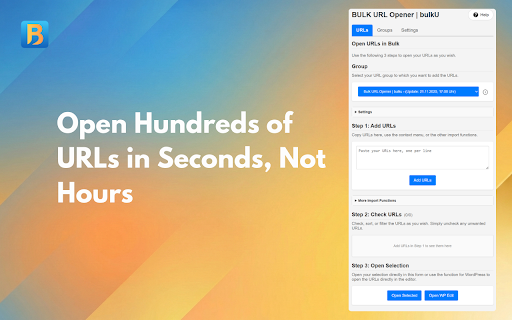
1. Click the bulkU icon to open the sidebar
2. Paste your URLs (one per line) into the text area
3. Click "Add URLs" to add them to your list
4. Review your URLs and uncheck any you don't want to open
5. Click "Open Selected" - done!

Support:

Need help? Visit https://minoka.de/en/bulku/ for documentation or email [email protected]

Why Choose bulkU?

Unlike other URL openers, bulkU offers a complete URL management system with persistent groups, advanced filtering, and professional features. The free version is genuinely useful with no artificial limitations designed to force upgrades. Pro features are truly optional conveniences for power users who want to support ongoing development.

Try bulkU today and never manually open URL lists again! 🚀
BULK URL Opener (bulkU) is a powerful browser extension designed to streamline your workflow when dealing with large lists of URLs. Whether you're an SEO professional analyzing website audits, a researcher managing sources, or a digital marketer tracking campaigns, bulkU saves you hours of repetitive clicking.

100% Free Forever

All core features are completely free with no time limits or tricks. The free version includes everything you need to efficiently manage and open URL lists. For users who want to support development and unlock additional convenience features, an optional Pro upgrade is available.

What's New in Version 1.1

- Extract URLs from mixed text: paste emails, notes or spreadsheet columns and let bulkU pick out the URLs while filtering email addresses and trailing punctuation.
- Drag & drop reordering in the URL list, plus shift-click multi-select with an 8-second undo for safe bulk delete.
- Open N random URLs from the visible list for sampling, spot-checks and audit validation.
- Three new interface languages: Japanese, Simplified Chinese and Brazilian Portuguese — 12 languages in total.
- Pro subscribers can re-unlock Pro on a new device with one click through the Account section in Settings.
- Toast notifications, a unified keyboard-shortcut overlay and an undo affordance for Clear List replace the previous blocking alerts.

Key Features

- Bulk URL Opening: open hundreds of URLs at once with customizable delays and batch sizes to prevent browser overload.
- Smart Organization: create groups to organize URLs by project, client or topic (5 groups in the free version, unlimited in Pro).
- Powerful Filtering: search URLs with text filters, regex patterns or filter by custom tags.
- Context Menu Integration: right-click on any webpage, link or text selection to instantly add URLs to your lists.
- Import & Export: import URLs from text files or export your groups as CSV/JSON for backup and sharing.
- Extract URLs from Text: a dedicated button pulls clean URLs out of any mixed paste (new in 1.1).
- WordPress Mode: automatically open WordPress posts in edit mode for faster bulk editing.
- Tab Management: open URLs in new tabs, windows or organized tab groups.
- Duplicate Prevention: automatically removes duplicate URLs to keep your lists clean.
- Sidebar Access: works in the browser sidebar for persistent access while browsing.
- 12 Languages: English, German, Spanish, French, Italian, Dutch, Polish, Portuguese, Brazilian Portuguese, Turkish, Japanese and Simplified Chinese.

Pro Features (Optional Upgrade)

- Keyboard Shortcuts: add tabs (Ctrl+Shift+A), open URLs (Ctrl+Shift+O) and create groups (Ctrl+Shift+N) without touching your mouse.
- URL Notes: add notes to individual URLs to track changes, context or important details.
- Scheduled Opening: automatically open URL groups at specific times (daily or weekly) for routine checks.
- Unlimited Tags: create unlimited color-coded tags to categorize and filter URLs (free version includes 2 tags).
- Unlimited Everything: no limits on URLs per group (free: 150) or number of groups (free: 5).
- Delete All Groups: one-click bulk delete with a safety confirmation.
- Cross-Device Pro Login: re-unlock Pro on a new install with one click via the Settings → Account section.

Perfect For

SEO Professionals: import URLs from Screaming Frog, Ahrefs or SEMrush and review them in batches.
Digital Marketers: organize campaign URLs, check landing pages and monitor competitor sites.
Researchers: manage literature sources, save reading lists and organize reference materials.
Content Managers: bulk-edit WordPress posts, review website pages and manage content workflows.
Anyone who regularly works with multiple URLs and wants to save time.

Privacy & Permissions

This extension requests broad permissions to function properly, but collects zero personal data. All your URLs and settings are stored 100% locally in your browser. Nothing is ever sent to external servers (except for optional Pro payment processing through ExtensionPay / Stripe).

Here's why each permission is needed:

- "Read browsing history" (tabs): required to open new tabs and manage tab groups. We don't read or store your history.
- "Read and change all data on websites" (host_permissions): required for the WordPress edit-mode feature and the context-menu integration. We only interact with pages when you trigger an action.
- "Storage": saves your URL groups locally in your browser.
- "Notifications": optional alerts for scheduled URL opening (Pro feature).

The "Enhanced Safe Browsing" warning appears because we need website access, which is essential for a URL opener to work.

Your data stays private, always.

Getting Started

1. Click the bulkU icon to open the sidebar.
2. Paste your URLs (one per line) into the text area.
3. Click "Add URLs" to add them to your list, or "Extract URLs" if you pasted mixed text.
4. Review your URLs and uncheck any you don't want to open.
5. Click "Open Selected" — done.

Support

Need help? Visit https://minoka.de/en/bulku/ for documentation, or email [email protected].

Why Choose bulkU

Unlike other URL openers, bulkU offers a complete URL management system with persistent groups, advanced filtering and professional features. The free version is genuinely useful with no artificial limitations designed to force upgrades. Pro features are truly optional conveniences for power users who want to support ongoing development.

Try bulkU today and never manually open URL lists again.
- May 14, 2026description
BULK URL Opener (bulkU) is a powerful browser extension designed to streamline your workflow when dealing with large lists of URLs. Whether you're an SEO professional analyzing website audits, a researcher managing sources, or a digital marketer tracking campaigns, bulkU saves you hours of repetitive clicking.

100% Free Forever

All core features are completely free with no time limits or tricks. The free version includes everything you need to efficiently manage and open URL lists. For users who want to support development and unlock additional convenience features, an optional Pro upgrade is available.

Key Features:

✅ Bulk URL Opening - Open hundreds of URLs at once with customizable delays and batch sizes to prevent browser overload

✅ Smart Organization - Create unlimited groups to organize URLs by project, client, or topic (5 groups in free version, unlimited in Pro)

✅ Powerful Filtering - Search URLs with text filters, regex patterns, or filter by custom tags

✅ Context Menu Integration - Right-click on any webpage, link, or text selection to instantly add URLs to your lists

✅ Import & Export - Import URLs from text files or export your groups as CSV/JSON for backup and sharing

✅ WordPress Mode - Automatically open WordPress posts in edit mode for faster bulk editing

✅ Tab Management - Open URLs in new tabs, windows, or organized tab groups

✅ Duplicate Prevention - Automatically removes duplicate URLs to keep your lists clean

✅ Sidebar Access - Works in the browser sidebar for persistent access while browsing

✅ 9 Languages - Full support for English, German, Spanish, French, Italian, Dutch, Polish, Portuguese, and Turkish

Pro Features (Optional Upgrade):

🎹 Keyboard Shortcuts - Add tabs (Ctrl+Shift+A), open URLs (Ctrl+Shift+O), and create groups (Ctrl+Shift+N) without touching your mouse

📝 URL Notes - Add notes to individual URLs to track changes, context, or important details

⏰ Scheduled Opening - Automatically open URL groups at specific times (daily or weekly) for routine checks

🏷️ Unlimited Tags - Create unlimited color-coded tags to categorize and filter URLs (free version includes 2 tags)

🚀 Unlimited Everything - No limits on URLs per group (free: 150) or number of groups (free: 5)

Perfect For:

SEO Professionals: Import URLs from Screaming Frog, Ahrefs, or SEMrush and review them in batches

Digital Marketers: Organize campaign URLs, check landing pages, and monitor competitor sites

Researchers: Manage literature sources, save reading lists, and organize reference materials

Content Managers: Bulk edit WordPress posts, review website pages, and manage content workflows

Anyone: Who regularly works with multiple URLs and wants to save time

🔒 PRIVACY & PERMISSIONS: Privacy First

This extension requests broad permissions to function properly, but collects ZERO personal data. All your URLs and settings are stored 100% locally in your browser. Nothing is ever sent to external servers (except for optional Pro payment processing via ExtensionPay/Stripe).

Here's why each permission is needed:

ℹ️ "Read browsing history" (tabs) - Required to open new tabs and manage tab groups. We don't read or store your history.
ℹ️ "Read/change all data on websites" (host_permissions) - Required for the WordPress edit mode feature and context menu integration. We only interact with pages when YOU trigger an action.
ℹ️ "Storage" - Saves your URL groups locally in your browser.
ℹ️ "Notifications" - Optional alerts for scheduled URL opening (Pro feature).

The "Enhanced Safe Browsing" warning appears because we need website access - but this is essential for a URL opener to work!

Your data stays private, always.


Getting Started:

1. Click the bulkU icon to open the sidebar
2. Paste your URLs (one per line) into the text area
3. Click "Add URLs" to add them to your list
4. Review your URLs and uncheck any you don't want to open
5. Click "Open Selected" - done!

Support:

Need help? Visit bulku.app for documentation or email [email protected]

Why Choose bulkU?

Unlike other URL openers, bulkU offers a complete URL management system with persistent groups, advanced filtering, and professional features. The free version is genuinely useful with no artificial limitations designed to force upgrades. Pro features are truly optional conveniences for power users who want to support ongoing development.

Try bulkU today and never manually open URL lists again! 🚀
BULK URL Opener (bulkU) is a powerful browser extension designed to streamline your workflow when dealing with large lists of URLs. Whether you're an SEO professional analyzing website audits, a researcher managing sources, or a digital marketer tracking campaigns, bulkU saves you hours of repetitive clicking.

100% Free Forever

All core features are completely free with no time limits or tricks. The free version includes everything you need to efficiently manage and open URL lists. For users who want to support development and unlock additional convenience features, an optional Pro upgrade is available.

Key Features:

✅ Bulk URL Opening - Open hundreds of URLs at once with customizable delays and batch sizes to prevent browser overload

✅ Smart Organization - Create unlimited groups to organize URLs by project, client, or topic (5 groups in free version, unlimited in Pro)

✅ Powerful Filtering - Search URLs with text filters, regex patterns, or filter by custom tags

✅ Context Menu Integration - Right-click on any webpage, link, or text selection to instantly add URLs to your lists

✅ Import & Export - Import URLs from text files or export your groups as CSV/JSON for backup and sharing

✅ WordPress Mode - Automatically open WordPress posts in edit mode for faster bulk editing

✅ Tab Management - Open URLs in new tabs, windows, or organized tab groups

✅ Duplicate Prevention - Automatically removes duplicate URLs to keep your lists clean

✅ Sidebar Access - Works in the browser sidebar for persistent access while browsing

✅ 9 Languages - Full support for English, German, Spanish, French, Italian, Dutch, Polish, Portuguese, and Turkish

Pro Features (Optional Upgrade):

🎹 Keyboard Shortcuts - Add tabs (Ctrl+Shift+A), open URLs (Ctrl+Shift+O), and create groups (Ctrl+Shift+N) without touching your mouse

📝 URL Notes - Add notes to individual URLs to track changes, context, or important details

⏰ Scheduled Opening - Automatically open URL groups at specific times (daily or weekly) for routine checks

🏷️ Unlimited Tags - Create unlimited color-coded tags to categorize and filter URLs (free version includes 2 tags)

🚀 Unlimited Everything - No limits on URLs per group (free: 150) or number of groups (free: 5)

Perfect For:

SEO Professionals: Import URLs from Screaming Frog, Ahrefs, or SEMrush and review them in batches

Digital Marketers: Organize campaign URLs, check landing pages, and monitor competitor sites

Researchers: Manage literature sources, save reading lists, and organize reference materials

Content Managers: Bulk edit WordPress posts, review website pages, and manage content workflows

Anyone: Who regularly works with multiple URLs and wants to save time

🔒 PRIVACY & PERMISSIONS: Privacy First

This extension requests broad permissions to function properly, but collects ZERO personal data. All your URLs and settings are stored 100% locally in your browser. Nothing is ever sent to external servers (except for optional Pro payment processing via ExtensionPay/Stripe).

Here's why each permission is needed:

ℹ️ "Read browsing history" (tabs) - Required to open new tabs and manage tab groups. We don't read or store your history.
ℹ️ "Read/change all data on websites" (host_permissions) - Required for the WordPress edit mode feature and context menu integration. We only interact with pages when YOU trigger an action.
ℹ️ "Storage" - Saves your URL groups locally in your browser.
ℹ️ "Notifications" - Optional alerts for scheduled URL opening (Pro feature).

The "Enhanced Safe Browsing" warning appears because we need website access - but this is essential for a URL opener to work!

Your data stays private, always.


Getting Started:

1. Click the bulkU icon to open the sidebar
2. Paste your URLs (one per line) into the text area
3. Click "Add URLs" to add them to your list
4. Review your URLs and uncheck any you don't want to open
5. Click "Open Selected" - done!

Support:

Need help? Visit https://minoka.de/en/bulku/ for documentation or email [email protected]

Why Choose bulkU?

Unlike other URL openers, bulkU offers a complete URL management system with persistent groups, advanced filtering, and professional features. The free version is genuinely useful with no artificial limitations designed to force upgrades. Pro features are truly optional conveniences for power users who want to support ongoing development.

Try bulkU today and never manually open URL lists again! 🚀
Permissions & access
- Permissions
- tabsstoragescriptingsidePanelcontextMenustabGroupsnotificationsalarms
- Host access
- <all_urls>
Screenshots


About
BULK URL Opener (bulkU) is a powerful browser extension designed to streamline your workflow when dealing with large lists of URLs. Whether you're an SEO professional analyzing website audits, a researcher managing sources, or a digital marketer tracking campaigns, bulkU saves you hours of repetitive clicking.

100% Free Forever

All core features are completely free with no time limits or tricks. The free version includes everything you need to efficiently manage and open URL lists. For users who want to support development and unlock additional convenience features, an optional Pro upgrade is available.

What's New in Version 1.1

- Extract URLs from mixed text: paste emails, notes or spreadsheet columns and let bulkU pick out the URLs while filtering email addresses and trailing punctuation.
- Drag & drop reordering in the URL list, plus shift-click multi-select with an 8-second undo for safe bulk delete.
- Open N random URLs from the visible list for sampling, spot-checks and audit validation.
- Three new interface languages: Japanese, Simplified Chinese and Brazilian Portuguese — 12 languages in total.
- Pro subscribers can re-unlock Pro on a new device with one click through the Account section in Settings.
- Toast notifications, a unified keyboard-shortcut overlay and an undo affordance for Clear List replace the previous blocking alerts.

Key Features

- Bulk URL Opening: open hundreds of URLs at once with customizable delays and batch sizes to prevent browser overload.
- Smart Organization: create groups to organize URLs by project, client or topic (5 groups in the free version, unlimited in Pro).
- Powerful Filtering: search URLs with text filters, regex patterns or filter by custom tags.
- Context Menu Integration: right-click on any webpage, link or text selection to instantly add URLs to your lists.
- Import & Export: import URLs from text files or export your groups as CSV/JSON for backup and sharing.
- Extract URLs from Text: a dedicated button pulls clean URLs out of any mixed paste (new in 1.1).
- WordPress Mode: automatically open WordPress posts in edit mode for faster bulk editing.
- Tab Management: open URLs in new tabs, windows or organized tab groups.
- Duplicate Prevention: automatically removes duplicate URLs to keep your lists clean.
- Sidebar Access: works in the browser sidebar for persistent access while browsing.
- 12 Languages: English, German, Spanish, French, Italian, Dutch, Polish, Portuguese, Brazilian Portuguese, Turkish, Japanese and Simplified Chinese.

Pro Features (Optional Upgrade)

- Keyboard Shortcuts: add tabs (Ctrl+Shift+A), open URLs (Ctrl+Shift+O) and create groups (Ctrl+Shift+N) without touching your mouse.
- URL Notes: add notes to individual URLs to track changes, context or important details.
- Scheduled Opening: automatically open URL groups at specific times (daily or weekly) for routine checks.
- Unlimited Tags: create unlimited color-coded tags to categorize and filter URLs (free version includes 2 tags).
- Unlimited Everything: no limits on URLs per group (free: 150) or number of groups (free: 5).
- Delete All Groups: one-click bulk delete with a safety confirmation.
- Cross-Device Pro Login: re-unlock Pro on a new install with one click via the Settings → Account section.

Perfect For

SEO Professionals: import URLs from Screaming Frog, Ahrefs or SEMrush and review them in batches.
Digital Marketers: organize campaign URLs, check landing pages and monitor competitor sites.
Researchers: manage literature sources, save reading lists and organize reference materials.
Content Managers: bulk-edit WordPress posts, review website pages and manage content workflows.
Anyone who regularly works with multiple URLs and wants to save time.

Privacy & Permissions

This extension requests broad permissions to function properly, but collects zero personal data. All your URLs and settings are stored 100% locally in your browser. Nothing is ever sent to external servers (except for optional Pro payment processing through ExtensionPay / Stripe).

Here's why each permission is needed:

- "Read browsing history" (tabs): required to open new tabs and manage tab groups. We don't read or store your history.
- "Read and change all data on websites" (host_permissions): required for the WordPress edit-mode feature and the context-menu integration. We only interact with pages when you trigger an action.
- "Storage": saves your URL groups locally in your browser.
- "Notifications": optional alerts for scheduled URL opening (Pro feature).

The "Enhanced Safe Browsing" warning appears because we need website access, which is essential for a URL opener to work.

Your data stays private, always.

Getting Started

1. Click the bulkU icon to open the sidebar.
2. Paste your URLs (one per line) into the text area.
3. Click "Add URLs" to add them to your list, or "Extract URLs" if you pasted mixed text.
4. Review your URLs and uncheck any you don't want to open.
5. Click "Open Selected" — done.

Support

Need help? Visit https://minoka.de/en/bulku/ for documentation, or email [email protected].

Why Choose bulkU

Unlike other URL openers, bulkU offers a complete URL management system with persistent groups, advanced filtering and professional features. The free version is genuinely useful with no artificial limitations designed to force upgrades. Pro features are truly optional conveniences for power users who want to support ongoing development.

Try bulkU today and never manually open URL lists again.
Technical
- Version
- 1.1
- Manifest
- V3
- Size
- 189KiB
- Min Chrome
- 88
- Languages
- 11
- Featured
- No
Metadata
- ID
- lfcbhejjnlhmleibapmffohnogennnem
- Developer ID
- u45fa9339e8d41151d87a645f9b1a7b58
- Developer Email
- [email protected]
- Created
- Nov 29, 2025
- Last Updated (Store)
- May 18, 2026
- Last Scraped
- Jun 9, 2026
- Website
- minoka.de
- Support URL
- —
- Privacy Policy
- https://minoka.de/en/bulku/privacy/
Similar extensions
Alternatives to BULK URL Opener | bulkU, ranked by description similarity.

Open Multiple URLs
Open multiple URLs [Bulk URL Opener] at once with customizable settings
151
★ 5.0

Bulk Link Grabber: Copy, Extract & Open Multiple URLs
Grab, copy & open multiple links fast. Extract URLs from tabs or drag-selects. Export to CSV/TXT. The ultimate bulk URL opener tool.
247
★ 5.0

Bulk URL Opener - Tab Manager
Open multiple URLs & links at once. Bulk URL opener with tab manager to organize, save & manage browser tabs. Open all links fast.
2.0K
★ 4.0

Bulk URL Opener - Open Multiple URLs Instantly
Open multiple URLs instantly in one click. Clean, organize, and launch bulk links fast for maximum productivity.
145
★ 5.0

Bulk URL Opener by Slash Mark
Quickly open multiple URLs at once in tabs or windows with flexible control options.
—

All URLs Opener: Open Multiple URLs Effortlessly
The All URLs Opener Chrome extension is an essential tool for users who frequently work with multiple URLs, simplifying the process…
919
★ 5.0

Bulk URL Opener – Open Multiple URLs/Links
Open multiple URLs/links instantly with a one-click mass URL opener.
925
★ 5.0

Open Multiple Links - Full Featured
Quickly open links! Remove duplicates, randomize order, export/import text files, bookmark lists. Boost your browsing efficiency!
40
★ 3.0
Data sourced from the Chrome Web Store · last verified Jun 9, 2026.