
Bulk Link Grabber: Copy, Extract & Open Multiple URLs
Grab, copy & open multiple links fast. Extract URLs from tabs or drag-selects. Export to CSV/TXT. The ultimate bulk URL opener tool.
As of June 2026, Bulk Link Grabber: Copy, Extract & Open Multiple URLs has 247 users and a 5.00/5 rating from 2 reviews in the Workflow & Planning category.
Usersup 174.4 percent+174.4%
247
247
Ratingno change0%
5.00
2 reviews
Reviewsno change0%
2
Version
1.1.0
Manifest V3
History
9 snapshotsTracking since Apr 7, 2026.
View as table
| Date | Users | Rating | Reviews | Version |
|---|---|---|---|---|
| Apr 7, 2026 | 90 | 5.00 | 2 | 1.1.0 |
| Apr 19, 2026 | 104 | 5.00 | 2 | 1.1.0 |
| Apr 24, 2026 | 123 | 5.00 | 2 | 1.1.0 |
| Apr 29, 2026 | 149 | 5.00 | 2 | 1.1.0 |
| May 4, 2026 | 159 | 5.00 | 2 | 1.1.0 |
| May 9, 2026 | 178 | 5.00 | 2 | 1.1.0 |
| May 17, 2026 | 182 | 5.00 | 2 | 1.1.0 |
| May 26, 2026 | 206 | 5.00 | 2 | 1.1.0 |
| Jun 5, 2026 | 225 | 5.00 | 2 | 1.1.0 |
| Now | 247 | 5.00 | 2 | 1.1.0 |
Permissions & access
- Permissions
- storagetabsclipboardReadclipboardWrite
- Host access
- <all_urls>
Screenshots


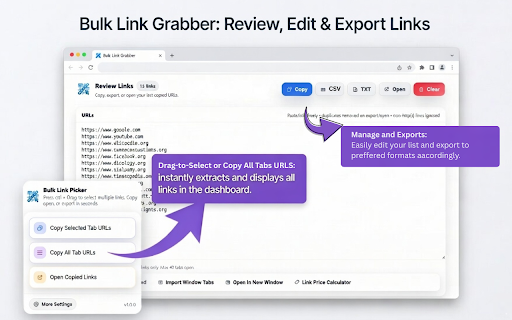

About
Bulk Link Grabber is the most powerful tool to copy, extract, and open multiple URLs instantly. Whether you need a bulk URL opener, a link extractor, or a way to manage browser tabs, this extension does it all with one click.

Stop clicking links one by one. Use drag-select to capture every link in a specific area, or use the one-click tab manager to grab every URL in your current window.


🚀 Core Features

▸ Bulk URL Opener: Open multiple links at once in new tabs or a separate window.

▸ Link Grabber & Extractor: Smartly finds, cleans, and deduplicates http/https links from any page.

▸ Drag-to-Select: Simply drag your mouse over a group of links to act on them instantly.

▸ Tab Management: Copy all tab URLs, current selection, or specific windows to your clipboard.

▸ Advanced Copying: Export URLs only, Page Titles only, or Title + URL pairs.


📊 Review & Export Tools

▸ Review Dashboard: Edit, dedupe, and manage your last copied links before saving.

▸ Export to CSV/TXT: Save your research or link lists into structured files (Excel/Sheets compatible).

▸ Tab Importer: Easily pull all open tabs from your current window into the review page for bulk editing.

▸ YouTube: Drag-Select links from video and Shorts links for clean, duplicate-free lists.


🖱️ How to Use

▸ Drag-Select: Hold your trigger key (Alt/Shift/Ctrl) and drag over any links.

▸ Release: Your chosen action (Open, Copy, or Export) runs immediately.

▸ Popup Menu: Use the extension icon to quickly grab all tab URLs or reopen previous sessions.

▸ Customize: Visit Settings to change activation buttons and selection box styles.


🛡️ Performance & Privacy

▸ Local Processing: No external servers, no analytics, and no data collection. Your links stay private.

▸ Highly Configurable: Works on almost any website with adjustable hotkeys to avoid site conflicts.


🎯 Perfect For:

▸ Researchers & Students: Collecting sources and citations in seconds.

▸ SEO & Marketing Pros: Managing large sets of backlink data or competitor URLs.

▸ Content Creators: Organizing YouTube playlists and resource lists for descriptions.

▸ Power Users: Anyone who needs an efficient way to handle multiple URLs every day.
Technical
- Version
- 1.1.0
- Manifest
- V3
- Size
- 66.53KiB
- Min Chrome
- 88
- Languages
- 1
- Featured
- Yes
Metadata
- ID
- fneafhcpkcogilibnbamcpggipfmhehn
- Developer ID
- ud4f582b110f6520fd423cef97500815d
- Developer Email
- [email protected]
- Created
- Jan 9, 2026
- Last Updated (Store)
- Feb 4, 2026
- Last Scraped
- Jun 5, 2026
- Website
- https://www.oneshotseo.com/
- Support URL
- —
- Privacy Policy
- https://www.oneshotseo.com/page/privacy-policy
Similar extensions
Alternatives to Bulk Link Grabber: Copy, Extract & Open Multiple URLs, ranked by description similarity.

Bulk URL Opener - Tab Manager
Open multiple URLs & links at once. Bulk URL opener with tab manager to organize, save & manage browser tabs. Open all links fast.
2.0K
★ 4.0

LinkGrab – The Ultimate Bulk Link Opener
Sélectionnez une zone pour ouvrir tous les liens présents dedans avec des effets améliorés.
32

Bulk URL Opener - Open Multiple URLs Instantly
Open multiple URLs instantly in one click. Clean, organize, and launch bulk links fast for maximum productivity.
145
★ 5.0

Open Multiple Links - Full Featured
Quickly open links! Remove duplicates, randomize order, export/import text files, bookmark lists. Boost your browsing efficiency!
40
★ 3.0

All URLs Opener: Open Multiple URLs Effortlessly
The All URLs Opener Chrome extension is an essential tool for users who frequently work with multiple URLs, simplifying the process…
919
★ 5.0

Bulk URL Opener by Slash Mark
Quickly open multiple URLs at once in tabs or windows with flexible control options.
—

Bulk URL Opener – Open Multiple URLs/Links
Open multiple URLs/links instantly with a one-click mass URL opener.
925
★ 5.0

Smart Link Opener – Instant Bulk URL Opener
Smart Link Opener Paste links and open them all with one click
59
★ 5.0
Data sourced from the Chrome Web Store · last verified Jun 5, 2026.