
Smart TV Emulator
The Smart TV Emulator enables any developers to test and debug their HTML5 apps for the Smart TV App Store.
As of June 2026, Smart TV Emulator has 4,000 users and a 1.53/5 rating from 15 reviews in the Developer Tools category.
Usersno change0%
4.0K
4,000
Ratingdown 5.6 percent−5.6%
1.53
15 reviews
Reviewsup 15.4 percent+15.4%
15
Version
1.4
Manifest V3
History
3 snapshotsTracking since Apr 21, 2026.
View as table
| Date | Users | Rating | Reviews | Version |
|---|---|---|---|---|
| Apr 21, 2026 | 4.0K | 1.62 | 13 | 1.4 |
| May 7, 2026 | 4.0K | 1.62 | 13 | 1.4 |
| May 18, 2026 | 4.0K | 1.57 | 14 | 1.4 |
| Now | 4.0K | 1.53 | 15 | 1.4 |
Permissions & access
- Permissions
- tabswebRequestbrowsingData
- Host access
- None declared
Screenshots

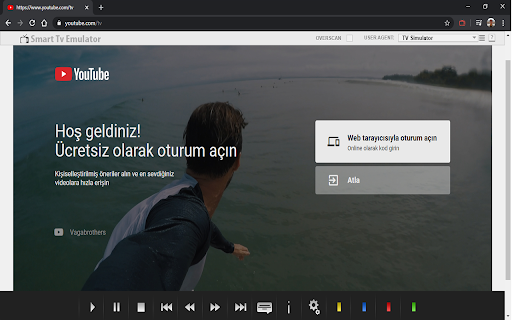
About
The Smart TV Simulator enables any developers to test and debug their HTML5 apps for the TV App Store. It emulates Smart Core version 4.0 and later which powers millions of Smart TVs, Blu-ray players and set-top boxes across the world.

Installation instructions:
- Install and enable the extension using Browser for computers
- Type in the URL you want to test and debug in the address bar
- Press the small extension icon to start the emulation so it turns red
- Start testing and debugging

Features:
- Functional key mappings - VK_KEY button emulation, including directional, enter, back and colour buttons (r,g,b,y).
- User agent - Add or update multiple custom user agent strings.
- Overscan support - Overscan is a common problem on TVs, where some parts of the app UI is not displayed on the TV screen. This option shows the safe area on the TV screen where the app UI will always be shown.
- Draggable popup with information appears when window.close function is called. This is useful for testing window.close behaviour in your app.
- localStorage disabled - In the Vewd App Store environment, localStorage support is disabled due to little memory available on the devices. If localStorage is used, a popup message appears warning the developer.

To use navigation, color keys, playback control keys (VK_PLAY etc.) with the keyboard please consider the following mapping:

Left - left arrow
Right - right arrow
Up - up arrow
Down - down arrow
Back - backspace key
Enter - Enter

Tips and tricks:
- After the installation is finished you can check "Allow access to file URLs" to emulate local files - e.g file://foo/bar/index.html
- By default, the extension will only work with the URLs you enabled it for, and not for all tabs. The extension is automatically starting for the URL you enabled it for
Technical
- Version
- 1.4
- Manifest
- V3
- Size
- 396KiB
- Min Chrome
- 88
- Languages
- 1
- Featured
- No
Metadata
- ID
- ldolgfmfhlgpgnmplmblipcdmojfhbld
- Developer ID
- uf5e3a16beabba5fa193aa6518a208467
- Developer Email
- [email protected]
- Created
- Mar 31, 2020
- Last Updated (Store)
- Jun 9, 2025
- Last Scraped
- Jun 1, 2026
- Website
- hascoding.com
- Support URL
- —
- Privacy Policy
- https://hascoding.com/pages/gizlilik-politikasi
Similar extensions
Alternatives to Smart TV Emulator, ranked by description similarity.

Device Simulator
Device Simulator
423
★ 5.0

Qvest HbbTV Emulator
Emulator for HbbTV apps
315
★ 5.0

Mobile Simulator Extension: Responsive Viewer
Professional mobile device simulator with multiple views, extensive device library, and sync scrolling
1.0K
★ 5.0

Mobile phone emulator - test websites
Responsive mobile emulator to test web layouts and designs.
601
★ 5.0

User-Agent Switcher: Device Identity Simulator
Simulate different device fingerprints for testing purposes
96
★ 4.0

OTT Visualizer
Visualizer for device profiles in Google Sheets
86
★ 5.0

E-ink Simulator Extension
Chrome extension for web developers to test and optimize applications for e-ink devices
21
★ 5.0

Simple Simulator
Simulates mouse and keyboard events on specified pages
179
★ 4.0
Data sourced from the Chrome Web Store · last verified Jun 1, 2026.