Testing Taxi Assistant
QA/Testing assistant sidebar for Chrome. Go deeper. Get more done.
As of May 2026, Testing Taxi Assistant has 85 users and a 5.00/5 rating from 2 reviews in the Developer Tools category.
Usersdown 10.5 percent−10.5%
85
85
Ratingno change0%
5.00
2 reviews
Reviewsno change0%
2
Version
1.22
Manifest V3
History
1 snapshotsTracking since Apr 25, 2026.
View as table
| Date | Users | Rating | Reviews | Version |
|---|---|---|---|---|
| Apr 25, 2026 | 95 | 5.00 | 2 | 1.22 |
| Now | 85 | 5.00 | 2 | 1.22 |
Permissions & access
- Permissions
- storagesidePanelactiveTabcontextMenusscripting
- Host access
- <all_urls>
Screenshots

About
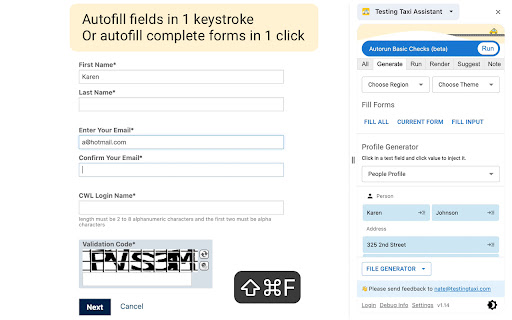
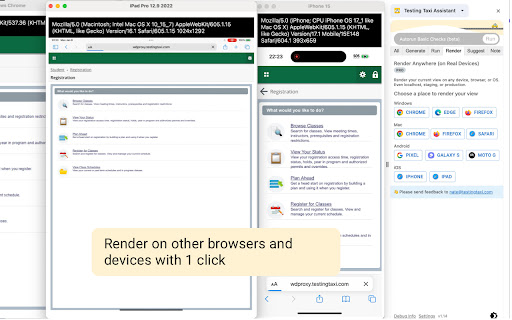
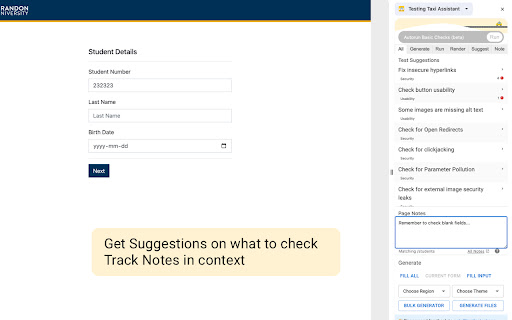
Go deeper. Get more done. Testing Taxi is your QA/Testing assistant sidebar for Chrome. Autofill Tedious Forms with One Click Get past those pesky forms quickly and get to the real spot you want to test. Let us auto-fill your form with reasonable sample data. Just place your cursor in an input field and press the fill button (or use the keyboard shortcut). Always-on Spell Check and Issue Auto-Detection As you work, we scan for spelling and common issues. Just leave the sidebar open and we’ll show orange or red alerts when something doesn’t look right. Our issue detection covers everything from in-secure links to missing alt text on images. Discover Hidden Boundaries with Auto Run Did you know there are over 12 email format boundaries that most systems don’t check for? We’ve got common boundaries like max/min length, but also format-specific ones so you can hit all those weird cases before the customer does. You can test your form for boundaries by placing your cursor in a field and hitting run. Detect Device Issues Fast with Render Testing on another device or browser takes a few minutes to set up. You need to open up the new device, find the browser, login and get your app into the situation you want to test. On Testing Taxi, you can test on other devices and browsers with a single click. We take care of the setup and render your screen exactly as you have it. It takes a few seconds and it’s one click away. *Works on localhost and firewalled sites Quick Access to Sample Data Copy/pasting data from your word doc isn’t a great way to test for boundaries. You can get realistic, randomised sample data with our data generator. Simply click in your form input and use the keyboard shortcut or click to insert the values. Learn with Contextual Suggestions There are a lot of ways to level up your testing game. Contextual suggestions give things you should check on the current screen. Suggestions all come with step by step instructions and why you should check this. We have content from top testers on things like Security, Usability and Validation. Jot a note (and actually find it back) We’ve all thrown a few notes in a word doc or on our favourite note app while we’re testing. After a while the doc becomes huge and we can’t find anything back. Testing Taxi provides contextual notes so you only see what’s relevant. Want to remember something about the user profile page? We’ll show it to you there, not on the reporting page. Audit for common issues There are a lot of pesky quality issues that we can quickly detect for you. Things like missing alt text on images or buttons that don’t meet the usability standards. Our audit makes it easy to show what’s failing (and saves you pulling out your pixel measuring tape) Happy Testing! Questions or feedback: email nate[at]testingtaxi.com or @natebosscher on Twitter
Technical
- Version
- 1.22
- Manifest
- V3
- Size
- 13.86MiB
- Min Chrome
- 88
- Languages
- 1
- Featured
- No
Metadata
- ID
- ldobmbmakmndclbjblegfbnkgbeodpbm
- Developer ID
- u8d91566aec4e2150defca55a24ac4cb1
- Developer Email
- [email protected]
- Created
- Oct 10, 2023
- Last Updated (Store)
- Mar 14, 2024
- Last Scraped
- May 22, 2026
- Website
- —
- Support URL
- https://testing.taxi/contact/
- Privacy Policy
- https://testing.taxi/our-privacy-policy/
Similar extensions
Alternatives to Testing Taxi Assistant, ranked by description similarity.

QA Test Case Helper
A professional tool for QA engineers that highlights testable elements and suggests comprehensive test cases
171
★ 4.0

Testbook - AI-Powered Automated Testing
Revolutionize web app testing with Testbook, AI-driven extension for effortless regression testing, UI comparison, and more! 🚀
423
★ 5.0

Testing Toolkit: 15+ Essential Manual Testing Tools
Redefine manual testing with best-in-class tools, supercharged with AI. JSON Formatter, Cache Manager, Responsive testing & more
20.0K
★ 4.9

Bugbasher
QA Testing Tools
30
★ 5.0

Light: QA Assistant
Maeris records real user flows and runs automated UI, API, and Security tests to help you make every release safe.
60
★ 5.0

Form Filler
A browser extension to fill forms automatically
—

A11y Live - Accessibility Testing Tool
Real-time accessibility testing tool that monitors DOM changes and provides instant feedback on WCAG compliance violations.
27

Accessibility & Responsive Checker
Analyzes accessibility and responsive design of web pages with detailed reports
12
★ 5.0
Data sourced from the Chrome Web Store · last verified May 22, 2026.