
Form Filler
A browser extension to fill forms automatically
As of May 2026, Form Filler has — users in the Developer Tools category.
Usersno change0%
—
—
Ratingno change0%
—
— reviews
Reviewsno change0%
—
Version
0.0.1
Manifest V3
Permissions & access
- Permissions
- storage
- Host access
- None declared
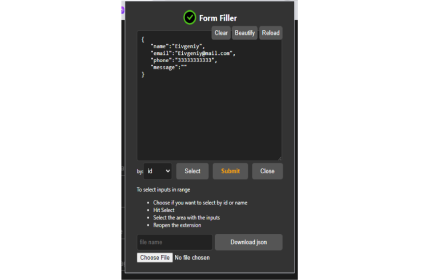
Screenshots

About
Tired of manually filling out forms during development and testing? This Chrome extension is built to save time and streamline your workflow.

🔧 Designed specifically for developers and QA engineers
⚙️ JSON-based configuration for flexible data input
🧪 Fill forms with dummy/test data instantly
🚀 Supports keyboard shortcuts for rapid testing
🔐 No data is sent anywhere – all information stays local in your browser

Speed up your development and QA processes by auto-filling forms with just one click.
Technical
- Version
- 0.0.1
- Manifest
- V3
- Size
- 1.54MiB
- Min Chrome
- 88
- Languages
- 1
- Featured
- No
Metadata
- ID
- keeibfdfnhpdibgkkbchjmljikpmmehd
- Developer ID
- udcf26e7ef66ce0c13ae8c0e60e927f64
- Developer Email
- [email protected]
- Created
- Jun 4, 2025
- Last Updated (Store)
- Jun 4, 2025
- Last Scraped
- May 31, 2026
- Website
- —
- Support URL
- —
Similar extensions
Alternatives to Form Filler, ranked by description similarity.
Form Filler
Automate form filling, extract and generate JSON data, and simplify QA testing with Form Filler
363
★ 4.0

Form Filler Extension
Auto-fill forms with realistic dummy data
28
★ 5.0

AutoFill Pro
AutoFill Pro: The ultimate form filler for developers & QA. Automate data entry, replay complex form states, and speed up testing.
101

QA Data Inserter
Automatically generate and insert test data into forms on specified sites. Speed up QA testing and eliminate duplication!
9

autoformx
An extension that fills your form quickly and easily
3

QuickFill
Instantly fill inputs with meaningful test data - built for developers and QA engineers!
8
★ 5.0

FormFlow: Smart Data Filler
The ultimate developer tool to fill forms with smart, realistic dummy data instantly.
2

TestDummy
Autofill signup forms with test accounts. Manage profiles, export/import settings, customize domains. Shortcut: Alt+Shift+F.
5
Data sourced from the Chrome Web Store · last verified May 31, 2026.