ChatGPT - Lets talk
Add voice to ChatGPT
As of May 2026, ChatGPT - Lets talk has 520 users and a 4.00/5 rating from 4 reviews in the Accessibility category.
Usersdown 1.7 percent−1.7%
520
520
Ratingno change0%
4.00
4 reviews
Reviewsno change0%
4
Version
1.1.5
Manifest V3
History
2 snapshotsTracking since Apr 25, 2026.
View as table
| Date | Users | Rating | Reviews | Version |
|---|---|---|---|---|
| Apr 25, 2026 | 529 | 4.00 | 4 | 1.1.5 |
| May 22, 2026 | 543 | 4.00 | 4 | 1.1.5 |
| Now | 520 | 4.00 | 4 | 1.1.5 |
Permissions & access
- Permissions
- storage
- Host access
- None declared
Screenshots


About
Voice chat with the ChatGPT on its site using few keyboard shortcuts.

# Updates
Version 1.1.5 - Update
- Updated to work with the latest URL change of ChatGPT site.

Version 1.1.4 - Update
- Modified to work with the latest changes of ChatGPT site (Mar 23 version)

Version 1.1.2 - Update
- Improved UI for the popup.

Version 1.1.0 - Update
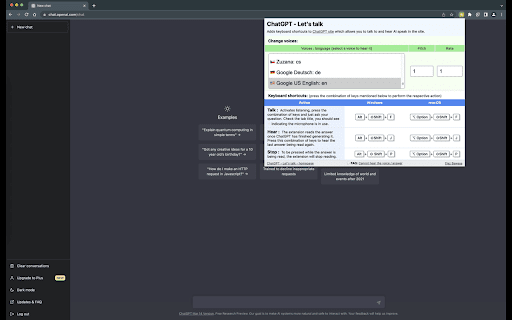
- Now you can change the voice of the AI and configure the pitch of the voice and the rate of speaking.


# Features:
1. Does not use any third party libraries or external network/API calls.
2. No UI - just keyboard shortcuts that make it possible to use the extension.
3. Created using native JavaScript using stuff available on the browser.


# Instructions to use
1. Ask questions using your microphone
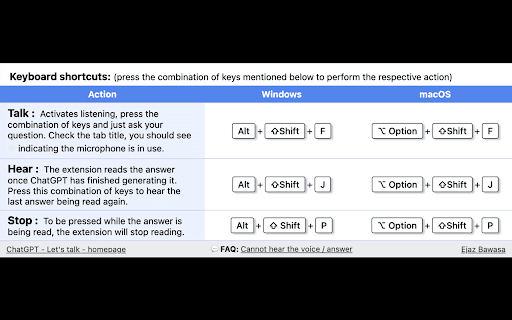
To voice chat and ask ChatGPT questions using your microphone, press the following combination of keys simultaneously:

Windows: Alt + Shift + F
Mac: Option + Shift + F

Once the keys are pressed the extension will be actively listening, so just ask questions using your voice. The extension will listen and submit your question. The answer will be read out loud automatically after being generated.


2. Hear ChatGPT repeat the last answer
Although the extension will read the answer out loud once it's finished generating it, you can also make it repeat its last answer. To do so, press the following combination of keys simultaneously:

Windows: Alt + Shift + J
Mac: Option + Shift + J

ChatGPT's last answer will be read out loud.


3. Stop the voice while it's reading the answer.
To stop the voice while it's reading the answer out loud, press the following combination of keys simultaneously:

Windows: Alt + Shift + P
Mac: Option + Shift + P

If pressed while the answer is being read out loud, the reading will stop.


# Troubleshooting:
1. Cannot hear the answer being read out loud, visit the following URL:
https://github.com/obfuscatedgeek/chatgpt-lets-talk#cannot-hear-the-answer
Technical
- Version
- 1.1.5
- Manifest
- V3
- Size
- 18.22KiB
- Min Chrome
- 88
- Languages
- 1
- Featured
- No
Metadata
- ID
- ldkeljfcpadfpkfdloofmhamhkgdcpbo
- Developer ID
- u2af112820371f0f164e77236ba4c051a
- Developer Email
- [email protected]
- Created
- Feb 21, 2023
- Last Updated (Store)
- Apr 20, 2023
- Last Scraped
- May 22, 2026
- Website
- —
- Privacy Policy
- —
Similar extensions
Alternatives to ChatGPT - Lets talk, ranked by description similarity.

Voice Typing for ChatGPT
A simple extension by Diakiv A.A. that allows users to type text using their voice on chat.openai.com
364
★ 3.0

HearChat: Accessible and Enhanced ChatGPT
adds features to make AI web apps more friendly for screen reader users.
14
★ 5.0

ChatGPT Voice Assistant
The ChatGPT voice assistant can communicate with ChatGPT just like a human!
199

TalkToGPT
A simple extension that allows the user to talk to ChatGPT. Click the microphone button and begin talking.
1.0K
★ 1.0

ChassistantGPT
Use ChatGPT as your personal assistant
1.0K
★ 2.7

VoiceGPT
Add voice input functionality to ChatGPT, Press Ctrl+Q to open voice input
78

Speech to Text for ChatGPT
Adds a speech to text microphone into the ChatGPT website.
1.0K
★ 2.6
PromptGPT - Speak/Listen/GPTify
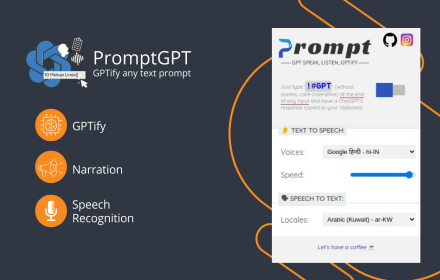
Turn any text field into a ChatGPT prompt and get the response right there, + Speaking and Listening abilities with ChatGPT web
13
★ 4.8
Data sourced from the Chrome Web Store · last verified May 22, 2026.