
StatsHunters
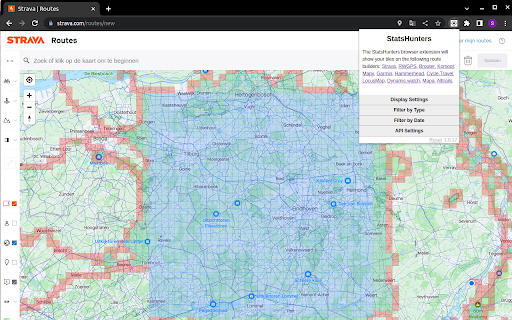
Show tiles on Strava route builder
As of June 2026, StatsHunters has 10,000 users and a 4.95/5 rating from 39 reviews in the Entertainment category.
Usersno change0%
10.0K
10,000
Ratingno change0%
4.95
39 reviews
Reviewsup 5.4 percent+5.4%
39
Version
3.3.7
Manifest V3
90-day change · In the last 90 days this extension 6 version updates.
History
7 snapshotsTracking since Apr 6, 2026.
View as table
| Date | Users | Rating | Reviews | Version |
|---|---|---|---|---|
| Apr 6, 2026 | 10.0K | 4.95 | 37 | 3.2.4 |
| Apr 17, 2026 | 10.0K | 4.95 | 37 | 3.2.6 |
| Apr 27, 2026 | 10.0K | 4.95 | 38 | 3.3.1 |
| May 11, 2026 | 10.0K | 4.95 | 38 | 3.3.3 |
| May 14, 2026 | 10.0K | 4.95 | 38 | 3.3.4 |
| Jun 11, 2026 | 10.0K | 4.95 | 38 | 3.3.6 |
| Jun 23, 2026 | 10.0K | 4.95 | 39 | 3.3.6 |
| Now | 10.0K | 4.95 | 39 | 3.3.7 |
Permissions & access
- Permissions
- storage
- Host access
- None declared
Screenshots

About
To make it easier to create new routes to achieve new tiles you can use the StatsHunters Chrome extension to show tiles on different route builders.

1. Install the extension
2. Login to StatsHunters and copy the API-code from the settings page
3. Click the StatsHunters Chrome extension icon and past the API-code
4. Go to one of the route builders
5. Start building new routes

You can use the plugin on different websites, the following sites are supported: Strava, Komoot and others. Check the full list on https://www.statshunters.com/faq
Technical
- Version
- 3.3.7
- Manifest
- V3
- Size
- 39.9KiB
- Min Chrome
- 88
- Languages
- 1
- Featured
- Yes
Metadata
- ID
- ldhkneiheabejbefhgjddpamijajabmm
- Developer ID
- u9023cdae252db21289656a5988476a3b
- Developer Email
- [email protected]
- Created
- Oct 5, 2020
- Last Updated (Store)
- Jun 18, 2026
- Last Scraped
- Jun 23, 2026
- Website
- statshunters.com
- Support URL
- —
- Privacy Policy
- —
Similar extensions
Alternatives to StatsHunters, ranked by description similarity.

SHGmap
Export missing tiles from StatsHunters to a Garmin IMG file.
9

VeloViewer Strava Plugin
Additions to Strava website to provide helpful links and features for VeloViewer.
10.0K
★ 4.8

dynamicWatch Route Save to Garmin
dynamicWatch Route Save: send routes to your Garmin watch or Edge GPS from Strava, Ride with GPS, Garmin Connect, MapMyRun and more.
5.0K
★ 4.9

Strava Extension: Street View, Maps & Advanced Analytics
Strava extension for maps, Street View, advanced analytics & workout insights.
706
★ 5.0

Wandrer Map Overlay
View your Wandrer map data in a variety of route planning tools, including Strava, Komoot and RideWithGPS
8.0K
★ 4.4

Strava Helper
Some tweaks for Strava. Adds a "Give Kudos to All" button, removes clutter and provides UI tweaks.
1.0K
★ 3.6

Strava Ranks
Quality of life features for Strava. Sort segments table. Show personal rank, total attempts and a lot more.
146
★ 5.0

Running Challenges
Adds challenge progress information to your parkrun results page.
9.0K
★ 5.0
Data sourced from the Chrome Web Store · last verified Jun 23, 2026.