
Voice DIM
Control DIM with your voice.
As of May 2026, Voice DIM has 878 users and a 5.00/5 rating from 13 reviews in the Productivity category.
Usersdown 1.1 percent−1.1%
878
878
Ratingno change0%
5.00
13 reviews
Reviewsno change0%
13
Version
1.3.0
Manifest V3
History
2 snapshotsTracking since Apr 25, 2026.
View as table
| Date | Users | Rating | Reviews | Version |
|---|---|---|---|---|
| Apr 25, 2026 | 888 | 5.00 | 13 | 1.3.0 |
| May 22, 2026 | 909 | 5.00 | 13 | 1.3.0 |
| Now | 878 | 5.00 | 13 | 1.3.0 |
Permissions & access
- Permissions
- tabsstorage
- Host access
- https://www.bungie.net/*
Screenshots

About
Ever needed to transfer a weapon in the middle of an encounter, but you didn't have time to Alt-Tab to DIM and find it yourself? Here comes Voice DIM to the rescue. Using a global shortcut (defaulted to Ctrl+Shift+0) or the new Always listening mode (using an activation phrase defaulted to "okay ghost"), Voice DIM will now listen for your command and execute it within seconds, even while in the middle of a heated Crucible match or raid encounter.

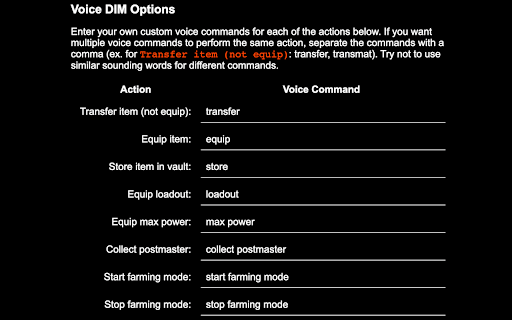
Here are the voice commands available:
• Transfer/Equip <weapon name>: Transfer any weapon by name
• Transfer/Equip <weapon type> + <energy type>: Transfer a weapon by its type and energy
• Transfer/Equip <weapon name> with <perks>: Transfer a weapon with a particular perk (works with multiple perks)
• Store <weapon name>: Store a weapon in the vault
• Loadout <loadout name>: Equip a loadout by name
• Start Farming Mode: Prevent items from going to the postmaster
• Stop Farming Mode: End farming mode
• Max Power: Equip the current character's max power items
• Collect postmaster: Collect all items from the current character's postmaster

These commands are now fully configurable! Head to the options page of Voice DIM to setup your own custom voice commands.

Current issues:
• Loadouts with numerics don't match well when requesting them (ex. Loadout 1)
• The auto rifle Krait doesn't match well because speech recognition gets "crate" and matches Fractethyst quite often. Mitigate by using "transfer K R A I T"

Visit voicedim.com for more information.
Technical
- Version
- 1.3.0
- Manifest
- V3
- Size
- 91.65KiB
- Min Chrome
- 88
- Languages
- 1
- Featured
- No
Metadata
- ID
- ldfeegohcppbkbmiefdcjcbdmjikpead
- Developer ID
- ue2673d4f8326681710f1271fa8d8d899
- Developer Email
- [email protected]
- Created
- Aug 19, 2022
- Last Updated (Store)
- Jul 28, 2024
- Last Scraped
- May 22, 2026
- Website
- voicedim.com
- Privacy Policy
- —
Similar extensions
Alternatives to Voice DIM, ranked by description similarity.

BetterDungeon
An all-in-one browser extension for AI Dungeon that enhances the experience with QOL additions and brand new features.
446
★ 4.6

zwitcha - Switch Prompts & Webhooks While Recording
Switch prompts & webhooks while recording. Voice to text with AI processing and instant automation. Your words, your way.
25
★ 5.0

OpenDKP Helper
A comprehensive helper extension for opendkp.com with auction alerts, RaidTick integration, and more
19

VoiceChess - Blindfold Chess for Chess.com
Play chess with your voice in English, Russian, or Spanish. Two modes: silent blitz or with announcements.
9

LLM Context Bridge
Switching AIs? No copy-pasting. Transfer your full conversation to ChatGPT, Claude, Gemini, Perplexity or Grok in one click.
97
★ 5.0

Venge Thingy
Venge Thingy by pix? - Custom crosshair & hitmarkers
76

Voice Everything
Use dictation for instant voice typing, AI quick access, searching and more. Speech to actions in real time.
141
★ 3.0

Thoughtful Voice
Record and drop audio/video directly to Gemini and ChatGPT.
7
★ 5.0
Data sourced from the Chrome Web Store · last verified May 22, 2026.