
No AltTab Video
Pause/Play Rewind/Forward video tutorials without using Alt+Tab or Command+Tab
As of June 2026, No AltTab Video has 13 users and a 5.00/5 rating from 1 reviews in the Productivity category.
Usersdown 23.5 percent−23.5%
13
13
Ratingno change0%
5.00
1 reviews
Reviewsno change0%
1
Version
1.0.2
Manifest V3
History
4 snapshotsTracking since Apr 1, 2026.
View as table
| Date | Users | Rating | Reviews | Version |
|---|---|---|---|---|
| Apr 1, 2026 | 17 | 5.00 | 1 | 1.0.2 |
| Apr 21, 2026 | 12 | 5.00 | 1 | 1.0.2 |
| May 7, 2026 | 13 | 5.00 | 1 | 1.0.2 |
| May 18, 2026 | 14 | 5.00 | 1 | 1.0.2 |
| Now | 13 | 5.00 | 1 | 1.0.2 |
Permissions & access
- Permissions
- tabs
- Host access
- None declared
Screenshots
About
Switching back and forth between your productivity tool (IDE, video editor, Photoshop etc) and YouTube (any video sites) disrupts your rhythm while following a tutorial video from YouTube

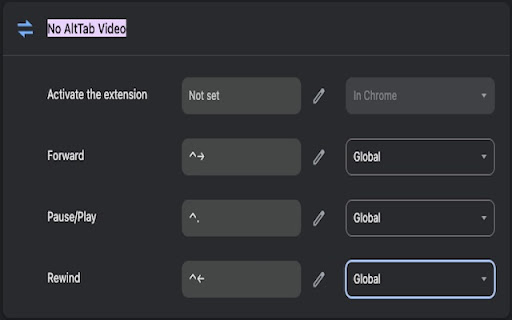
This extension helps you pause/play, and rewind/forward the tutorial video right in your productivity tool, so you don't have to switch the active window to the tutorial video to perform pause/play, rewind/forward

Default shortcut for macOS:
Pause/Play: Control+Period
Rewind: Control+Left
Forward: Control+Right

Default shortcut for Windows:
Pause/Play: Alt+Period
Rewind: Alt+Left
Forward: Alt+Right

To change the keyboard shortcut, click the No AltTab Video's toolbar icon. Alternatively, you can also change the keyboard shortcut by pasting this in Chrome's address bar:

chrome://extensions/shortcuts#:~:text=No%20AltTab%20Video

Don't forget to change the dropdown from Chrome to Global, otherwise the keyboard shortcuts won't work when the active window is not Chrome (e.g., your IDE, video editor, Photoshop etc)
Technical
- Version
- 1.0.2
- Manifest
- V3
- Size
- 7.44KiB
- Min Chrome
- 88
- Languages
- 1
- Featured
- No
Metadata
- ID
- ldcmnebdlbaibnlpnkemmboennodencn
- Developer ID
- ua75dd1d8f0fe75ecb3478739bdb2e026
- Developer Email
- [email protected]
- Created
- Jan 12, 2024
- Last Updated (Store)
- Jun 3, 2025
- Last Scraped
- Jun 1, 2026
- Website
- —
- Support URL
- —
- Privacy Policy
- —
Similar extensions
Alternatives to No AltTab Video, ranked by description similarity.

Quick Control Video Extension
Play, pause, and seek videos across any tab using keyboard shortcuts.
19

YouTube Enhancer
Enhance your YouTube viewing experience with intelligent playback control and customizable features
6
★ 5.0

YouTube Shorts Video Controller
Control YouTube Shorts with your keyboard! Use the arrow keys to fast-forward or rewind videos effortlessly.
26
★ 5.0

Speedster
Control media playback speed with keyboard shortcuts allowing unlimited speed.
8

Web Video Manipulator
Enables you to rewind or fast-forward videos
16

Coursera playback hotkeys
Add keyboard hotkeys for video playback
41
★ 5.0

Simple Video Speed Controller
Automatically adjust video speed on any website.
202
★ 5.0

Video Shortcut Controller
Control YouTube and Netflix video playback using 'O' and 'P' keys with custom jump duration.
1
★ 5.0
Data sourced from the Chrome Web Store · last verified Jun 1, 2026.