
Simple Video Speed Controller
Automatically adjust video speed on any website.
As of June 2026, Simple Video Speed Controller has 202 users and a 5.00/5 rating from 4 reviews in the Productivity category.
Usersup 94.2 percent+94.2%
202
202
Ratingno change0%
5.00
4 reviews
Reviewsup 33.3 percent+33.3%
4
Version
1.8
Manifest V3
90-day change · In the last 90 days this extension 2 version updates.
History
10 snapshotsTracking since Apr 6, 2026.
View as table
| Date | Users | Rating | Reviews | Version |
|---|---|---|---|---|
| Apr 6, 2026 | 104 | 5.00 | 3 | 1.6 |
| Apr 18, 2026 | 103 | 5.00 | 3 | 1.7 |
| Apr 25, 2026 | 110 | 5.00 | 3 | 1.7 |
| May 3, 2026 | 114 | 5.00 | 3 | 1.7 |
| May 9, 2026 | 124 | 5.00 | 3 | 1.8 |
| May 14, 2026 | 126 | 5.00 | 3 | 1.8 |
| May 20, 2026 | 131 | 5.00 | 3 | 1.8 |
| May 26, 2026 | 133 | 5.00 | 3 | 1.8 |
| Jun 2, 2026 | 150 | 5.00 | 4 | 1.8 |
| Jun 8, 2026 | 182 | 5.00 | 4 | 1.8 |
| Now | 202 | 5.00 | 4 | 1.8 |
Permissions & access
- Permissions
- storagescriptingactiveTabtabs
- Host access
- None declared
Screenshots
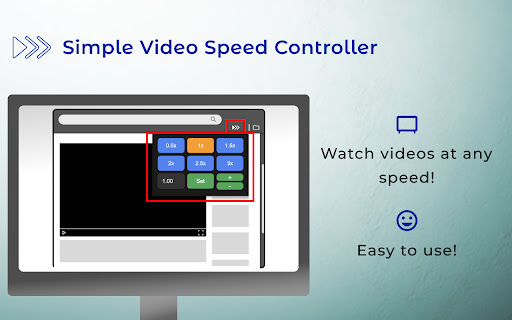


About
Enhance your viewing experience with our open source Chrome extension, designed to adjust playback speeds across a wide range of streaming platforms. Whether you're looking to speed through content or slow it down for detailed viewing, our extension offers seamless control.

Be sure to reload your tabs after installing and pin the extension for easy access!

Universal Compatibility:
Works with major streaming platforms and video content across the web, including YouTube, Netflix, Disney, and other popular services. Whether you're watching educational content, entertainment, sports, or news videos, this extension allows you to control playback speed on any site that uses standard HTML5 video players.

Key use cases:
Speed up educational videos and tutorials
Watch entertainment content at your preferred pace
Control playback speed on news and sports highlights
Adjust lecture and presentation videos for better comprehension
Maintain consistent speed settings across different video platforms

Keyboard Shortcuts:
Windows: `Windows Key + Alt + Plus` to increase speed
Windows: `Windows Key + Alt + Minus` to decrease speed
Windows: `Windows Key + Alt + Delete` to reset to 1x speed
Windows: `Windows Key + Alt + [1-9]` to set specific speed. Press again to add 0.5x, and press again to revert.
Windows: `Windows Key + Alt + 0` to set to 16x max speed. Press again to reset to 1x speed.

Mac: `Command + Option + Plus` to increase speed
Mac: `Command + Option + Minus` to decrease speed
Mac: `Command + Option + Delete` to reset to 1x speed
Mac: `Command + Option + [1-9]` to set specific speed. Press again to add 0.5x, and press again to revert.
Mac: `Command + Option + 0` to set to 16x max speed. Press again to reset to 1x speed.


Domain-Specific Speed Memory:
Remembers your preferred playback speed for each website

Clean, Intuitive Interface:
Quick preset buttons for common speeds (0.5x to 3x)
Custom speed input for precise control
Fine-tuning buttons for incremental adjustments

Open Source Code:
https://github.com/Chaseos/SimpleVideoSpeedController
Technical
- Version
- 1.8
- Manifest
- V3
- Size
- 37.93KiB
- Min Chrome
- 88
- Languages
- 9
- Featured
- No
Metadata
- ID
- kcjfpmjkbkhgojilpihplkedadndnked
- Developer ID
- udc19be4fb0097f174edf5c553bce84d9
- Developer Email
- [email protected]
- Created
- Jan 21, 2025
- Last Updated (Store)
- Apr 26, 2026
- Last Scraped
- Jun 8, 2026
- Website
- —
- Support URL
- —
Similar extensions
Alternatives to Simple Video Speed Controller, ranked by description similarity.

Video Speed Controller
Simple video speed controller for adjusting playback speed
9

Video Speed and Navigation Controller
Control video playback speed and navigation on web pages.
119
★ 5.0

SpeedView - Video Speed Controller
SpeedView - video speed controller with overlay UI, keyboard shortcuts. Works on YouTube, Netflix, and all videos.
—

Video Speeder
Adjust video playback speed with ease.
775
★ 4.0

Speed Up Video
Use Speed Up Video for controlling video playback speed. Accelerate or slow videos with this top-rated video speed controller.
7.0K
★ 4.7

Swift Shift
Control video playback speed individually for different websites
—

Video Speed Master by AIO.com.ai
Speed up, slow down, advance and rewind HTML5 audio/video with shortcuts
16

Video Speed Controller
Increase or decrease video speed.
206
★ 5.0
Data sourced from the Chrome Web Store · last verified Jun 8, 2026.