
SONAR Email Tracker for Gmail - Secure & Free
Unlimited and forever free tool to track your emails easily.
As of June 2026, SONAR Email Tracker for Gmail - Secure & Free has 610 users and a 4.56/5 rating from 16 reviews in the Workflow & Planning category.
Usersup 3.2 percent+3.2%
610
610
Ratingdown 0.7 percent−0.7%
4.56
16 reviews
Reviewsdown 5.9 percent−5.9%
16
Version
1.1.5
Manifest V3
History
3 snapshotsTracking since Apr 1, 2026.
View as table
| Date | Users | Rating | Reviews | Version |
|---|---|---|---|---|
| Apr 1, 2026 | 591 | 4.59 | 17 | 1.1.5 |
| May 3, 2026 | 621 | 4.59 | 17 | 1.1.5 |
| Jun 2, 2026 | 651 | 4.56 | 16 | 1.1.5 |
| Now | 610 | 4.56 | 16 | 1.1.5 |
Permissions & access
- Permissions
- storagetabsnotifications
- Host access
- https://*/*
Screenshots
About
SONAR Email Tracker is a Chromium-based browser extension for Gmail that makes you able to track your email activities, such as when your email is opened. Other than that, SONAR Email Tracker will give you peace of mind and a hint of what is the next email you should send or the next action you should take after you send an email, know who opened your emails, how many times your emails are opened, and how many times the links are clicked.

With SONAR Email Tracker, you can:
- Track email activities. Never lose track of your most important emails.
- Get real-time notifications when your urgent email is opened.
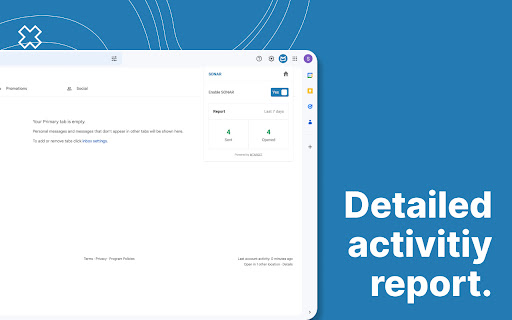
- Have a daily report on every email activity to analyze and improve your strategy.

And with SONAR Email Tracker Pro features, you can:
- Hide SONAR signature.
- Track links in your email.
- Get the first open alert via email.
- Get reminder for unopened emails.
- Track emails for 7 days.
- Get a more detailed, in-depth daily email report.
- Get an in-depth activity dashboard.

Why should you use SONAR Email Tracker?
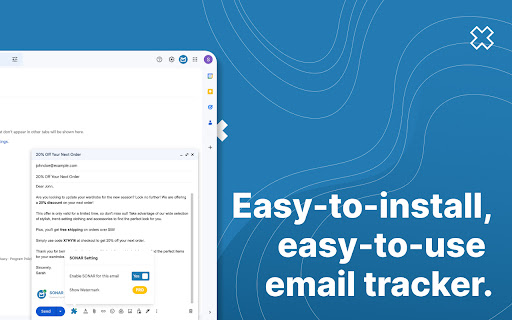
- Easy to install, easy to use.
- It has a very low learning curve.
- High-powered tool.
- Free and unlimited in tracking your email journey.
- You can use it as a personal email marketing tool.
- Tracking emails has never been this easy.
- Boost your email productivity like never before.
- Know your next action when the recipients open your email.

How to start using SONAR Email Tracker?
- Go to Chrome Web Store, hover your mouse to “Search” on the top navigation bar, and type SONAR Email Tracker.
- Click and continue with the installation of the SONAR by MTARGET extension for your Google Chrome Extension.
- Compose your email as usual, and hit send. SONAR will automatically track your email without you having to do any settings.
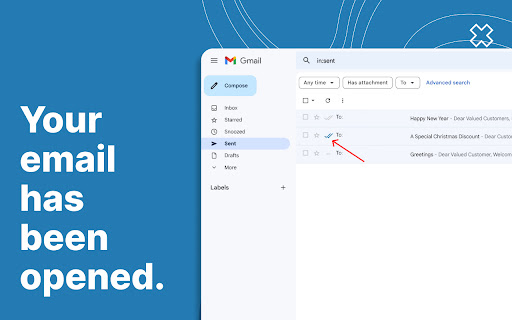
- You can start email tracking by clicking the “Sent emails” folder.
- Grey double-dashed line -- means that the email you sent wasn’t powered by SONAR.
- Two grey check marks ✓✓ mean that the recipient hasn’t opened your email.
- Two blue check marks ✓✓ mean that the recipient has opened and read your email.

Perfect Time to Use SONAR Email Tracker:
- Job application: Know when your application has been opened or not by the recruiter.
- Marketing or sales activities: Know if your potential clients have already read your emails and engaged with it.
- Most important emails: Know when your most important and urgent email is opened to make the right move after it's opened.

Enjoy SONAR features forever free:
- Tracked first open and notification on Chrome.
- Track your email for up to 48 hours.
- Tracked email indicator.
- Report on a daily basis.

SONAR Email Tracker works with:
- Google Chrome
- Opera
- Microsoft Edge
- Samsung Internet
- Vivaldi
- Brave
- Epic Privacy, and other chromium-based browsers.

Updates

SONAR v1.1.5
- Minor bugfix after improvement

SONAR v1.1.4
- Improvement in sending email performance

SONAR v1.1.0
- Fixed issues with Gmail becoming slow and relatively unuseable when too many emails in the sent folder.
- Loading performance improved.
Technical
- Version
- 1.1.5
- Manifest
- V3
- Size
- 351KiB
- Min Chrome
- 88
- Languages
- 1
- Featured
- Yes
Metadata
- ID
- lcjmfkbfkpmpfpppjllldbmjhbcpimcm
- Developer ID
- uf705859494d59d7b7e5872fc5ab78fc2
- Developer Email
- [email protected]
- Created
- Dec 23, 2022
- Last Updated (Store)
- Sep 27, 2024
- Last Scraped
- Jun 2, 2026
- Website
- getsonar.co
- Support URL
- —
- Privacy Policy
- https://getsonar.co/privacy-policy
Similar extensions
Alternatives to SONAR Email Tracker for Gmail - Secure & Free, ranked by description similarity.

Unlimited Email Tracker by Snov.io
Email tracker for Gmail. Email opens tracking and link clicks statistics for your email messages.
100.0K
★ 4.9
Email Tracker For Gmail - MailerPlex
Free email tracker for Gmail. See email tracking and link click stats in real-time
3.0K
★ 4.0

Mail Seen - Unlimited Email Tracker for Gmail
Know when your emails are opened!
5.0K
★ 4.7

Email Tracker de MailBolt™
Track opens and clicks for your emails directly in Gmail. Know when your emails are read.
1
Email Tracker, Email Tracking w/ AI - Mailtag
Email Tracking 2.0 for Gmail. Don't settle for a Email Tracker - Get more Responses. Free e-mail tracking, Signatures and Campaigns.
10.0K
★ 3.9

MailTrack
Know exactly when your emails are read. Real-time tracking and link click notifications for Gmail.
308

SurfSense
Track time spent on websites, view top sites, and see visual summaries by category to boost your focus.
8

Streak Email Tracking for Gmail
Know when your email is viewed.
70.0K
★ 4.8
Data sourced from the Chrome Web Store · last verified Jun 2, 2026.