Email Tracker For Gmail - MailerPlex
Free email tracker for Gmail. See email tracking and link click stats in real-time
As of June 2026, Email Tracker For Gmail - MailerPlex has 3,000 users and a 4.04/5 rating from 24 reviews in the Workflow & Planning category.
Usersno change0%
3.0K
3,000
Ratingdown 3.8 percent−3.8%
4.04
24 reviews
Reviewsup 20.0 percent+20.0%
24
Version
2.0.0.11
Manifest V3
History
4 snapshotsTracking since Apr 1, 2026.
View as table
| Date | Users | Rating | Reviews | Version |
|---|---|---|---|---|
| Apr 1, 2026 | 3.0K | 4.20 | 20 | 2.0.0.11 |
| Apr 16, 2026 | 3.0K | 4.10 | 21 | 2.0.0.11 |
| Apr 26, 2026 | 3.0K | 4.24 | 21 | 2.0.0.11 |
| May 13, 2026 | 3.0K | 4.13 | 23 | 2.0.0.11 |
| Now | 3.0K | 4.04 | 24 | 2.0.0.11 |
Permissions & access
- Permissions
- scriptingstoragebackgroundalarmsnotificationsdeclarativeNetRequestdeclarativeNetRequestFeedbackgcm
- Host access
- https://mail.google.com/, https://inbox.google.com/
Screenshots


About
Mailerplex email tracker extension is a simple tool, which lets you see email opens and clicks in real-time. It's available as a chrome add-on for Gmail. With the extension, you can track your email opens, clicks and do appropriate follow-ups.

Depending on your profession, email open tracking can give a boost to your outreach. For example, if you know when someone opens your email, how often, you can gauge their engagement levels and tailor appropriate content. Also you can reach them as soon they open, so that your email is fresh in their mind.

If you are sending a number of emails from your Gmail account, here are some of the questions that are important for you. What happens after you send an email? Are your important emails being read? Do your prospects click on the resource links that you send them?

With Mail Tracker extension, you can get these questions answered. You can also track Gmail location of your recipient and know if they have clicked on any link included in your email.

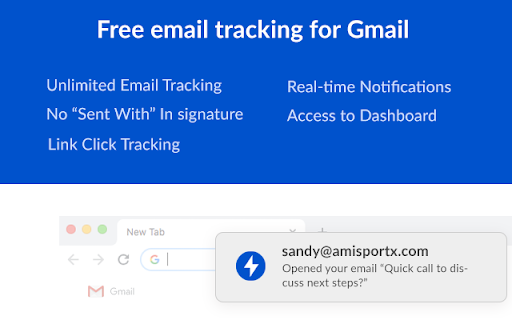
It also comes with real-time notifications and detailed dashboard for your analysis. Listed below are the features of the chrome extension.

IMP FEATURES
============

REAL-TIME EMAIL OPEN NOTIFICATIONS (How do I know when someone opens my email)
You will get a real-time notification, as soon as your email is opened by the recipient. This will help you to do perfectly-timed follow-ups and make your overall communication better.

WE OFFER A FREE VERSION
in the free version of MailerPlex, you can send 30 tracked emails per months without any signature. Also, it comes with real-time notification and access to a detailed dashboard.

QUICK AND DETAILED DASHBOARD ACCESS
Both free and paid versions come with access to a real-time dashboard. The dashboard has a detailed activity stream for your emails. Also, you can access your quick dashboard by clicking on the extension icon.

MULTIPLE EMAIL ACCOUNTS IN THE SAME BROWSER
Want to use both professional and personal email? MailerPlex comes with a robust multi-account feature.

IDENTIFY ENGAGED LEADS AND THOSE WHO NEED FOLLOW-UPs
With our detailed dashboard, you can easily identify the leads that are engaged with your content. Also, you can identify the ones who are not opening your emails and tune your communication accordingly.

GET STARTED INSTANTLY. VERY SIMPLE TO USE
We have designed MailerPlex to be extremely simple to use. And we would like to keep it that way.

AFFORDABLE PAID VERSION
Our pro version is priced at $6/User/Month ($4/user/month for annual plan) and comes with additional capabilities such as link click tracking, email support and other advanced features. We continuously add useful and essential features to our pro version, so that we can deliver more value to your sales process.

WHAT OUR CUSTOMERS SAY -
*Very useful for sales professionals like me. Helps with right communication and follow-ups. Add low price and simplicity to that.*
- Kurt Eichenwood, VP Sales

*Mailerplex enables my team to hire premium candidates better. We immediately act on the ones who have opened or clicked our mails. Those who don't open, we try to pitch them better. Must have for recruiters.*
- Amy Christian, Recruitment Lead


The $6/User/Month ($4/user/month for annual plan, cancel anytime) Mailtrack extension Pro version comes with link click tracking and additional pro-level functionality. For our customers, MailerPlex is an essential tool for their overall outreach and follow-up strategy.

==========================
What is email open tracking?

If you send professional as well as personal emails, tracking email opens and clicks could be very useful for you. Knowing whether someone opened your email, when they opened, their devices and location etc. may help you for better outreach. Here are some of the the ways you can use this information.

To Do Better Followups - If you know that someone opened your email at a particular time, you can do a follow-up immediately to get better response. This is very useful when you are doing sales, business development, recruitment, job search and in many other professions. Studies have shown that if you reach your prospect at a time she is going through your content, you can get much higher response rate.

To Know Highly Interested Prospects - If you see your recipient is opening your email multiple times and clicking on multiple links in your email, they are more interested. So you can tailor your follow-up email accordingly and can get better response.

To Improve Subject Line or Offer More Value - If your emails are not getting opened, that may mean the subject line is not generating enough interest. You may need to work upon your subject or offer better value, so that they can engage with you.

Depending on what you do, email open and click tracking may be very useful or even essential for you.
But the challenge here is most of the email providers don’t track this information. For this you have to use a email Tracking tool like MailerPlex. MailerPlex is a simple Chrome extension for Gmail. Using MailerPlex, you can get detailed insight into the emails that you are sending.

ANY QUESTIONS
https://mailerplex.com/faq.html

SUPPORT
[email protected]
Technical
- Version
- 2.0.0.11
- Manifest
- V3
- Size
- 2.24MiB
- Min Chrome
- 88
- Languages
- 1
- Featured
- Yes
Metadata
- ID
- kihifmacbckmlbcaobdofgjikfgidkmd
- Developer ID
- u2ab317c83e6849be96495719d4643061
- Developer Email
- [email protected]
- Created
- Nov 29, 2018
- Last Updated (Store)
- Jan 16, 2026
- Last Scraped
- Jun 9, 2026
- Website
- https://mailerplex.com/
- Support URL
- —
- Privacy Policy
- https://mailerplex.com/privacy.html
Similar extensions
Alternatives to Email Tracker For Gmail - MailerPlex, ranked by description similarity.
Email Tracker, Email Tracking w/ AI - Mailtag
Email Tracking 2.0 for Gmail. Don't settle for a Email Tracker - Get more Responses. Free e-mail tracking, Signatures and Campaigns.
10.0K
★ 3.9

MailTrack
Know exactly when your emails are read. Real-time tracking and link click notifications for Gmail.
308

Streak Email Tracking for Gmail
Know when your email is viewed.
70.0K
★ 4.8

Unlimited Email Tracker by Snov.io
Email tracker for Gmail. Email opens tracking and link clicks statistics for your email messages.
100.0K
★ 4.9

Email Tracker de MailBolt™
Track opens and clicks for your emails directly in Gmail. Know when your emails are read.
1

DoSales: Email Tracking & Templates For Gmail
DoSales will help you boost your sales by increasing your productivity with email tracking and email templates.
151
★ 4.0
Email Tracker + Pixelblock Detector & Blocker
Find out if your emails get read + pixelblock. Free & unlimited email tracking for Gmail, Outlook, Hotmail, Office 365 & Yahoo Mail
300.0K
★ 4.6

Mail Seen - Unlimited Email Tracker for Gmail
Know when your emails are opened!
5.0K
★ 4.7
Data sourced from the Chrome Web Store · last verified Jun 9, 2026.