
WPS Docs
Create new docs, sheets, slides and view WPS Docs files from your browser bar.
As of June 2026, WPS Docs has 9,000 users and a 5.00/5 rating from 2 reviews in the Workflow & Planning category.
Usersup 12.5 percent+12.5%
9.0K
9,000
Ratingno change0%
5.00
2 reviews
Reviewsno change0%
2
Version
1.0.0
Manifest V3
90-day change · In the last 90 days this extension gained 1.0K users.
History
2 snapshotsTracking since Apr 1, 2026.
View as table
| Date | Users | Rating | Reviews | Version |
|---|---|---|---|---|
| Apr 1, 2026 | 8.0K | 5.00 | 2 | 1.0.0 |
| May 3, 2026 | 9.0K | 5.00 | 2 | 1.0.0 |
| Now | 9.0K | 5.00 | 2 | 1.0.0 |
Permissions & access
- Permissions
- cookiesdeclarativeNetRequestdeclarativeNetRequestWithHostAccess
- Host access
- *://*.wps.com/
Screenshots


About
The official extension of WPS Docs.

Introduction:
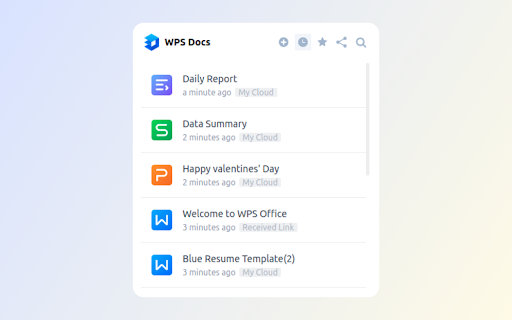
The official extension of WPS Docs is a perfect tool that allows you to view, create and search for documents in your browser. It features a clean layout, a user-friendly interface and multiple useful functions that gives user an easy and instant access to WPS Cloud, Docs, Slides, Sheets and Livepage.
If you want to quickly create, view and search for your files in your brower, then the extension is just the ideal tool for you.

Features:
☆ WPS Cloud: Enjoy quick access to WPS Cloud interface.
☆ Create: Create online Docs, Slides, Sheets and Livepage files easily.
☆ View: Quickly view and open your recently opened and starred files, and also the files that others shared with you.
☆  Search: Search for the files you want in a quick way.

How to use it:
1. Click the extension.
2. Choose what you want to do with different options
• By clicking the “WPS Docs” logo, you can enter the WPS Cloud interface.
• By clicking “Create” option, you can select what kind of file you would like to create, including WPS docs, Slides, Sheets and Livepage.
• By clicking “Recent” option, you can view and open your recently opened files.
• By clicking “Starred” option, you now have access to all your starred files.
• By clicking “Shared with me” option, you can view all the files that others shared with you.
• By clicking “Search” option, you can type in the keywords and quickly find all the related documents.

We'd appreciate it very much for any possible interaction with our dearest users!
Technical
- Version
- 1.0.0
- Manifest
- V3
- Size
- 112KiB
- Min Chrome
- 88
- Languages
- 1
- Featured
- Yes
Metadata
- ID
- lchfkoahaepmbengiebapcnoeahhkpll
- Developer ID
- u0775e28f4acc984800e423fad12f9e3d
- Developer Email
- [email protected]
- Created
- Mar 25, 2023
- Last Updated (Store)
- Mar 25, 2023
- Last Scraped
- Jun 2, 2026
- Website
- —
- Support URL
- https://docs.wps.com
- Privacy Policy
- —
Similar extensions
Alternatives to WPS Docs, ranked by description similarity.

Document Editor
Create, edit and share Docs, Sheets, Slides, Word, Excel, PowerPoint documents. Work with others on shared projects.
4.0K
★ 4.7

Quick Google Docs Create
Quick Google Docs Create
256
★ 5.0

DocsWork Editor for documents DOC & DOCX
Create and edit DOC & DOCX documents with an editor online
30.0K
★ 3.7
Docs Online Viewer
Open and view any online file in your browser. Supports almost all major file and document formats. Fast, easy to use and free.
100.0K
★ 4.3

Docx QuickView
View local Word (.docx) files instantly in your browser.
80
★ 1.0

Docsy - Google Docs Quick Launcher
Create new Google Docs, Sheets, Slides, Forms, and Drawings from your browser bar.
11

SmartDocs Document Viewer
Optimizes document display and rendering of Documents managed on SmartDocs platform
5

QweTab
A customizable new tab page with shortcuts and widgets. In-app search uses your Chrome default search engine (Chrome Search API).
8.0K
★ 3.8
Data sourced from the Chrome Web Store · last verified Jun 2, 2026.