
QweTab
A customizable new tab page with shortcuts and widgets. In-app search uses your Chrome default search engine (Chrome Search API).
As of June 2026, QweTab has 8,000 users and a 3.75/5 rating from 4 reviews in the Workflow & Planning category.
Usersno change0%
8.0K
8,000
Ratingno change0%
3.75
4 reviews
Reviewsno change0%
4
Version
3.0.6
Manifest V3
90-day change · In the last 90 days this extension 1 version update, changed permissions.
History
3 snapshotsTracking since Apr 30, 2026.
View as table
| Date | Users | Rating | Reviews | Version |
|---|---|---|---|---|
| Apr 30, 2026 | 8.0K | 3.75 | 4 | 3.0.1 |
| May 9, 2026 | 8.0K | 3.75 | 4 | 3.0.6 |
| May 26, 2026 | 9.0K | 3.75 | 4 | 3.0.6 |
| Now | 8.0K | 3.75 | 4 | 3.0.6 |
Changelog
- Apr 30, 2026description
QweTab is 100% free and will convert and create various types of files (such as Word DOC, Excel XLS, and PowerPoint PPT).

This extension configures your New tab and offers a convenient web search.

Converter tool that supports PDF, Word, Excel, PPT, JPG. Convert PDF to different formats and vice versa with just one click.

Quick and easy access directly from your browser Free PDF Converter processes documents in Word, Excel, PDF, PPT and JPG. Simply select a Word file and press "Convert to PDF" to apply the format you want.

Functions:
- Easily convert PDF to Word accurately and vice versa.
- Convert PDF file to Excel and make it editable. Excel to PDF for easy reading.
- Convert PDF pages to JPG, or from JPG images to PDF format.
- Convert PDF to PowerPoint and convert it back in a second.

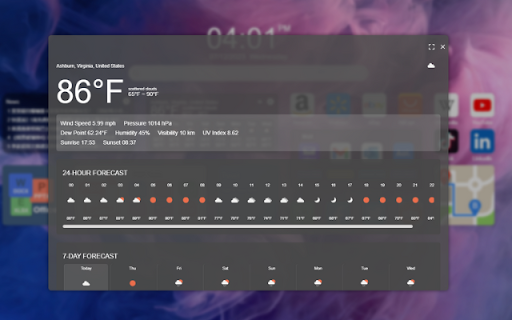
Quick access to incognito mode, random wallpapers and local weather, all data is saved on your own computer. We recommend you add the frequently used website shortcuts. If you want to sync data or achieve other functions, you can leave a message in the comment section, we will develop more features based on users' opinions.

1. Incognito mode
Select the text or link on any website and right click on the "Find / Open In Incognito Mode" menu. You can also open an incognito window for the shortcut you added. The search results will also open in a private window. In incognito mode, the browser does not record your visit records, cookies and form data. You can surf safely without leaving any traces to better protect your privacy.

2. Multi-desktop
Add multiple desktops to classify the desktops and move smoothly between different desktops. Add shortcuts you use frequently so that you can easily find them whenever you need.

3. Quick search
The powerful search function can search your history, bookmarks or just enter the url to open the website. It's the same as the browser's address bar, which is perfect. There are several modes in the search results. You can choose to open in a new tab, open in a new window, or open in an incognito window.

4. Quick favorite
Select the context menu on the website to save the current URL in QwerPDF Workspace.

5. Widgets
We support a variety of gadgets with different functions, you can add gadgets to the desktop.

6. Rate us
You can click "Rate US" button at the bottom of the toolbar on the right side of the desktop, which will open our review page in the webstore. Please give us a suitable score and comment.

By installing this extension you agree to the data protection regulations (https://qwerpdf.com/privacy-policy.html).

By installing this extension you agree to the main principles in order to use our service:
https://qwerpdf.com/terms-of-service.html

Used authorizations and reasons:

"Read and change your information on a number of websites"
In order for our product to work, we need access to the websites we own and manage.

"Replace the page that appears when you open a new tab."
This way we can show you our product - a new tab with free web search.

"Read your browsing history and bookmarks"
This enables us to match product-specific content or offers to relevant information.
QweTab: Personalized Productivity Dashboard & PDF Toolkit

Transform your "New Tab" into a powerful, minimalist productivity dashboard. QweTab keeps your essential tools, widgets, and navigation organized right at your fingertips.

Main Purpose:
QweTab is a centralized productivity hub that replaces the default new tab page. It streamlines your workflow by consolidating document tools, task management, and quick web access into one efficient workspace.

Key Features (Integrated Widgets):

Quick Web Access: A convenient search bar on your dashboard for fast navigation.

PDF & File Toolkit: Quick-access widgets to convert Word, Excel, PPT, and JPG to/from PDF directly from your new tab.

Workflow Organization: Manage your daily tasks with the built-in Todo list and organize shortcuts with multi-desktop layouts.

Privacy & Tools: Local weather updates, dynamic wallpapers, and a quick-entry for Incognito browsing.

Affiliate Disclosure (Mandatory):
Please Note: To keep this extension free, QweTab participates in affiliate marketing programs. Some navigation links or sponsored shortcuts within the dashboard may contain affiliate IDs. We may receive a small commission if you make a purchase through these links.

Permissions:

Replace New Tab: To display the custom dashboard.

Bookmarks/History: To provide quick navigation shortcuts.

By installing, you agree to:
Privacy Policy: https://qwerpdf.com/privacy-policy.html
- Apr 30, 2026short_description
QweTab offers a convenient web search, incognito mode, multi-desktop, quick search, favorite and widgets.
A customizable new tab page with shortcuts and widgets. In-app search uses your Chrome default search engine (Chrome Search API).
- Apr 30, 2026permissions
storage
storage, search
Permissions & access
- Permissions
- storagesearch
- Host access
- https://*.qwerpdf.com/
Screenshots



About
QweTab: Personalized Productivity Dashboard & PDF Toolkit

Transform your "New Tab" into a powerful, minimalist productivity dashboard. QweTab keeps your essential tools, widgets, and navigation organized right at your fingertips.

Main Purpose:
QweTab is a centralized productivity hub that replaces the default new tab page. It streamlines your workflow by consolidating document tools, task management, and quick web access into one efficient workspace.

Key Features (Integrated Widgets):

Quick Web Access: A convenient search bar on your dashboard for fast navigation.

PDF & File Toolkit: Quick-access widgets to convert Word, Excel, PPT, and JPG to/from PDF directly from your new tab.

Workflow Organization: Manage your daily tasks with the built-in Todo list and organize shortcuts with multi-desktop layouts.

Privacy & Tools: Local weather updates, dynamic wallpapers, and a quick-entry for Incognito browsing.

Affiliate Disclosure (Mandatory):
Please Note: To keep this extension free, QweTab participates in affiliate marketing programs. Some navigation links or sponsored shortcuts within the dashboard may contain affiliate IDs. We may receive a small commission if you make a purchase through these links.

Permissions:

Replace New Tab: To display the custom dashboard.

Bookmarks/History: To provide quick navigation shortcuts.

By installing, you agree to:
Privacy Policy: https://qwerpdf.com/privacy-policy.html
Technical
- Version
- 3.0.6
- Manifest
- V3
- Size
- 2.64MiB
- Min Chrome
- 88
- Languages
- 9
- Featured
- No
Metadata
- ID
- anpkocpohfbojanempbnghhbkednaicb
- Developer ID
- u7138150034cf37bff863418079dae456
- Developer Email
- [email protected]
- Created
- Dec 30, 2021
- Last Updated (Store)
- Apr 8, 2026
- Last Scraped
- Jun 16, 2026
- Website
- —
- Support URL
- https://qwerpdf.com/contact-us.html
- Privacy Policy
- https://qwerpdf.com/privacy-policy.html
Similar extensions
Alternatives to QweTab, ranked by description similarity.
InstaPDFPro
Easily convert documents to PDF.
10.0K
★ 5.0
Qwer PDF
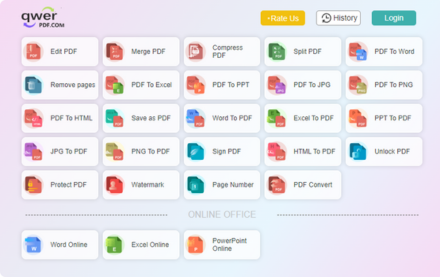
Qwer PDF extension is Online Convert PDF To Word & Excel, PPT & PDF Editor - 100% Free. Power Up Your Productivity.
30.0K
★ 4.1

PDF2DOCS
Get access to a free and fast PDF converter with a new tab page search.
10.0K
★ 4.0

Online PDF Converter
Converter tool that supports PDF, Word, Excel, PPT, JPG. Convert PDF to different formats and vice versa in one click.
20.0K
★ 3.9

PDF Clipper
This extension Allows quick conversion for any file to PDF from the task bar icon. A new tab will show a background image.
1.0K

TabiTab
The most useful Newtab in the world!
2.0K
★ 3.7

PDF Quick Tools — Merge, Split & Rotate (Offline, Free)
Merge, split & rotate PDFs 100% offline and FREE. No uploads or watermarks. Instant downloads.
154
★ 5.0

Tabme — Tab & Bookmark Manager | Save, Organize & Sync Tabs
The easiest way to save, organize & sync your tabs.
10.0K
★ 4.5
Data sourced from the Chrome Web Store · last verified Jun 16, 2026.