
AutoTextify
Create personalized shortcuts to instantly expand frequent text and URL snippets. Say goodbye to repetitive typing!
As of June 2026, AutoTextify has 129 users and a 2.75/5 rating from 4 reviews in the Productivity category.
Usersdown 6.5 percent−6.5%
129
129
Ratingno change0%
2.75
4 reviews
Reviewsno change0%
4
Version
0.3.6
Manifest V3
History
10 snapshotsTracking since Apr 1, 2026.
View as table
| Date | Users | Rating | Reviews | Version |
|---|---|---|---|---|
| Apr 1, 2026 | 138 | 2.75 | 4 | 0.3.6 |
| Apr 16, 2026 | 141 | 2.75 | 4 | 0.3.6 |
| Apr 22, 2026 | 133 | 2.75 | 4 | 0.3.6 |
| Apr 27, 2026 | 136 | 2.75 | 4 | 0.3.6 |
| May 4, 2026 | 137 | 2.75 | 4 | 0.3.6 |
| May 10, 2026 | 139 | 2.75 | 4 | 0.3.6 |
| May 15, 2026 | 148 | 2.75 | 4 | 0.3.6 |
| May 28, 2026 | 140 | 2.75 | 4 | 0.3.6 |
| Jun 4, 2026 | 124 | 2.75 | 4 | 0.3.6 |
| Jun 9, 2026 | 133 | 2.75 | 4 | 0.3.6 |
| Now | 129 | 2.75 | 4 | 0.3.6 |
Permissions & access
- Permissions
- tabsstoragescriptingcookiescontextMenusnotificationsmanagementclipboardReadclipboardWritedeclarativeNetRequestsidePanel
- Host access
- https://autotextify.com/, <all_urls>
Screenshots




About
What can you do with the AutoTextify Chrome Extension:

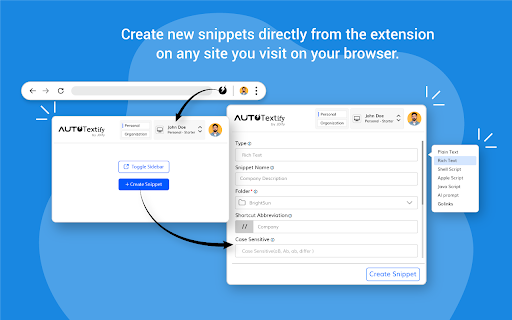
Once you have installed the AutoTextify extension, you can start adding shortcut.
Add any text or URL to the shortcut.
All the shortcuts that you have created will be added automatically to the Omni box.
You can preview the shortcuts that you have created and get to know how they will work in real-time.
Once you are done with customizing your shortcuts, you can enable the AutoTextify extension and use it to enter all your snippets in any text area.

Some Uses of AutoTextify Chrome Extension:
1. Time Optimization:
Instead of repeatedly typing out identical phrases or paragraphs, users can employ shortcuts that promptly expand into the desired text. This feature proves especially handy for tasks like email responses, report writing, or form completion.

2. Productivity Surge:
Rather than getting bogged down in mundane tasks, users can concentrate on more crucial and intricate aspects of their work. Moreover, the ability to create customized macros enables the automation of entire command sequences, further amplifying productivity levels.

3. Precision and Accuracy:
By enabling the creation of predefined text blocks with correct spelling and grammar, they eliminate the risk of typos or omissions.

4. Tailored Efficiency:
Shortcuts can be created for frequently used words, phrases, or entire email templates. Advanced text expanders even support variables, enabling the automatic insertion of dynamic information like the current date, time, or personalized greetings

5. Uniformity and Reliability:
In fields where maintaining consistent and standardized language is crucial, text expanders play a pivotal role. Whether one is a customer support representative, legal professional, or medical practitioner, utilizing a text expander ensures that predefined templates or standardized responses are accurately reproduced every time.```
Technical
- Version
- 0.3.6
- Manifest
- V3
- Size
- 16.11MiB
- Min Chrome
- 88
- Languages
- 1
- Featured
- No
Metadata
- ID
- lapkecidankkaahioamnekanckbbjiod
- Developer ID
- u90196faa72dd627ff1d6c3975f55989a
- Developer Email
- [email protected]
- Created
- Sep 3, 2024
- Last Updated (Store)
- Mar 19, 2026
- Last Scraped
- Jun 9, 2026
- Website
- autotextify.com
- Privacy Policy
- https://autotextify.com/privacy
Similar extensions
Alternatives to AutoTextify, ranked by description similarity.

Auto Text Expander: Text Shortcuts & Snippets
Create smart text expansions to get more done and streamline your work. Billions of keystrokes saved!
2.0K
★ 3.2

Smart Text Snippets
A powerful productivity tool that expands text shortcuts like //email or //sig into full phrases automatically across any website.
4

Web Text Expander: Text Shortcuts & Snippets
Work smarter and type faster with text shortcuts! Use text expander to turn text snippets into words or sentences anywhere online
20.0K
★ 4.6

Snippet Master
Save and insert snippets of text with custom shortcuts
22

SmartText – Text Expander & Autocomplete Shortcuts
Text expansion Chrome extension - create shortcuts that expand into full phrases instantly
25
★ 4.8

Text Expander Pro
Type less, do more. Smart text expansion for professionals.
100
★ 5.0

Text Shortcuts: canned messages and replies
Use customizable text shortcuts for frequently used text responses like canned replies. Save time and type smarter!
883
★ 4.6

Text Expander
Use Text Expander – a magical text expander to expand text instantly with paste shortcut and save typing time
142
★ 5.0
Data sourced from the Chrome Web Store · last verified Jun 9, 2026.