
Tabs Gallery
Capture and save tabs in a visual gallery.
As of June 2026, Tabs Gallery has 12 users and a 5.00/5 rating from 2 reviews in the Productivity category.
Usersdown 7.7 percent−7.7%
12
12
Ratingno change0%
5.00
2 reviews
Reviewsno change0%
2
Version
1.1.9
Manifest V3
History
7 snapshotsTracking since Apr 16, 2026.
View as table
| Date | Users | Rating | Reviews | Version |
|---|---|---|---|---|
| Apr 16, 2026 | 13 | 5.00 | 2 | 1.1.9 |
| Apr 24, 2026 | 12 | 5.00 | 2 | 1.1.9 |
| May 1, 2026 | 9 | 5.00 | 2 | 1.1.9 |
| May 7, 2026 | 10 | 5.00 | 2 | 1.1.9 |
| May 15, 2026 | 13 | 5.00 | 2 | 1.1.9 |
| May 24, 2026 | 14 | 5.00 | 2 | 1.1.9 |
| Jun 3, 2026 | 15 | 5.00 | 2 | 1.1.9 |
| Now | 12 | 5.00 | 2 | 1.1.9 |
Permissions & access
- Permissions
- storagealarmscontextMenusactiveTabnotificationstabs
- Host access
- <all_urls>
Screenshots


About
Short title: Tabs Gallery: Organize your tabs with custom groups and inspiring phrases.

Long description:

Tabs Gallery turns your tabs into a visual gallery with screenshots. Now, with custom groups and inspiring phrases, organize your digital space like never before. Suspend inactive tabs, free up RAM, and retrieve them easily and quickly. 20 images are worth more than 16 Gigabytes.

Is your browser on the verge of collapse due to too many tabs? Tabs Gallery doesn't just suspend them: it turns them into a visual gallery so you can keep them in sight without them devouring your memory.

✨ New Features and Highlights:

Custom Groups: Create your own categories to organize your tabs however you want. Drag and drop to group them!

Visual Gallery: Each suspended tab is saved as a thumbnail, so you can find it instantly.

RAM/CPU Saving: Lightweight Chrome, without sacrificing productivity.

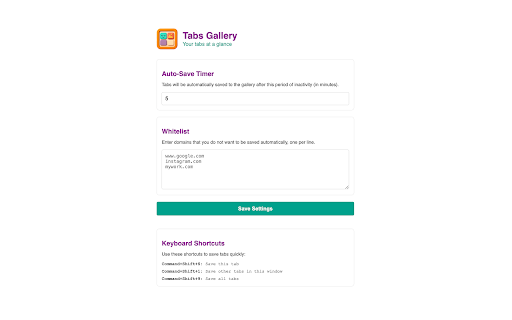
Total Control: Whitelist, timer, and automatic exceptions for audio/video calls.

Quick Shortcuts: Suspend and restore with hotkeys.

Instant Recovery: Return to any tab with a click.

Why Tabs Gallery? Those of us who don't close tabs do so because we want to keep things in sight. That's what we're looking for, but avoiding the hassle of the computer thinking about them. With Tabs Gallery, we've not only achieved this, but now you can further customize your organization and find a little inspiration along the way.

👉 Download it and turn your chaos into a visual reminder of your wanderings on the web.

Your Privacy is Our Priority At Tabs Gallery, we understand the importance of your privacy. That's why we explain with complete transparency the permissions we request and what they are used for:

storage: Saves your preferences (shortcuts, suspension rules, whitelist, your custom groups) and your suspended tab data (title, URL, thumbnail). Everything is stored locally in your browser and is never shared with us or third parties.
alarms: Allows you to schedule automatic tab suspension after a period of inactivity defined by you. It does not track your activity; it only frees up memory efficiently.
contextMenus: Adds options for faster access to functions.
activeTab: Only activated when you use the extension (icon or shortcut). It allows us to capture the screenshot, title, and URL of that tab to save it to your Gallery. It does not give access to your history or other tabs.
host_permissions: (Access to all URLs): This is the broadest permission, and we want to be clear. We use it for:

Captures: We need it to take thumbnails of any tab you send to the Gallery.
Restoration: Allows you to reload the original URL when you retrieve a tab from the Gallery.
🔒 Privacy Guarantee: Tabs Gallery DOES NOT read, collect, save, or transmit your history, passwords, or sensitive data. Everything remains in your browser, under your control. Our business model does not depend on your data, but on offering a useful tool to manage your tabs.
Technical
- Version
- 1.1.9
- Manifest
- V3
- Size
- 767KiB
- Min Chrome
- 109
- Languages
- 4
- Featured
- No
Metadata
- ID
- lalkcjnjcaliheapkkofibpbmgcnbnpe
- Developer ID
- uc4494b8bb78d7341ada4d563af822c01
- Developer Email
- [email protected]
- Created
- Aug 31, 2025
- Last Updated (Store)
- Feb 3, 2026
- Last Scraped
- Jun 3, 2026
- Website
- —
- Support URL
- —
- Privacy Policy
- https://gallery.tabstonap.com/
Similar extensions
Alternatives to Tabs Gallery, ranked by description similarity.

Tab Gallery – Visual Tab Manager for Chrome
Visual Tab Manager for Chrome · Built for Power Users
568
★ 5.0

SmartTab Manager
Intelligently manage, organize, and optimize your browser tabs with AI-powered features.
6
★ 5.0

Tidy Tabs
Add notes and reminders to browser tabs so you never forget why you opened them
41
★ 4.3

Tab Manager Pro
Organize, search, and manage browser tabs across windows. Group by domain, find duplicates, boost productivity.
3

Tabforge – Smart Tab Manager
Smart tab manager to organize tabs, close duplicates, group tabs by domain, and search open tabs instantly.
3
★ 5.0

Tab Suspender & Manager
Save memory by suspending inactive tabs, organize by groups, and save sessions. Boost browser performance with smart tab management.
19

Tab Portal
Your cinematic workspace for managing tabs with glassmorphism elegance.
22
★ 5.0

Vertical Tabs Manager
Vertical tab manager with active highlight, ordering, export, and restore from file
11
Data sourced from the Chrome Web Store · last verified Jun 3, 2026.