
Snippt - a better text expander
Quickly expand custom text shortcuts into longer snippets while typing, works on all URLs
As of June 2026, Snippt - a better text expander has 120 users and a 5.00/5 rating from 3 reviews in the Productivity category.
Usersup 3.4 percent+3.4%
120
120
Ratingno change0%
5.00
3 reviews
Reviewsno change0%
3
Version
3.0.0
Manifest V3
90-day change · In the last 90 days this extension 3 version updates.
History
9 snapshotsTracking since Apr 2, 2026.
View as table
| Date | Users | Rating | Reviews | Version |
|---|---|---|---|---|
| Apr 2, 2026 | 116 | 5.00 | 3 | 2.0.10 |
| Apr 17, 2026 | 112 | 5.00 | 3 | 2.0.10 |
| Apr 26, 2026 | 122 | 5.00 | 3 | 2.0.10 |
| May 7, 2026 | 123 | 5.00 | 3 | 2.0.10 |
| May 14, 2026 | 115 | 5.00 | 3 | 2.0.10 |
| May 23, 2026 | 117 | 5.00 | 3 | 2.0.10 |
| May 29, 2026 | 141 | 5.00 | 3 | 2.0.11 |
| Jun 5, 2026 | 122 | 5.00 | 3 | 2.0.15 |
| Jun 11, 2026 | 115 | 5.00 | 3 | 3.0.0 |
| Now | 120 | 5.00 | 3 | 3.0.0 |
Permissions & access
- Permissions
- storagecontextMenusactiveTabcommandstabs
- Host access
- <all_urls>
Screenshots

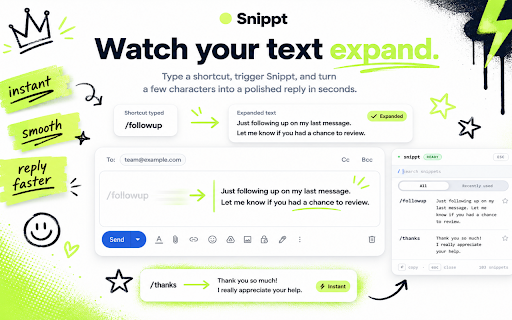


About
Snippt: Type Less, Do More

Save time typing by turning short text into long text automatically. Snippt works everywhere - in your emails, documents, and any place you type.

What Makes Snippt Great

* Save any text you use often and give it a quick shortcut. For example, turn "ty" into "Thank you for your message"
* Use it anywhere you type - emails, social media, documents, or any text box
* Press Alt+a (or customize it to your liking) to see all your saved shortcuts in a simple menu
* Your shortcuts only expand when you want them to, not by accident
* Save or share your shortcuts by importing and exporting them
* Choose how fast your shortcuts expand
* Simple, clean design that's easy to use

Block Websites

* Don't want Snippt to work on certain websites? Just add them to your block list in the settings.

Start Fresh

* Want to remove all your shortcuts? Just click one button and confirm by typing "I confirm" - that's it!

Shortcut Reset Timer

* If you pause while typing a shortcut, Snippt will reset after your chosen time. This stops accidental expansions when you take a break.
* For example: Type "a", wait, then "dr" - it won't expand to your address because you paused too long. Change this timer in settings to match how you type.

Perfect Uses

* Quick replies to common messages
* Code you use often
* Phrases you type every day
* Filling out forms
* Customer service replies
* Your address and contact info

How to Use It

1. Save text you use often
2. Type the shortcut
3. Watch it change into your full text
4. Or press Alt+a (or customize it by clicking the Advanced button) to see all your saved text

Real Examples

* Type "addr" → shows your full address
* Type "ty" → shows "Thank you for your message"
* Type "sig" → shows your email signature

Your Privacy Matters

* Works without internet
* Doesn't collect your data
* Keeps your text safe in your browser

Want to save time typing? Snippt is for you. Install it now and start typing less!
Technical
- Version
- 3.0.0
- Manifest
- V3
- Size
- 294KiB
- Min Chrome
- 88
- Languages
- 1
- Featured
- No
Metadata
- ID
- kphobklmlkppbidecaopainkdbijpboo
- Developer ID
- ucd2db47b2b03dfcd7a8223fbe74c565a
- Developer Email
- [email protected]
- Created
- Jan 7, 2025
- Last Updated (Store)
- May 31, 2026
- Last Scraped
- Jun 11, 2026
- Website
- —
- Support URL
- —
- Privacy Policy
- https://snippt-privacy-e86a42.netlify.app/
Similar extensions
Alternatives to Snippt - a better text expander, ranked by description similarity.

SlashSnip
Text expansion with customizable triggers and templates
—

Text Shortcuts – Text Expander & Snippets
Reusable text snippets with fillable fields. Insert dynamic templates anywhere on the web, without retyping.
2.0K
★ 4.8

QuickSnip
Type /trigger shortcuts on any website to auto-expand saved text snippets. Manage snippets via popup. 100% local — no data sent.
6

Easy Type
Easy Type
3

SmartText – Text Expander & Autocomplete Shortcuts
Text expansion Chrome extension - create shortcuts that expand into full phrases instantly
25
★ 4.8

SnapType - Smart Snippet Manager
Text snippet manager that eliminates repetitive typing. Full support for native keyboard shortcuts.
9

Ziptype — Text Expander, Prompt Library & Shortcut Tool
Create text shortcuts & save AI prompts that expand instantly anywhere in Chrome. Free text expander & prompt library — no sign-up.
31
★ 5.0

Text Shortcuts: canned messages and replies
Use customizable text shortcuts for frequently used text responses like canned replies. Save time and type smarter!
883
★ 4.6
Data sourced from the Chrome Web Store · last verified Jun 11, 2026.