
Hide My Email for Gmail™
Hide your emails in Gmail™ to focus and get in the flow. Unhide them whenever you're ready.
As of May 2026, Hide My Email for Gmail™ has 347 users and a 4.43/5 rating from 7 reviews in the Workflow & Planning category.
Usersup 13.0 percent+13.0%
347
347
Ratingno change0%
4.43
7 reviews
Reviewsno change0%
7
Version
2.3
Manifest V3
History
2 snapshotsTracking since Apr 27, 2026.
View as table
| Date | Users | Rating | Reviews | Version |
|---|---|---|---|---|
| Apr 27, 2026 | 307 | 4.43 | 7 | 2.3 |
| May 24, 2026 | 346 | 4.43 | 7 | 2.3 |
| Now | 347 | 4.43 | 7 | 2.3 |
Permissions & access
- Permissions
- storage
- Host access
- None declared
Screenshots
About
Now you can hide your emails in Gmail™ whenever you want so you can get in the flow and do more deep work.

## Overview
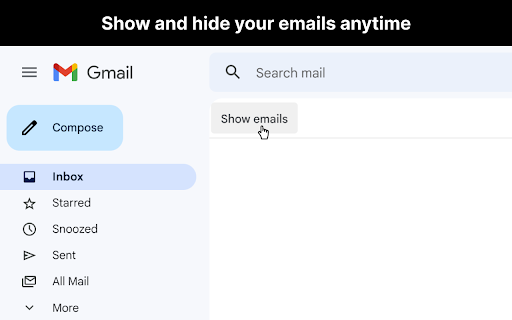
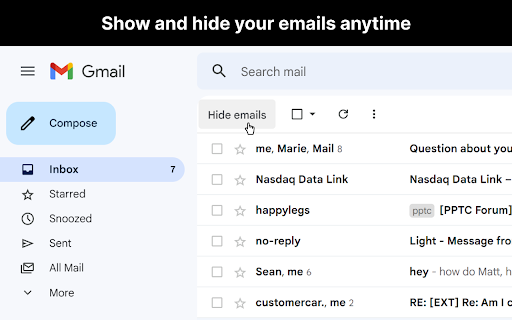
After you open Gmail™, click the "Hide emails" button to hide your messages. You'll still be able to search Gmail™ and use it as a reference, just without all your emails appearing and distracting you.

When you're ready to view your the emails in your inbox again, just click "Show emails".

This extension only works if you use the Gmail™ website on chrome. It doesn't work if you're using the Gmail™ desktop app.

## View the code
https://github.com/mthurmond/hide-my-email-for-gmail

## More helpful extensions
Try my other two extensions to remove distractions. Both are free & open source:
- Distraction free for Linkedin™:   https://chrome.google.com/webstore/detail/distraction-free-for-link/kigfnbfbpfpgphbocdkmeablbgdbpfke

- Slack hider:   https://chrome.google.com/webstore/detail/slack-hider/ojfkenmmieminleikclgocedgpggeecp
Technical
- Version
- 2.3
- Manifest
- V3
- Size
- 50.95KiB
- Min Chrome
- 88
- Languages
- 1
- Featured
- Yes
Metadata
- ID
- koobmglbcddgeoopgphanmhjppfaehaa
- Developer ID
- uc0ee7c7f711a831e09f5648e49da1fd5
- Developer Email
- [email protected]
- Created
- Feb 2, 2021
- Last Updated (Store)
- Jan 5, 2023
- Last Scraped
- May 24, 2026
- Website
- —
- Privacy Policy
- —
Similar extensions
Alternatives to Hide My Email for Gmail™, ranked by description similarity.

Distraction Free for LinkedIn™
Hide distractions on LinkedIn™ when you need to focus.
1.0K
★ 4.4

Slack hider
Hide your slacks to focus and get in the flow. Unhide them whenever you're ready.
28
★ 5.0

Hide!!! - Panic Button and Tab Manager
Instantly hide and restore your open tabs.
5.0K
★ 4.0

inbox hide for gmail
Choose when to show your email inbox.
17

Gmail Unsubscriber & Email Cleaner Fast
🧹Clean your Gmail in 1 click — Mass unsubscribe, 🗑️delete, and 📦archive instantly. ⚡Fast & 🔒secure.
65
★ 5.0

Inbox When Ready for Gmail™
Protect your focus... spend less time on your email.
10.0K
★ 4.9

Save Emails as PDF by cloudHQ
Export, convert and save Gmail™ emails as a PDF document
100.0K
★ 4.3

Hide the Page
This browser extension hides your page if you don't want anyone to see it when they around you.
71
★ 3.0
Data sourced from the Chrome Web Store · last verified May 24, 2026.