
Zest - The Zendesk Colour Coder
Colour code Zendesk tickets to help visualize and organise your workflow. Developed by Nevin George
As of June 2026, Zest - The Zendesk Colour Coder has 2,000 users and a 5.00/5 rating from 5 reviews in the Workflow & Planning category.
Usersno change0%
2.0K
2,000
Ratingno change0%
5.00
5 reviews
Reviewsdown 16.7 percent−16.7%
5
Version
1.3
Manifest V3
History
1 snapshotsTracking since Jun 22, 2026.
View as table
| Date | Users | Rating | Reviews | Version |
|---|---|---|---|---|
| Jun 22, 2026 | 2.0K | 5.00 | 6 | 1.3 |
| Now | 2.0K | 5.00 | 5 | 1.3 |
Changelog
- Apr 27, 2026description
New (experimental) feature: Change background for internal notes!
You can now change the colour of internal notes to any colour of your choosing!

What is Zest? To put it simply, it’s an easy way to organise your Zendesk tickets!
Zest will allow you to customize your ticket view by allowing you to personally colour code your tickets. Not only by the standard priority (low-high), but by any field/category.

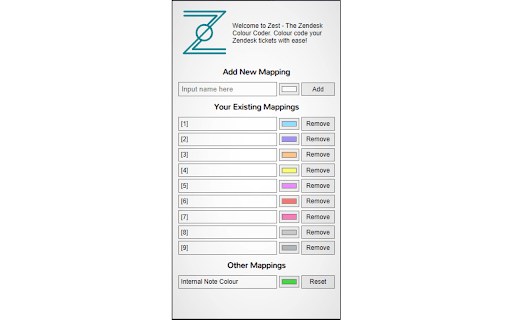
How do you use Zest? Simply click the icon on the top right of your chrome browser, type in the category you want coloured, choose a colour and click add. Refresh your Zendesk page to see the changes take effect.
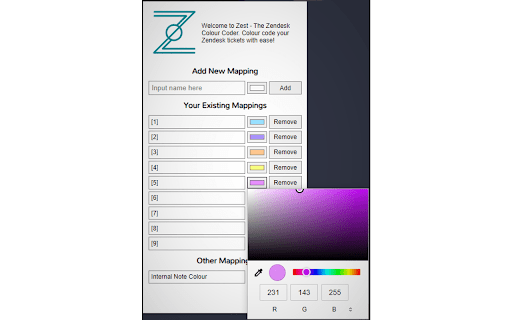
Changing the colour of a category is easy too, just click on the colour next to the category name, change it and refresh the Zendesk page.

How does Zest work? It changes the styling of the page to add a background to each row to the colour that you choose. It does not modify the functionality of the site.

Got more questions? Feel free to contact me for any questions or concerns for yourself or for your business.

Enjoy using Zest?
Please consider leaving a rating on the extension so it can reach out to more people.
Also consider supporting me via paypal.me/NevGZCC
What is Zest? To put it simply, it’s an easy way to organise your Zendesk tickets!
Zest will allow you to customize your ticket view by allowing you to personally colour code your tickets. Not only by the standard priority (low-high), but by any field/category.

How do you use Zest? Simply click the icon on the top right of your chrome browser, type in the category you want coloured, choose a colour and click add. Refresh your Zendesk page to see the changes take effect.
Changing the colour of a category is easy too, just click on the colour next to the category name, change it and refresh the Zendesk page.

How does Zest work? It changes the styling of the page to add a background to each row to the colour that you choose. It does not modify the functionality of the site.

Got more questions? Feel free to contact me for any questions or concerns for yourself or for your business.
Enjoy using Zest?
Please consider leaving a rating on the extension so it can reach out to more people.
Also consider supporting me via https://paypal.me/NevinGeo
Permissions & access
- Permissions
- storage
- Host access
- None declared
Screenshots

About
What is Zest? To put it simply, it’s an easy way to organise your Zendesk tickets!
Zest will allow you to customize your ticket view by allowing you to personally colour code your tickets. Not only by the standard priority (low-high), but by any field/category.

How do you use Zest? Simply click the icon on the top right of your chrome browser, type in the category you want coloured, choose a colour and click add. Refresh your Zendesk page to see the changes take effect.
Changing the colour of a category is easy too, just click on the colour next to the category name, change it and refresh the Zendesk page.

How does Zest work? It changes the styling of the page to add a background to each row to the colour that you choose. It does not modify the functionality of the site.

Got more questions? Feel free to contact me for any questions or concerns for yourself or for your business.
Enjoy using Zest?
Please consider leaving a rating on the extension so it can reach out to more people.
Also consider supporting me via https://paypal.me/NevinGeo
Technical
- Version
- 1.3
- Manifest
- V3
- Size
- 98.93KiB
- Min Chrome
- 88
- Languages
- 1
- Featured
- No
Metadata
- ID
- kohidmaedanhmmhkhkbeaonheneldfbi
- Developer ID
- u7d0963a13ca74f47054fa41047096a4c
- Developer Email
- [email protected]
- Created
- Aug 19, 2020
- Last Updated (Store)
- Apr 15, 2026
- Last Scraped
- Jun 22, 2026
- Website
- —
- Support URL
- —
- Privacy Policy
- —
Similar extensions
Alternatives to Zest - The Zendesk Colour Coder, ranked by description similarity.

Zendesk Ticket Color Coder
Zendesk Ticket Color Coder - reduces mistakes, highlights high priority tickets instantly
23
★ 4.0

Zendesk Helper
An extension to manage Zendesk tickets efficiently.
124
★ 5.0

Notes – Organize your Zeplin Comments
This extension collects all the notes within a Zeplin project and displays them in a filterable list.
1.0K
★ 4.8

Zendo – Grouped To-Do List & Task Manager
Boost productivity with Zendo, a minimalist task manager. Organize tasks: group, drag-and-drop, prioritize for efficient planning.
2

NotifyMe for Zendesk
Real time Zendesk Ticket Notifications
2.0K
★ 4.4

Zendesk TabGrab
Well behaved browser tabs for Zendesk agents
303
★ 4.8

BetterTab
Transform your new tab page into a minimal and productive workspace.
6
★ 5.0

Naya Tab - A new tab extension by sharadcodes
A new tab extension developed by Sharad Raj Singh Maurya who lives in India building useful things for the world.
14
★ 5.0
Data sourced from the Chrome Web Store · last verified Jun 22, 2026.